Custom Query View showing up in Constituent Interaction rather than main Interaction section in Ad-hoc Query




Dear all,
I've built a very simple Query View, called TWS - Interaction Extras, using the SDK, very similar to many we've built in the past. However, when I load it into the Catalog, it appears in the wrong place in the Ad-hoc Query editor. When I choose a Query of type Steps/Interactions, it doesn't show up in the main list of sub-nodes, but rather hidden under Constituent Interaction.
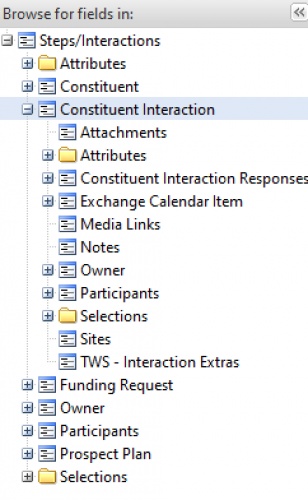
The <RelationshipOperations> tag is as follows:
<RelationshipOperations>
<AddToParentView Field="ID" ParentView="V_QUERY_INTERACTION" ParentViewRelatedField="ID" PathAlias="TWS - Interaction Extras" DisplayAliasResourceKey="$$tws_interaction_extras"/>
</RelationshipOperations>
What am I doing wrong?
I've attached the full XML, complete with some debugging info, sorry.
Kind regards,
David.
Comments
-
I would change the parent view to V_QUERY_INTERACTIONALL and it should be in the correct location. I got that view name from this query in SQL:
SELECT * FROM QUERYVIEWCATALOG WHERE DISPLAYNAME = 'Steps/Interactions'0 -
@Nick McGinnis
Dear Nick et al,Brilliant. Thanks, Nick. That did the trick, for Queries of type Steps/Interactions.
However, for Queries of type Constituent, the 'TWS - Interaction Extras' View/node doesn't seem to be present at all. Normally, Query Views/nodes attached to, say Constituents, show up in Views like Steps/Interactions. Has anyone any ideas how to get my new View to show up under both Steps/Interactions and Constituents?
Thanks,
David.
0


Categories
- All Categories
- 6 Blackbaud Community Help
- 209 bbcon®
- 1.4K Blackbaud Altru®
- 394 Blackbaud Award Management™ and Blackbaud Stewardship Management™
- 1.1K Blackbaud CRM™ and Blackbaud Internet Solutions™
- 15 donorCentrics®
- 359 Blackbaud eTapestry®
- 2.5K Blackbaud Financial Edge NXT®
- 646 Blackbaud Grantmaking™
- 563 Blackbaud Education Management Solutions for Higher Education
- 3.2K Blackbaud Education Management Solutions for K-12 Schools
- 934 Blackbaud Luminate Online® and Blackbaud TeamRaiser®
- 84 JustGiving® from Blackbaud®
- 6.4K Blackbaud Raiser's Edge NXT®
- 3.7K SKY Developer
- 243 ResearchPoint™
- 118 Blackbaud Tuition Management™
- 165 Organizational Best Practices
- 238 The Tap (Just for Fun)
- 33 Blackbaud Community Challenges
- 28 PowerUp Challenges
- 3 (Open) Raiser's Edge NXT PowerUp Challenge: Product Update Briefing
- 3 (Closed) Raiser's Edge NXT PowerUp Challenge: Standard Reports+
- 3 (Closed) Raiser's Edge NXT PowerUp Challenge: Email Marketing
- 3 (Closed) Raiser's Edge NXT PowerUp Challenge: Gift Management
- 4 (Closed) Raiser's Edge NXT PowerUp Challenge: Event Management
- 3 (Closed) Raiser's Edge NXT PowerUp Challenge: Home Page
- 4 (Closed) Raiser's Edge NXT PowerUp Challenge: Standard Reports
- 4 (Closed) Raiser's Edge NXT PowerUp Challenge: Query
- 779 Community News
- 2.9K Jobs Board
- 53 Blackbaud SKY® Reporting Announcements
- 47 Blackbaud CRM Higher Ed Product Advisory Group (HE PAG)
- 19 Blackbaud CRM Product Advisory Group (BBCRM PAG)