Spotlight on Attendance help topics and tutorials





As students returned for the fall term, we started hearing questions from the Education Management community about setting up, recording, and modifying attendance. We thought it might be helpful to put all of our help topics and tutorials on attendance in one place.Here are some attendance guides and help topics that we hope will be useful for everyone from newcomers to veteran users. If you have any other questions about attendance, sound off in the comments and we’ll get to work updating the help to better answer them!

The Attendance Setup Guide will walk you through the steps of setting up attendance categories, setting record methods, and enabling attendance. It also walks you through the steps to create virtual attendance categories (see the Set record method heading).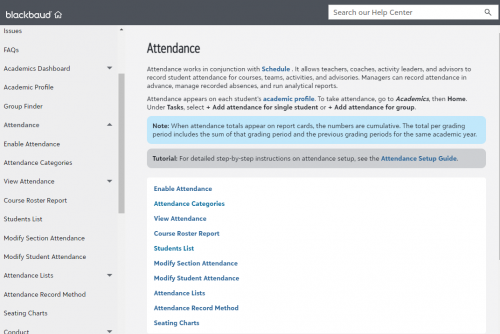
The Attendance landing page is where you can find all of our help topics on attendance, including how to generate a course roster report, how to set up and use seating charts, and how to modify attendance after it has been recorded.
As a reminder, you can always look for help using the search bar in the Help Center.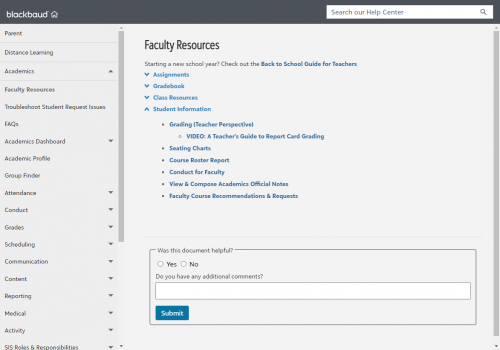
The Faculty Resources landing page includes help topics specific to the Faculty persona. Two important topics for Attendance include: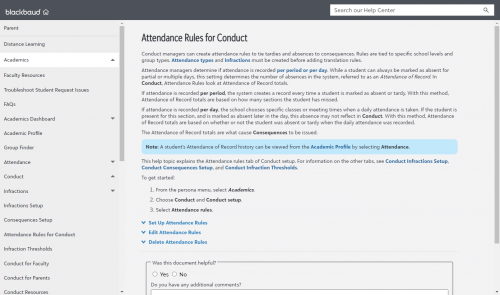
Conduct managers can create attendance rules so that when students receive a certain number of tardies or absences, they receive infractions and consequences. For information on setting up this feature, see the help topic Attendance Rules for Conduct.
For a walkthrough with screen shots, see our blog post from September 2020, Introducing: Virtual attendance types!
Let us know if you’re hitting any stumbling blocks and can’t find the help you’re looking for. We’re always looking to improve!
How to set up attendance at your school

The Attendance Setup Guide will walk you through the steps of setting up attendance categories, setting record methods, and enabling attendance. It also walks you through the steps to create virtual attendance categories (see the Set record method heading).
Focused help topics on attendance

The Attendance landing page is where you can find all of our help topics on attendance, including how to generate a course roster report, how to set up and use seating charts, and how to modify attendance after it has been recorded.
As a reminder, you can always look for help using the search bar in the Help Center.
Help for faculty

The Faculty Resources landing page includes help topics specific to the Faculty persona. Two important topics for Attendance include:
- Seating Charts: How to create them, how to edit them, and how to use them to take attendance.
- Course Roster Report: How to generate a list of students enrolled in a course.
Setting infractions and consequences for attendance

Conduct managers can create attendance rules so that when students receive a certain number of tardies or absences, they receive infractions and consequences. For information on setting up this feature, see the help topic Attendance Rules for Conduct.
Adding a virtual attendance category
The Attendance Categories help topic includes instructions for setting up virtual attendance-taking at your school.For a walkthrough with screen shots, see our blog post from September 2020, Introducing: Virtual attendance types!
Setting up seating charts
Last fall, we introduced the ability to take attendance through seating charts. This was a highly requested feature in the community, so we published a walkthrough with screenshots when the feature went live. You can read that here: Introducing Seating Charts for Attendance. You can also check out the help topic Seating Charts.Let us know if you’re hitting any stumbling blocks and can’t find the help you’re looking for. We’re always looking to improve!
0
Comments
-
As I have mentioned in the Ideas forum and elsewhere, the Higher-Ed attendance functions need to be updated to match how Higher-Ed works, rather than how K-12 works. Most importantly, faculty need to be able to modify their own attendance logs, or at the least, the Attendance Manager needs to be able to turn on/off an option for faculty self-editing. I understand the need for control over K-12 attendance, but faculty at this level use attendance for very different reasons, and while following some guidelines from the college bulletin, often have additional consequences for tardiness/absence.
0 -
Thank you!
0





Categories
- All Categories
- 6 Blackbaud Community Help
- 209 bbcon®
- 1.4K Blackbaud Altru®
- 394 Blackbaud Award Management™ and Blackbaud Stewardship Management™
- 1.1K Blackbaud CRM™ and Blackbaud Internet Solutions™
- 15 donorCentrics®
- 359 Blackbaud eTapestry®
- 2.5K Blackbaud Financial Edge NXT®
- 646 Blackbaud Grantmaking™
- 563 Blackbaud Education Management Solutions for Higher Education
- 3.2K Blackbaud Education Management Solutions for K-12 Schools
- 934 Blackbaud Luminate Online® and Blackbaud TeamRaiser®
- 84 JustGiving® from Blackbaud®
- 6.4K Blackbaud Raiser's Edge NXT®
- 3.7K SKY Developer
- 243 ResearchPoint™
- 118 Blackbaud Tuition Management™
- 165 Organizational Best Practices
- 238 The Tap (Just for Fun)
- 33 Blackbaud Community Challenges
- 28 PowerUp Challenges
- 3 (Open) Raiser's Edge NXT PowerUp Challenge: Product Update Briefing
- 3 (Closed) Raiser's Edge NXT PowerUp Challenge: Standard Reports+
- 3 (Closed) Raiser's Edge NXT PowerUp Challenge: Email Marketing
- 3 (Closed) Raiser's Edge NXT PowerUp Challenge: Gift Management
- 4 (Closed) Raiser's Edge NXT PowerUp Challenge: Event Management
- 3 (Closed) Raiser's Edge NXT PowerUp Challenge: Home Page
- 4 (Closed) Raiser's Edge NXT PowerUp Challenge: Standard Reports
- 4 (Closed) Raiser's Edge NXT PowerUp Challenge: Query
- 779 Community News
- 2.9K Jobs Board
- 53 Blackbaud SKY® Reporting Announcements
- 47 Blackbaud CRM Higher Ed Product Advisory Group (HE PAG)
- 19 Blackbaud CRM Product Advisory Group (BBCRM PAG)