New: Automatically add new constituents to a workflow in Workflow designer





In Workflow designer, you can now set workflows to automatically include new constituents who meet list criteria when you create the workflows. For example, you can create a list of all constituents who give a first gift of over $50 and apply that list to a workflow. When a new constituent meets the criteria, the list and the workflow update to include them. This feature helps you save time and prevents having to create new workflows for new constituents.
Note: Because you can only activate a workflow once, this feature doesn't apply to existing activated workflows.
How does it work?
From Tools, Workflow designer, create a new workflow. When you add the first step, select an existing list of constituents and select Apply workflow to new constituents added to this list. Otherwise, the workflow only applies to the constituents who are in the list when you activate it.
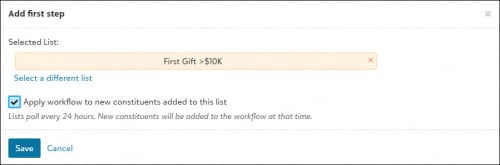
Note: Workflows check lists for new constituents every night beginning the date you activate the workflow. Depending on how long it takes to process, lists may complete updates during your local business hours.
How do I know if I'm applying new constituents to my workflow?
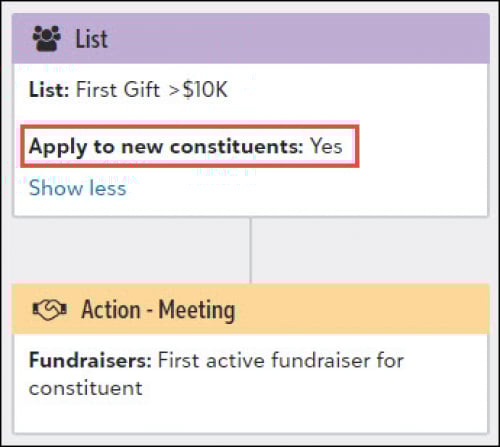
On the List step in your workflow, select Show more to verify whether your workflow will apply to new constituents in the list.
How can I see how many constituents are in my list?
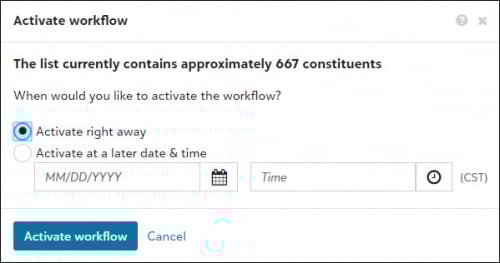
When you schedule your workflow activation, you can now see approximately how many constituents the workflow will apply to based on the list you selected.
For more information, see Workflows.
Note: Because you can only activate a workflow once, this feature doesn't apply to existing activated workflows.
How does it work?
From Tools, Workflow designer, create a new workflow. When you add the first step, select an existing list of constituents and select Apply workflow to new constituents added to this list. Otherwise, the workflow only applies to the constituents who are in the list when you activate it.

Note: Workflows check lists for new constituents every night beginning the date you activate the workflow. Depending on how long it takes to process, lists may complete updates during your local business hours.
How do I know if I'm applying new constituents to my workflow?
On the List step in your workflow, select Show more to verify whether your workflow will apply to new constituents in the list.

How can I see how many constituents are in my list?
When you schedule your workflow activation, you can now see approximately how many constituents the workflow will apply to based on the list you selected.

For more information, see Workflows.
8
Comments
-
I appreciate the break down of this new feature with the screen shots! Thank you!0



Categories
- All Categories
- New K-12 Community Home (TEST)
- New Higher Education Home Page (Test)
- New Impact Edge Community TEST
- New YourCause Community TEST
- New SKY Community TEST
- New Grantmaking TEST Community
- New Altru Test Community
- New bbcon Community - TEST
- 12 Blackbaud Agents for Good™
- New Raiser's Edge NXT Community
- 8 Blackbaud Community Help
- 223 bbcon®
- 1.4K Blackbaud Altru®
- 411 Blackbaud Award Management™ and Blackbaud Stewardship Management™
- 1.2K Blackbaud CRM™ and Blackbaud Internet Solutions™
- 16 donorCentrics®
- 361 Blackbaud eTapestry®
- 2.7K Blackbaud Financial Edge NXT®
- 688 Blackbaud Grantmaking™
- 604 Blackbaud Education Management Solutions for Higher Education
- 3.3K Blackbaud Education Management Solutions for K-12 Schools
- 954 Blackbaud Luminate Online® and Blackbaud TeamRaiser®
- 85 JustGiving® from Blackbaud®
- 7.1K Blackbaud Raiser's Edge NXT®
- 4K SKY Developer
- 258 ResearchPoint™
- 123 Blackbaud Tuition Management™
- 165 Organizational Best Practices
- 249 Member Lounge (Just for Fun)
- 40 Blackbaud Community Challenges
- 37 PowerUp Challenges
- 3 (Closed) PowerUp Challenge: Grid View Batch
- 3 (Closed) PowerUp Challenge: Chat for Blackbaud AI
- 3 (Closed) PowerUp Challenge: Data Health
- 3 (Closed) Raiser's Edge NXT PowerUp Challenge: Product Update Briefing
- 3 (Closed) Raiser's Edge NXT PowerUp Challenge: Standard Reports+
- 3 (Closed) Raiser's Edge NXT PowerUp Challenge: Email Marketing
- 3 (Closed) Raiser's Edge NXT PowerUp Challenge: Gift Management
- 4 (Closed) Raiser's Edge NXT PowerUp Challenge: Event Management
- 3 (Closed) Raiser's Edge NXT PowerUp Challenge: Home Page
- 4 (Closed) Raiser's Edge NXT PowerUp Challenge: Standard Reports
- 4 (Closed) Raiser's Edge NXT PowerUp Challenge: Query
- 829 Community News
- 3.1K Jobs Board
- 57 Blackbaud SKY® Reporting Announcements
- 47 Blackbaud CRM Higher Ed Product Advisory Group (HE PAG)
- 19 Blackbaud CRM Product Advisory Group (BBCRM PAG)