What's New In Raiser's Edge NXT The Week Of September 28





Refund gifts paid by credit card (for those who use Blackbaud Merchant Services)
To streamline how you manage refund requests from donors, you can now refund a gift in the web view and it automatically adjusts to $0.00. Previously, you needed to issue a refund from the Blackbaud Merchant Services Web Portal and manually adjust the gift in the database view.
You can refund a gift if it's:
-
Paid by credit card within the last 365 days.
-
Processed through Blackbaud Merchant Services.
From the top of the gift record, Refund appears when it's eligible to refunded. To refund the full amount of the gift, select Refund. Under Notes, enter additional details to track the reason for the refund, then select Refund.

The gift adjusts to $0.00 and the full amount returns to the donor's original payment method. Notes that you enter display on the adjustment record in the database view.
Note: You can't refund a gift that was previously fully or partially refunded.
Send receipts for gifts-in-kind
You can now send email or PDF receipts for gifts-in-kind. When you select a gift-in-kind to receipt, the Transactions details merge field automatically displays the gift type of Gift-in-kind, and includes the Comment field with the value you entered on the gift record — typically a short description of the item(s) donated.
With gifts-in-kind, you might not want to include a specific amount or value associated with the gift on the receipt. Therefore, the following the following fields are removed from the Transaction details merge field for gifts-in-kind:
-
Gift amount / Value
-
Total benefit amount
-
Contribution amount
-
"Gift amount = Total benefit amount + Contribution amount" label

Tip: Depending on your organization's processes, you might want to mention the value of gifts-in-kind on the receipt using specific contextual wording. To do this, create a separate receipt template for gifts-in-kind, and include the Gift amount merge field in the body content.
For more information, see Receipt Templates Merge Fields.
Enhancements to the JustGiving integration
You can now set additional default settings for new donors and fundraisers that are created by the JustGiving integration. From Control Panel, Settings, select JustGiving integration, Default settings, Defaults for constituents:
-
Under Primary name formats, you can now set an Addressee or Salutation format to apply to the donor's or fundraiser's record.
-
Under Consent, you can now set a default Email consent category for donors and fundraisers who opt in to communications in JustGiving.

If a donor wrote a message to the fundraiser in JustGiving, the message now automatically displays on the gift record in Raiser's Edge NXT under Custom fields, JustGiving Donor Message.

Data clean up was improved for donor and fundraiser names and addresses:
-
Double spaces are replaced with single spaces
-
Spaces at the beginning or end of fields are removed
-
First letters are capitalized
Note: Words that follow a hyphen are not capitalized
For more information, see JustGiving Integration.
Comments
-
Great info! Thanks for the updates Kimberly!
0 -
Has anybody else tried the process of Refunding donors in RE NXT? We did. It successfully performed the refund in BBMS but the cursor keeps spinning in RENXT and the gifts didn't adjust to $0. ?
0 -
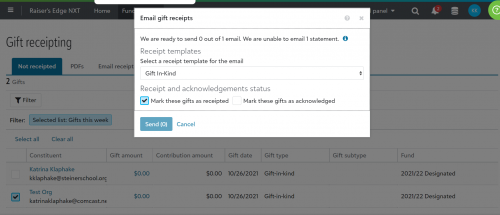
It's great that you can now easily do receipts for gifts in-kind, however we get many of these gifts from organizations. For some reason, I am unable to email a receipt to an organization, even when there is a contact e-mail in this organizations record. Am I missing something?
0 -
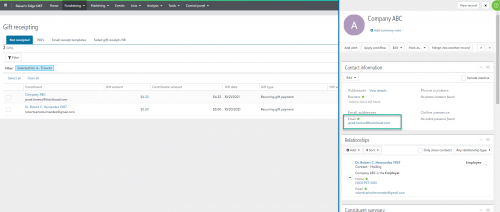
Hey Katrina, Do you mind elaborating on what you are seeing? You can absolutely email receipt to organizations through the Gift receipting area. I would make sure that you're not somehow filtering them out from the List you select.
Also keep in mind that the email address we'll use for those is the Primary email address on the organization record itself. So if its showing without an email address, that's something to check as well.
 0
0 -
I set up a test email and had already marked it as the primary email.
Here is what I'm seeing:
 0
0










Categories
- All Categories
- 6 Blackbaud Community Help
- 209 bbcon®
- 1.4K Blackbaud Altru®
- 394 Blackbaud Award Management™ and Blackbaud Stewardship Management™
- 1.1K Blackbaud CRM™ and Blackbaud Internet Solutions™
- 15 donorCentrics®
- 359 Blackbaud eTapestry®
- 2.5K Blackbaud Financial Edge NXT®
- 646 Blackbaud Grantmaking™
- 563 Blackbaud Education Management Solutions for Higher Education
- 3.2K Blackbaud Education Management Solutions for K-12 Schools
- 934 Blackbaud Luminate Online® and Blackbaud TeamRaiser®
- 84 JustGiving® from Blackbaud®
- 6.4K Blackbaud Raiser's Edge NXT®
- 3.7K SKY Developer
- 243 ResearchPoint™
- 118 Blackbaud Tuition Management™
- 165 Organizational Best Practices
- 238 The Tap (Just for Fun)
- 33 Blackbaud Community Challenges
- 28 PowerUp Challenges
- 3 (Open) Raiser's Edge NXT PowerUp Challenge: Product Update Briefing
- 3 (Closed) Raiser's Edge NXT PowerUp Challenge: Standard Reports+
- 3 (Closed) Raiser's Edge NXT PowerUp Challenge: Email Marketing
- 3 (Closed) Raiser's Edge NXT PowerUp Challenge: Gift Management
- 4 (Closed) Raiser's Edge NXT PowerUp Challenge: Event Management
- 3 (Closed) Raiser's Edge NXT PowerUp Challenge: Home Page
- 4 (Closed) Raiser's Edge NXT PowerUp Challenge: Standard Reports
- 4 (Closed) Raiser's Edge NXT PowerUp Challenge: Query
- 779 Community News
- 2.9K Jobs Board
- 53 Blackbaud SKY® Reporting Announcements
- 47 Blackbaud CRM Higher Ed Product Advisory Group (HE PAG)
- 19 Blackbaud CRM Product Advisory Group (BBCRM PAG)