Blackbaud’s Education Management Solutions: What’s New For April 11, 2023

Denise Kadilak
Blackbaud Employee




Here are the latest changes, updates, and new features for the Education management products for April 11, 2023.
To upload a signature image, you will need to go to Core, open the Settings menu, and select Application style settings. A signature image file can be uploaded via the Logos and Seals tab by selecting + Add New.
Once you have uploaded the image, navigate back to Academics, open the Grades menu, and select either Report card setup or Transcripts setup. Edit a template and navigate to the Style form. Under the Footer style menu, make sure that Include signature line is selected and then select Browse the image gallery. Find the signature image and then click Select.
The signature image file will now be included on the signature line at the bottom of the final page for each student Report Card or Transcript generated from this template. If you choose to display either the print date or page number on the right side of the footer, then the signature line will appear to the left of that information.
Instructions for this process can be found in the help topic Add a Signature to Report Cards and Transcripts.
We’ve also added question flyouts to the Question breakdown. Select a bar in the graph to open a flyout with additional details about that question, including the question type and the number of Correct, Partial, and Incorrect responses for the question. Additional details in the flyout vary by question type: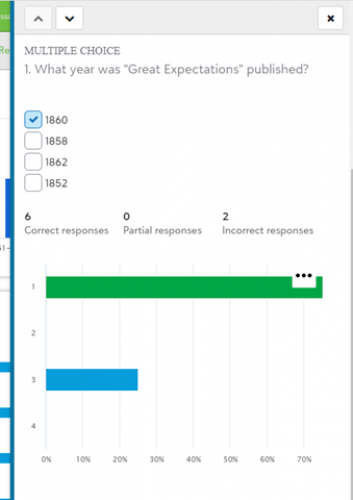
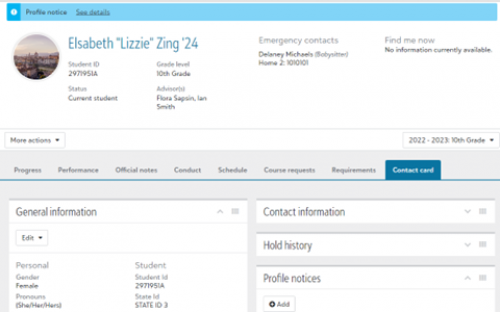
The new profile, also known as the 360 Profile, will display when you select a student or alumnus via the People finder or via a list in Academics. It contains the same features and capabilities as the older profile, but arranged in a more accessible format.
The new profile is arranged in tabs labeled Contact card, Progress, Performance, Official notes, Conduct, Schedule, Course requests, and Requirements. The tabs you are able to access and the features you are able to use depend on your role at the school, which can be managed by administrators at your school via Core.
For more information about accessing and using the new profile tabs, see the Academic Profile and Contact Card help topic. Help links for each of the tabs can be found at the bottom of the help topic page.
“Sincerely,
Your Blackbaud Tuition Management Team”
If the school enters a different Reply To Email Address, the automated signature will not appear.
To manage your community subscriptions:
Academics
Adding a signature image to report cards and transcripts
You can now add the image of a signature to the signature line on Report Card and Transcript templates. This can be useful in cases where a school wants to include, for example, the Head of School’s signature on each student transcript.To upload a signature image, you will need to go to Core, open the Settings menu, and select Application style settings. A signature image file can be uploaded via the Logos and Seals tab by selecting + Add New.
Once you have uploaded the image, navigate back to Academics, open the Grades menu, and select either Report card setup or Transcripts setup. Edit a template and navigate to the Style form. Under the Footer style menu, make sure that Include signature line is selected and then select Browse the image gallery. Find the signature image and then click Select.
The signature image file will now be included on the signature line at the bottom of the final page for each student Report Card or Transcript generated from this template. If you choose to display either the print date or page number on the right side of the footer, then the signature line will appear to the left of that information.
Instructions for this process can be found in the help topic Add a Signature to Report Cards and Transcripts.
Assessment Reporting
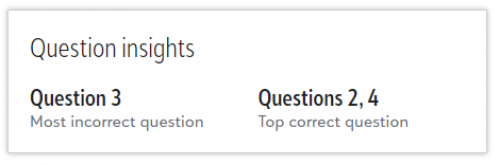
Reporting for the new assessment experience now includes Question insights, which teachers can use to quickly identify the most incorrect question and most correct question in their assessment. Incorrect and Partial answers are combined to determine the most incorrect question. In instances of a tie, more than one question will be listed.
We’ve also added question flyouts to the Question breakdown. Select a bar in the graph to open a flyout with additional details about that question, including the question type and the number of Correct, Partial, and Incorrect responses for the question. Additional details in the flyout vary by question type:
- Essay: Displays the number of Full credit, Partial credit, No credit, and Not graded responses.
- Fill in the blank: A table displays all responses received, a count of each unique response, and which responses were counted as correct.
- Multiple choice: Displays the correct answer choice(s) and a bar graph representing how often each answer choice was selected.
- True/False: Displays the correct answer choice and a bar graph indicating the percentage of correct and incorrect answers.

New columns on Day and Class attendance lists
If a school has created Admin view only fields or Publishable fields, those fields can now display as columns on the Day attendance list and Class attendance list. These columns are already also available on the Students list.New Academic Profiles
The new version of Academic Profiles is being gradually released to all schools. The first wave of schools received access in late March, and more are coming soon. Click here to watch a walkthrough video demonstrating the features.
The new profile, also known as the 360 Profile, will display when you select a student or alumnus via the People finder or via a list in Academics. It contains the same features and capabilities as the older profile, but arranged in a more accessible format.
The new profile is arranged in tabs labeled Contact card, Progress, Performance, Official notes, Conduct, Schedule, Course requests, and Requirements. The tabs you are able to access and the features you are able to use depend on your role at the school, which can be managed by administrators at your school via Core.
For more information about accessing and using the new profile tabs, see the Academic Profile and Contact Card help topic. Help links for each of the tabs can be found at the bottom of the help topic page.
Enrollment management
School Forms
When a school form recipient is filling out a profile update form, if the Address Same as User field is selected, it now copies the address values from the User Address.Student Checklists
Thanks to ideas from our community, we've expanded the information displayed from Student Checklist. Now, admissions managers will see totals for Steps ready to process and Steps in awaiting status. Keep in mind that these values are specific to the school year selected in the list, so changing that will also change the totals displayed.Tuition management
New automatic signature on emails
When sending a custom email blast (Families > Email Parents), if a user enters the Reply To Email Address customerservice@blackbaud.school (or chartercustomerservice@blackbaud.school for charter schools), the following automated signature will appear at the end of the email:“Sincerely,
Your Blackbaud Tuition Management Team”
If the school enters a different Reply To Email Address, the automated signature will not appear.
API and Integrations
School API and OneRoster API
For information about recently added endpoints and other updates, view the School API and OneRoster API changelog.Subscribe to “What’s New”
To receive email notifications when the What’s new update appears, make sure to subscribe to the K12 community’s blog by logging into the community site and selecting the Subscribe button.To manage your community subscriptions:
- Log into the community and locate your name and profile picture in the upper right corner.
- Select the drop-down arrow and select My Account.
- From the My Account page, select the Subscriptions tab and scroll down to the Blogs section.
- Locate Blackbaud K-12 Education solutions Blog. If you want to be notified as soon as the What’s new content goes live on the community, select the Instant option. You can also opt for Daily and Weekly notifications.
- Scroll to the end of the page and select Save changes.
What’s Recent
Missed any of our weekly releases? You can catch up on everything in our Month in Review blog posts, which cover every feature and update Education management releases each month.0
Categories
- All Categories
- 6 Blackbaud Community Help
- 209 bbcon®
- 1.4K Blackbaud Altru®
- 395 Blackbaud Award Management™ and Blackbaud Stewardship Management™
- 1.1K Blackbaud CRM™ and Blackbaud Internet Solutions™
- 15 donorCentrics®
- 359 Blackbaud eTapestry®
- 2.5K Blackbaud Financial Edge NXT®
- 646 Blackbaud Grantmaking™
- 563 Blackbaud Education Management Solutions for Higher Education
- 3.2K Blackbaud Education Management Solutions for K-12 Schools
- 934 Blackbaud Luminate Online® and Blackbaud TeamRaiser®
- 84 JustGiving® from Blackbaud®
- 6.4K Blackbaud Raiser's Edge NXT®
- 3.7K SKY Developer
- 243 ResearchPoint™
- 118 Blackbaud Tuition Management™
- 165 Organizational Best Practices
- 238 The Tap (Just for Fun)
- 33 Blackbaud Community Challenges
- 28 PowerUp Challenges
- 3 (Open) Raiser's Edge NXT PowerUp Challenge: Product Update Briefing
- 3 (Closed) Raiser's Edge NXT PowerUp Challenge: Standard Reports+
- 3 (Closed) Raiser's Edge NXT PowerUp Challenge: Email Marketing
- 3 (Closed) Raiser's Edge NXT PowerUp Challenge: Gift Management
- 4 (Closed) Raiser's Edge NXT PowerUp Challenge: Event Management
- 3 (Closed) Raiser's Edge NXT PowerUp Challenge: Home Page
- 4 (Closed) Raiser's Edge NXT PowerUp Challenge: Standard Reports
- 4 (Closed) Raiser's Edge NXT PowerUp Challenge: Query
- 779 Community News
- 2.9K Jobs Board
- 53 Blackbaud SKY® Reporting Announcements
- 47 Blackbaud CRM Higher Ed Product Advisory Group (HE PAG)
- 19 Blackbaud CRM Product Advisory Group (BBCRM PAG)