Blackbaud’s Education Management Solutions: What’s New For August 8, 2023

Katie Burckhalter
Blackbaud Employee




Here are the latest changes, updates, and new features for the Education management products for August 8, 2023.
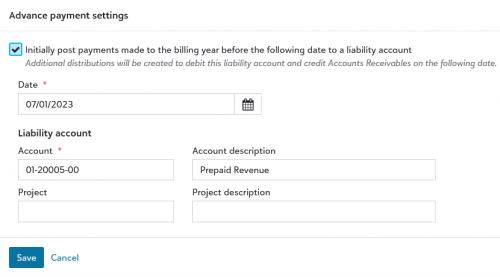
Advance payments enable the recording of payments made before a defined date (e.g., July 1, 202X) into a deferred liability account. These advance payments credit a liability account (e.g., Prepaid Revenue) when applied to charges within the billing year until the defined date passes. On this date, a reversal occurs, and the money is debited from the Prepaid Revenue account, and Accounts Receivable is credited.
Billing clerks enable Advance payments by navigating to Billing years and selecting Advance payments in the navigation. Enabling Advance payments requires turning off Application distributions (Billing settings > Transaction rules > Application Distributions).
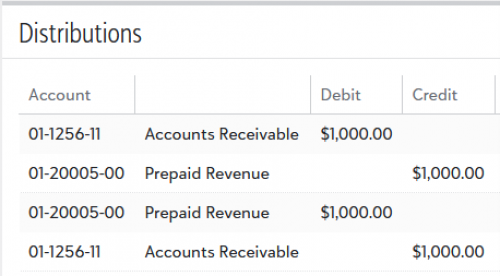
In the following example, a payment was entered on 5/1/23, Accounts Receivable was debited, and Prepaid Revenue was credited. On the advance payment date defined in settings (e.g., 7/1/23), for the same payment, Prepaid Revenue was debited, and Accounts Receivable was credited.
Audio files elsewhere in Education management are not affected by this change.
At all schools, platform managers can now use the new experience for managing security roles and tasks for users.
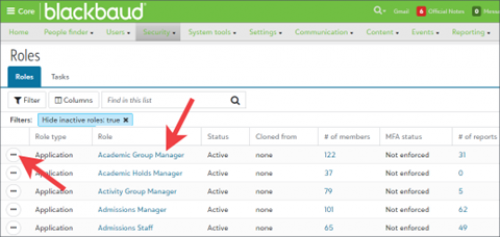
To access the new version, go to Core, Security, Roles. Then, from the list of Roles, select the role name.
Want a tour of the new functionality? Follow these steps to enable the new experience for one of your cloned platform managers. In the process, you’ll see most of the new stuff. Start by enabling the task for the role.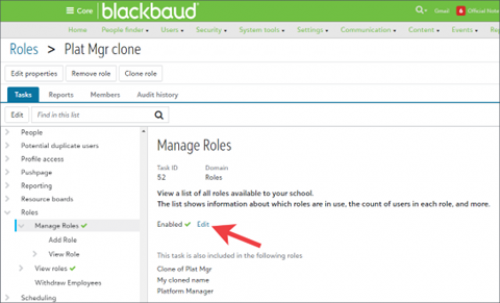
There’s another way to view a list of all roles and users with the Manage roles task enabled and to enable it for users.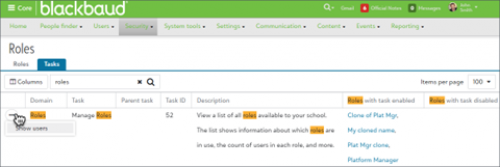
From a user’s profile in Core, select Access. The user’s roles, personas, and authentication method appear. Select Role membership. A legacy interface for managing the specific user’s role memberships appears.
Admissions managers can now view forms that have been started but not submitted inside of the Forms Submissions list using the Date Started and Form Status columns. As part of this, we've updated the Form Submissions count on the Events page as well as the cover page tally to reflect started, submitted, and total forms.
Thanks to the Ideas Bank in the community, we've made a couple of quality-of-life changes to School Forms. When working in the School forms editor, admissions managers can now choose the sort order when creating options for a form field rather than it set to alphabetical by default. In addition, the parent, candidate, student, or recommender filling out a form will now see in the specific order that the admissions manager selected in the editor.
Endpoints now featuring the grades property include:
Teachers that have not begun their active start dates are now included in OneRoster exports.
Previously, students who had not logged in did not have a username assigned to them; this created issues for both 3rd party integrations that required the username field.
Now, all students have their BBID email recorded as usernames. However, admins are able to specify which email is used for the username field, if needed.
For information about recently added endpoints and other updates, view the School API and OneRoster API changelog.
To manage your community subscriptions:
Learning resources
Webinar: Multi-factor authentication for Blackbaud ID
To learn more about multi-factor authentication (MFA) for Blackbaud ID (BBID) and to prepare for this change view the webinar on August 9th at 2:00 PM ET. Recordings will also be available on demand after the webinar event.Billing management (Early Availability)
Blackbaud Billing management is available to customers not currently using Blackbaud Tuition management.
Record advance payments to a deferred liability account
Advance payments enable the recording of payments made before a defined date (e.g., July 1, 202X) into a deferred liability account. These advance payments credit a liability account (e.g., Prepaid Revenue) when applied to charges within the billing year until the defined date passes. On this date, a reversal occurs, and the money is debited from the Prepaid Revenue account, and Accounts Receivable is credited.Billing clerks enable Advance payments by navigating to Billing years and selecting Advance payments in the navigation. Enabling Advance payments requires turning off Application distributions (Billing settings > Transaction rules > Application Distributions).

In the following example, a payment was entered on 5/1/23, Accounts Receivable was debited, and Prepaid Revenue was credited. On the advance payment date defined in settings (e.g., 7/1/23), for the same payment, Prepaid Revenue was debited, and Accounts Receivable was credited.

Core
Audio content type limited to MP3
Previously, if a user uploaded an audio file to the Audio content type, the file was automatically converted to the MP3 file format. With this release, files for the Audio content type are no longer converted. Users can only upload MP3 files for this content type.Audio files elsewhere in Education management are not affected by this change.
Manage roles & tasks – Generally available
At all schools, platform managers can now use the new experience for managing security roles and tasks for users.
- For schools that participated in the early adaptor program (EAP), even cloned platform managers have access to the new roles experience by default. They retain the access they had during the EAP. Thank you for participating in this EAP to help make this new experience possible!
- Schools that did not participate in the EAP can enable the new experience for cloned platform manager roles. A member of the Platform Manager base role can update each clone’s roles and tasks.
To access the new version, go to Core, Security, Roles. Then, from the list of Roles, select the role name.

Want a tour of the new functionality? Follow these steps to enable the new experience for one of your cloned platform managers. In the process, you’ll see most of the new stuff. Start by enabling the task for the role.
- Go to Core, Security, Roles. You’ll use this list to
- view and edit the role and its tasks,
- update role membership,
- enable Multi-Factor Authentication for Blackbaud ID,
- clone existing roles to create new ones,
- and view a list of reports the role members can view or run.
- From the list of roles, search for Platform manager and then sort the list by selecting the column header called Cloned from.
- For each cloned role, select the role name. Tasks which can be enabled for the role appear, organized by domains. You’ll also use this page to access:
- a list of Reports the role can run and view,
- a list of users who are Members of the role,
- and an Audit history which shows changes to the role and its memberships.
- Expand the domain for Roles and select the task called Manage roles. Details about the task appear. They include:
- a description of what the task enables users to see and do,
- the task’s status,
- and a list of additional roles which have the task enabled.
- From the details, update the task’s status. Select Edit, Enabled, and then Save.

- Remember to tell the affected users to log out and back in to see the changes. To identify which users are affected, select the Members tab.
- You can also Remove the role from users or + Add it to additional users from the Members tab.
There’s another way to view a list of all roles and users with the Manage roles task enabled and to enable it for users.
- Return to Core, Security, Roles.
- Select Tasks.
- Search for “Role” and then sort the list by Domain by selecting the column header. Find the row for the “Manage roles” task.
- Use the columns called Roles with task enabled and Roles with task disabled to access the roles which could have the task enabled. Edit each role.
- Select (…) and then Show users to view the list of users who have at least one role with the task enabled. Then select a user’s name to go to their user profile.

From a user’s profile in Core, select Access. The user’s roles, personas, and authentication method appear. Select Role membership. A legacy interface for managing the specific user’s role memberships appears.
Enrollment management
Contracts
When viewing Contracts from a Candidate or Student Profile, we've added a View deleted contracts button which displays an audit log containing information of when the contract was deleted, who deleted it, and if any reason was added for why it was deleted. Keep in mind that it only displays the contracts for the currently selected School Year.
Events
Admissions managers can now view forms that have been started but not submitted inside of the Forms Submissions list using the Date Started and Form Status columns. As part of this, we've updated the Form Submissions count on the Events page as well as the cover page tally to reflect started, submitted, and total forms.
School Forms
Thanks to the Ideas Bank in the community, we've made a couple of quality-of-life changes to School Forms. When working in the School forms editor, admissions managers can now choose the sort order when creating options for a form field rather than it set to alphabetical by default. In addition, the parent, candidate, student, or recommender filling out a form will now see in the specific order that the admissions manager selected in the editor.API and Integrations
OneRoster API
Grades property added to class and course endpoints
We’ve updated several endpoints to include a grades property, which contains an array of grade levels associated with a course or class (e.g., 01, 02); the format for each grade level value aligns with the enumeration values defined by the Common Education Data Standards (CEDS) initiative.Endpoints now featuring the grades property include:
- GET Course by id
- GET Courses all
- GET Courses for school
- GET Class by id
- GET Class all
- GET Classes for a school
- GET Classes for a teacher
Pending teachers now included in OneRoster exports
Teachers that have not begun their active start dates are now included in OneRoster exports.
Usernames now available for inactive students
Previously, students who had not logged in did not have a username assigned to them; this created issues for both 3rd party integrations that required the username field.Now, all students have their BBID email recorded as usernames. However, admins are able to specify which email is used for the username field, if needed.
School API and OneRoster API Changelog
For information about recently added endpoints and other updates, view the School API and OneRoster API changelog.Subscribe to “What’s New”
To receive email notifications when the What’s new update appears, make sure to subscribe to the K12 community’s blog by logging into the community site and selecting the Subscribe button.To manage your community subscriptions:
- Log into the community and locate your name and profile picture in the upper right corner.
- Select the drop-down arrow and select My Account.
- From the My Account page, select the Subscriptions tab and scroll down to the Blogs section.
- Locate Blackbaud K-12 Education solutions Blog. If you want to be notified as soon as the What’s new content goes live on the community, select the Instant option. You can also opt for Daily and Weekly notifications.
- Scroll to the end of the page and select Save changes.
What’s Recent
Missed any of our weekly releases? You can catch up on everything in our Month in Review blog posts, which cover every feature and update Education management releases each month.0
Categories
- All Categories
- 6 Blackbaud Community Help
- 209 bbcon®
- 1.4K Blackbaud Altru®
- 395 Blackbaud Award Management™ and Blackbaud Stewardship Management™
- 1.1K Blackbaud CRM™ and Blackbaud Internet Solutions™
- 15 donorCentrics®
- 359 Blackbaud eTapestry®
- 2.5K Blackbaud Financial Edge NXT®
- 646 Blackbaud Grantmaking™
- 563 Blackbaud Education Management Solutions for Higher Education
- 3.2K Blackbaud Education Management Solutions for K-12 Schools
- 934 Blackbaud Luminate Online® and Blackbaud TeamRaiser®
- 84 JustGiving® from Blackbaud®
- 6.4K Blackbaud Raiser's Edge NXT®
- 3.7K SKY Developer
- 243 ResearchPoint™
- 118 Blackbaud Tuition Management™
- 165 Organizational Best Practices
- 238 The Tap (Just for Fun)
- 33 Blackbaud Community Challenges
- 28 PowerUp Challenges
- 3 (Open) Raiser's Edge NXT PowerUp Challenge: Product Update Briefing
- 3 (Closed) Raiser's Edge NXT PowerUp Challenge: Standard Reports+
- 3 (Closed) Raiser's Edge NXT PowerUp Challenge: Email Marketing
- 3 (Closed) Raiser's Edge NXT PowerUp Challenge: Gift Management
- 4 (Closed) Raiser's Edge NXT PowerUp Challenge: Event Management
- 3 (Closed) Raiser's Edge NXT PowerUp Challenge: Home Page
- 4 (Closed) Raiser's Edge NXT PowerUp Challenge: Standard Reports
- 4 (Closed) Raiser's Edge NXT PowerUp Challenge: Query
- 779 Community News
- 2.9K Jobs Board
- 53 Blackbaud SKY® Reporting Announcements
- 47 Blackbaud CRM Higher Ed Product Advisory Group (HE PAG)
- 19 Blackbaud CRM Product Advisory Group (BBCRM PAG)