Financial Edge NXT Enhancements

Justin Ward
Blackbaud Employee




Hey everyone! Today we want to highlight an enhancement just added to Financial Edge NXT this week. In Expense management, we added the All invoice requests tile.
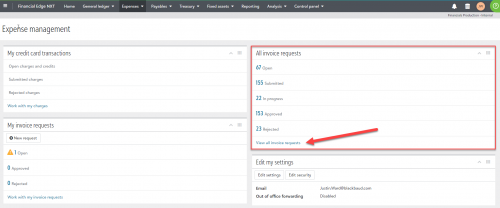
This new tile allows you to easily view the status of all your invoice requests. This helps you see what’s in the pipeline so that you can intervene as necessary, and know if it’s safe to close month-end.
From the tile, select View all invoice requests to open the All invoice requests page.
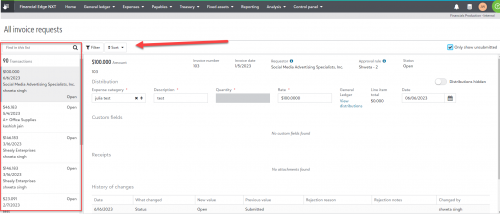
To quickly locate a specific invoice request, use the search or filter the list. You can also sort transactions by amount, status, or vendor. Use the icons next to the transactions in the left panel to easily identify the transaction status.

This new tile allows you to easily view the status of all your invoice requests. This helps you see what’s in the pipeline so that you can intervene as necessary, and know if it’s safe to close month-end.
From the tile, select View all invoice requests to open the All invoice requests page.

To quickly locate a specific invoice request, use the search or filter the list. You can also sort transactions by amount, status, or vendor. Use the icons next to the transactions in the left panel to easily identify the transaction status.
4
Comments
-
Its great that Admins can now see this information! When will they be able to work with the information (e.g. edit or delete unapproved requests)?
0




Categories
- All Categories
- 6 Blackbaud Community Help
- 209 bbcon®
- 1.4K Blackbaud Altru®
- 395 Blackbaud Award Management™ and Blackbaud Stewardship Management™
- 1.1K Blackbaud CRM™ and Blackbaud Internet Solutions™
- 15 donorCentrics®
- 359 Blackbaud eTapestry®
- 2.5K Blackbaud Financial Edge NXT®
- 646 Blackbaud Grantmaking™
- 563 Blackbaud Education Management Solutions for Higher Education
- 3.2K Blackbaud Education Management Solutions for K-12 Schools
- 934 Blackbaud Luminate Online® and Blackbaud TeamRaiser®
- 84 JustGiving® from Blackbaud®
- 6.4K Blackbaud Raiser's Edge NXT®
- 3.7K SKY Developer
- 243 ResearchPoint™
- 118 Blackbaud Tuition Management™
- 165 Organizational Best Practices
- 238 The Tap (Just for Fun)
- 33 Blackbaud Community Challenges
- 28 PowerUp Challenges
- 3 (Open) Raiser's Edge NXT PowerUp Challenge: Product Update Briefing
- 3 (Closed) Raiser's Edge NXT PowerUp Challenge: Standard Reports+
- 3 (Closed) Raiser's Edge NXT PowerUp Challenge: Email Marketing
- 3 (Closed) Raiser's Edge NXT PowerUp Challenge: Gift Management
- 4 (Closed) Raiser's Edge NXT PowerUp Challenge: Event Management
- 3 (Closed) Raiser's Edge NXT PowerUp Challenge: Home Page
- 4 (Closed) Raiser's Edge NXT PowerUp Challenge: Standard Reports
- 4 (Closed) Raiser's Edge NXT PowerUp Challenge: Query
- 779 Community News
- 2.9K Jobs Board
- 53 Blackbaud SKY® Reporting Announcements
- 47 Blackbaud CRM Higher Ed Product Advisory Group (HE PAG)
- 19 Blackbaud CRM Product Advisory Group (BBCRM PAG)