ResearchPoint™ Tips: Adding Grateful Patient Solution Encrypted Fields To Queries And Research Lists

Shelley Weifenbach
Blackbaud Employee




Queries and Research Lists are at the heart of identifying patient prospects. Once your organization is using the Grateful Patient Solution encrypted attributes to store sensitive patient data, you will want to update your prospect lists. This blog will review how to navigate to and to use these attributes in Query and Research Lists.Introduction
In February 2021, Blackbaud announced the launch of six encrypted attributes to provide an extra layer of security around select sensitive patient data for organizations with the Grateful Patient Solution (GPS). These attributes are:
Now that you have these fields, you and your team will need to update your existing queries and research lists. The list below summarizes the key features of queries vs. research lists:
Your daily/weekly process reviewing your Grateful Patient Solution results may include queries, research lists, and/or exports. Start by doing a quick inventory of your process and determine what criteria and output you may need to update. Once, you have your to do list ready, it’s time to make the updates!
Updating Queries
We will start by updating the existing Grateful Patient Solution queries with the encrypted attributes in both the criteria and the output.
Updating Research Lists
Research Lists are often a go-to tool for grateful patient prospecting because of their ease of use and duplicate prospect suppression. You can view the encrypted fields in the output of a research list as well as include them using the built-in filters or a query selection.


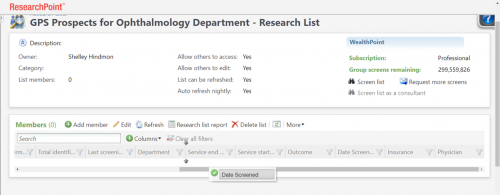
Tip: Remember that if others will be using this research list too, each user will need to complete the last two steps of adding and rearranging the columns in the research list
Conclusion
I hope this walkthrough of updating your queries and research lists with the Grateful Patient Solution encrypted attributes helps you to get up and running with your revised lists quickly! We will continue this discussion in the blog “ResearchPoint™ Export Tips: Adding Grateful Patient Solution Encrypted Fields to Export Definitions” coming soon!
In February 2021, Blackbaud announced the launch of six encrypted attributes to provide an extra layer of security around select sensitive patient data for organizations with the Grateful Patient Solution (GPS). These attributes are:
- Insurance: health insurance status (Yes/No)
- Department: general department of service information
- Service Start Date: start date of service
- Service End Date: end date of service
- Physician: treating physician name
- Outcome: outcome information
Now that you have these fields, you and your team will need to update your existing queries and research lists. The list below summarizes the key features of queries vs. research lists:
Query
- Complex criteria including all GPS scores and attributes
- Display all GPS scores and attributes in the results
- Output is the same for all users based on the query settings
- Possible duplicates in the results depending on the fields in output
- Download results or use in Export
Research Lists
- Built-in filters including encrypted attributes or use a query selection
- Limited fields to display, but includes all Grateful Patient Solution scores and attributes
- Output customized by user
- Add and remove specific prospects from the list
- Suppresses duplicate prospects in the results
- Use to run WealthPoint screening a group of prospects
- Sync the list to Raiser’s Edge NXT
- Download results into CSV or XLSX file
Your daily/weekly process reviewing your Grateful Patient Solution results may include queries, research lists, and/or exports. Start by doing a quick inventory of your process and determine what criteria and output you may need to update. Once, you have your to do list ready, it’s time to make the updates!
Updating Queries
We will start by updating the existing Grateful Patient Solution queries with the encrypted attributes in both the criteria and the output.
- Navigate to Analysis > Information Library and edit one of your grateful patient prospecting queries.
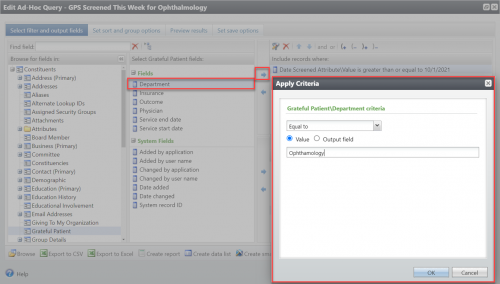
- Find the encrypted attribute fields under the Constituents header and the Grateful Patient section.
- Add field(s) to the criteria.

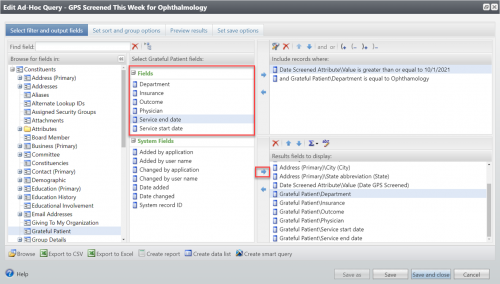
- Add field(s) to the output.

- Set sort options and preview results.
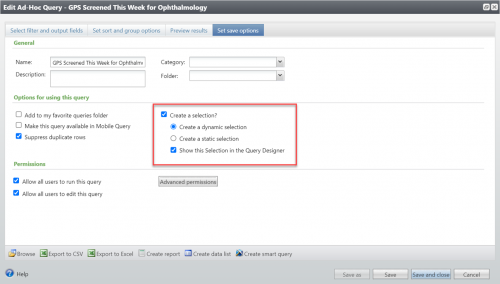
- Save the query with the checkbox marked for “Create a selection?” so it could be used in a research list if needed.

Updating Research Lists
Research Lists are often a go-to tool for grateful patient prospecting because of their ease of use and duplicate prospect suppression. You can view the encrypted fields in the output of a research list as well as include them using the built-in filters or a query selection.
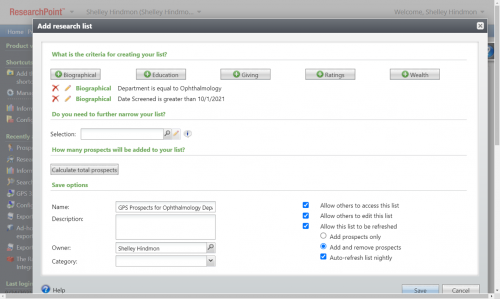
- Navigate to the Prospects tab, then to the Research Lists section. Select “Add” for a new list or “View all lists” to edit an existing list.
- Select the Biographical button and select the field, operator, and value, then OK. Add additional filters as needed. Tip: All attributes including the Grateful Patient Solution scores will be under Biographical.


- Hit the Save button to view the results.

- To adjust the columns, click on the Columns button and check each field you want to display and select Apply.

- You may want to rearrange the columns by dragging and dropping and/or sort the columns by clicking on the column header.

Tip: Remember that if others will be using this research list too, each user will need to complete the last two steps of adding and rearranging the columns in the research list
Conclusion
I hope this walkthrough of updating your queries and research lists with the Grateful Patient Solution encrypted attributes helps you to get up and running with your revised lists quickly! We will continue this discussion in the blog “ResearchPoint™ Export Tips: Adding Grateful Patient Solution Encrypted Fields to Export Definitions” coming soon!
1
Categories
- All Categories
- 6 Blackbaud Community Help
- 209 bbcon®
- 1.4K Blackbaud Altru®
- 394 Blackbaud Award Management™ and Blackbaud Stewardship Management™
- 1.1K Blackbaud CRM™ and Blackbaud Internet Solutions™
- 15 donorCentrics®
- 359 Blackbaud eTapestry®
- 2.5K Blackbaud Financial Edge NXT®
- 646 Blackbaud Grantmaking™
- 563 Blackbaud Education Management Solutions for Higher Education
- 3.2K Blackbaud Education Management Solutions for K-12 Schools
- 934 Blackbaud Luminate Online® and Blackbaud TeamRaiser®
- 84 JustGiving® from Blackbaud®
- 6.4K Blackbaud Raiser's Edge NXT®
- 3.7K SKY Developer
- 243 ResearchPoint™
- 118 Blackbaud Tuition Management™
- 165 Organizational Best Practices
- 238 The Tap (Just for Fun)
- 33 Blackbaud Community Challenges
- 28 PowerUp Challenges
- 3 (Open) Raiser's Edge NXT PowerUp Challenge: Product Update Briefing
- 3 (Closed) Raiser's Edge NXT PowerUp Challenge: Standard Reports+
- 3 (Closed) Raiser's Edge NXT PowerUp Challenge: Email Marketing
- 3 (Closed) Raiser's Edge NXT PowerUp Challenge: Gift Management
- 4 (Closed) Raiser's Edge NXT PowerUp Challenge: Event Management
- 3 (Closed) Raiser's Edge NXT PowerUp Challenge: Home Page
- 4 (Closed) Raiser's Edge NXT PowerUp Challenge: Standard Reports
- 4 (Closed) Raiser's Edge NXT PowerUp Challenge: Query
- 779 Community News
- 2.9K Jobs Board
- 53 Blackbaud SKY® Reporting Announcements
- 47 Blackbaud CRM Higher Ed Product Advisory Group (HE PAG)
- 19 Blackbaud CRM Product Advisory Group (BBCRM PAG)