What's New In Blackbaud Raiser's Edge NXT® — December 13th





- Review gifts received over time per donation form (for those in the US)
- Designation Search allows donors to donate to their preferred designation
The Total gifts over time chart is now available on individual donation forms, which lets you review the total gifts received through the form, as well as filter by both date range and gift type. This chart replaces the Recent performance chart but provides you with more information and control.
To navigate to the Total gifts over time chart for a donation form:
-
From Blackbaud Apps, Online Giving, All donation forms, select the name of a donation form. For more information, see Performance in Online Giving.
Note: Don't see this? Expect its wider release in a future update.
-
From Tools, Donation forms, All donation forms, select the name of a donation form. For more information, see Donation Form Details.
Designation Search allows donors to donate to their preferred designation
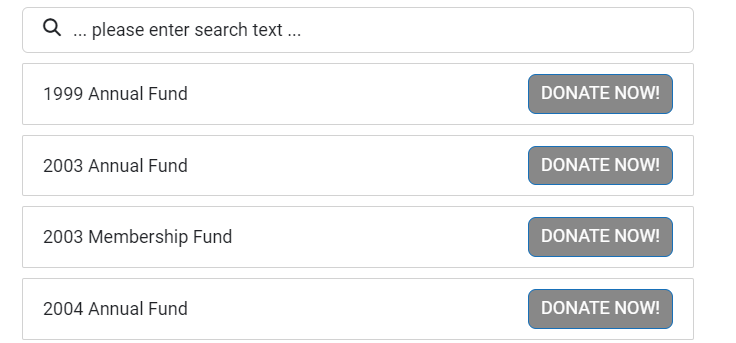
With the new Designation search website component donors can donate directly to the designation of their choice. The component displays a list of designations on your website next to a donate button. The donate button redirects donors to a Blackbaud hosted URL where they can complete their donation through a donation form you select.
You can use the styling options to match the designation names and donate buttons to your organization's branding.
To create a Designation search website component:
-
From Blackbaud Apps, Online Giving, Website components, select New component, Designation search. For more information, see Designation Search.
-
From Tools, Donation forms, Website components, select New component, Designation search. For more information, see Designation Search.
Categories
- All Categories
- 6 Blackbaud Community Help
- 211 bbcon®
- 1.4K Blackbaud Altru®
- 403 Blackbaud Award Management™ and Blackbaud Stewardship Management™
- 1.2K Blackbaud CRM™ and Blackbaud Internet Solutions™
- 16 donorCentrics®
- 360 Blackbaud eTapestry®
- 2.6K Blackbaud Financial Edge NXT®
- 661 Blackbaud Grantmaking™
- 581 Blackbaud Education Management Solutions for Higher Education
- 3.2K Blackbaud Education Management Solutions for K-12 Schools
- 944 Blackbaud Luminate Online® and Blackbaud TeamRaiser®
- 84 JustGiving® from Blackbaud®
- 6.7K Blackbaud Raiser's Edge NXT®
- 3.8K SKY Developer
- 250 ResearchPoint™
- 120 Blackbaud Tuition Management™
- 165 Organizational Best Practices
- 242 Member Lounge (Just for Fun)
- 37 Blackbaud Community Challenges
- 37 PowerUp Challenges
- 3 (Closed) PowerUp Challenge: Grid View Batch
- 3 (Closed) PowerUp Challenge: Chat for Blackbaud AI
- 3 (Closed) PowerUp Challenge: Data Health
- 3 (Closed) Raiser's Edge NXT PowerUp Challenge: Product Update Briefing
- 3 (Closed) Raiser's Edge NXT PowerUp Challenge: Standard Reports+
- 3 (Closed) Raiser's Edge NXT PowerUp Challenge: Email Marketing
- 3 (Closed) Raiser's Edge NXT PowerUp Challenge: Gift Management
- 4 (Closed) Raiser's Edge NXT PowerUp Challenge: Event Management
- 3 (Closed) Raiser's Edge NXT PowerUp Challenge: Home Page
- 4 (Closed) Raiser's Edge NXT PowerUp Challenge: Standard Reports
- 4 (Closed) Raiser's Edge NXT PowerUp Challenge: Query
- 802 Community News
- 3K Jobs Board
- 56 Blackbaud SKY® Reporting Announcements
- 47 Blackbaud CRM Higher Ed Product Advisory Group (HE PAG)
- 19 Blackbaud CRM Product Advisory Group (BBCRM PAG)