Registrar's Office: Scheduling 101 - It All Starts in Configuration



It's scheduling season! But, before you head into the Scheduling area of Registrar's Office, don't forget that it's important to review scheduling settings in Configuration. That's right, the scheduling process really starts in Configuration.
Here's a list of components in Configuration that impact your scheduling process:
* Academic Year Record
* School
* Session
* Cycle
* Timetable
* Patterns
* Terms
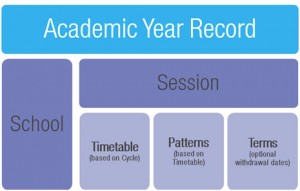
And, here's how the components relate to each other:
Want to see a sample academic year record? Click here.
To Be Clear -- Each year, you associate an academic year record with a school and session.
Each session on an academic year record identifies the timetable, patterns, and terms for that scheduling time frame.
For Example -- Here's an example of how scheduling components fit together. This cycle is defined so that classes follow an A Day through D Day rotation.

This timetable – based on the cycle above – defines the bell schedule for classes.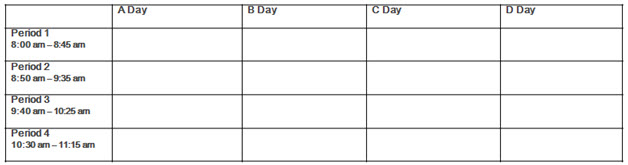
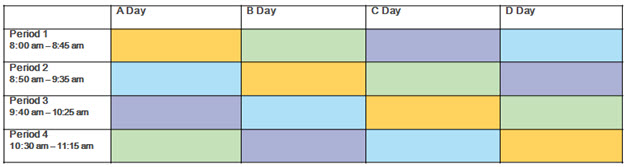
This scheduling pattern — based on the timetable above – identifies options for classes scheduled in the timetable. Each color represents a unique path that classes can take through the timetable.
Wait ... What About Withdraw?
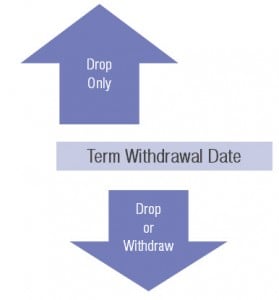
To activate the feature for withdrawing students from classes – which retains attendance and grade entries – you can define a withdrawal date for a term on the academic year record.
Before the withdrawal date for a term – or if there is no withdrawal date – you can only drop students from classes. Starting on the withdrawal date, you can drop or withdraw students from classes.
* How to add an academic year: BB129553.
* How to define cycles and timetables: BB177578.
* How to create scheduling patterns: BB134808.
* How to define a withdrawal date for a term: BB303896.
* How to determine whether to withdraw, drop, or transfer a student: BB376574.
Here's a list of components in Configuration that impact your scheduling process:
* Academic Year Record
* School
* Session
* Cycle
* Timetable
* Patterns
* Terms
And, here's how the components relate to each other:
Want to see a sample academic year record? Click here.
To Be Clear -- Each year, you associate an academic year record with a school and session.
Each session on an academic year record identifies the timetable, patterns, and terms for that scheduling time frame.
For Example -- Here's an example of how scheduling components fit together. This cycle is defined so that classes follow an A Day through D Day rotation.

This timetable – based on the cycle above – defines the bell schedule for classes.

This scheduling pattern — based on the timetable above – identifies options for classes scheduled in the timetable. Each color represents a unique path that classes can take through the timetable.

Wait ... What About Withdraw?
To activate the feature for withdrawing students from classes – which retains attendance and grade entries – you can define a withdrawal date for a term on the academic year record.
Before the withdrawal date for a term – or if there is no withdrawal date – you can only drop students from classes. Starting on the withdrawal date, you can drop or withdraw students from classes.

***
Turn to Knowledgebase for More Information* How to add an academic year: BB129553.
* How to define cycles and timetables: BB177578.
* How to create scheduling patterns: BB134808.
* How to define a withdrawal date for a term: BB303896.
* How to determine whether to withdraw, drop, or transfer a student: BB376574.
***
Looking for Training on Scheduling?- Visit Training Central.
- Search with the keyword Scheduling.
- In the results list, select the self-paced online class (aka video), curriculum (aka training path), or instructor-led online event that meets your need.
0
Categories
- All Categories
- 6 Blackbaud Community Help
- 213 bbcon®
- 1.4K Blackbaud Altru®
- 400 Blackbaud Award Management™ and Blackbaud Stewardship Management™
- 1.1K Blackbaud CRM™ and Blackbaud Internet Solutions™
- 15 donorCentrics®
- 360 Blackbaud eTapestry®
- 2.6K Blackbaud Financial Edge NXT®
- 655 Blackbaud Grantmaking™
- 576 Blackbaud Education Management Solutions for Higher Education
- 3.2K Blackbaud Education Management Solutions for K-12 Schools
- 939 Blackbaud Luminate Online® and Blackbaud TeamRaiser®
- 84 JustGiving® from Blackbaud®
- 6.6K Blackbaud Raiser's Edge NXT®
- 3.7K SKY Developer
- 248 ResearchPoint™
- 119 Blackbaud Tuition Management™
- 165 Organizational Best Practices
- 241 Member Lounge (Just for Fun)
- 34 Blackbaud Community Challenges
- 34 PowerUp Challenges
- 3 (Open) PowerUp Challenge: Chat for Blackbaud AI
- 3 (Closed) PowerUp Challenge: Data Health
- 3 (Closed) Raiser's Edge NXT PowerUp Challenge: Product Update Briefing
- 3 (Closed) Raiser's Edge NXT PowerUp Challenge: Standard Reports+
- 3 (Closed) Raiser's Edge NXT PowerUp Challenge: Email Marketing
- 3 (Closed) Raiser's Edge NXT PowerUp Challenge: Gift Management
- 4 (Closed) Raiser's Edge NXT PowerUp Challenge: Event Management
- 3 (Closed) Raiser's Edge NXT PowerUp Challenge: Home Page
- 4 (Closed) Raiser's Edge NXT PowerUp Challenge: Standard Reports
- 4 (Closed) Raiser's Edge NXT PowerUp Challenge: Query
- 790 Community News
- 2.9K Jobs Board
- 53 Blackbaud SKY® Reporting Announcements
- 47 Blackbaud CRM Higher Ed Product Advisory Group (HE PAG)
- 19 Blackbaud CRM Product Advisory Group (BBCRM PAG)