Registrar's Office: Scheduling 101 - Globally Edit Course Limits in Edit Master Schedule



Hi, it's Marianna again. Last week, we started off the summer scheduling series by talking about how scheduling really starts in Configuration. This week, let's chat about the importance of accurate course limits.
The Restrictions 1 tab of course records identifies the minimum, target, and maximum numbers for classes and class sizes per term. These numbers are known as the course limits.
As a best practice, ensure the course limits are correct for all courses before you start the scheduling process for a new academic year.
Need some convincing? Here's an example of what can happen if course limits are wrong: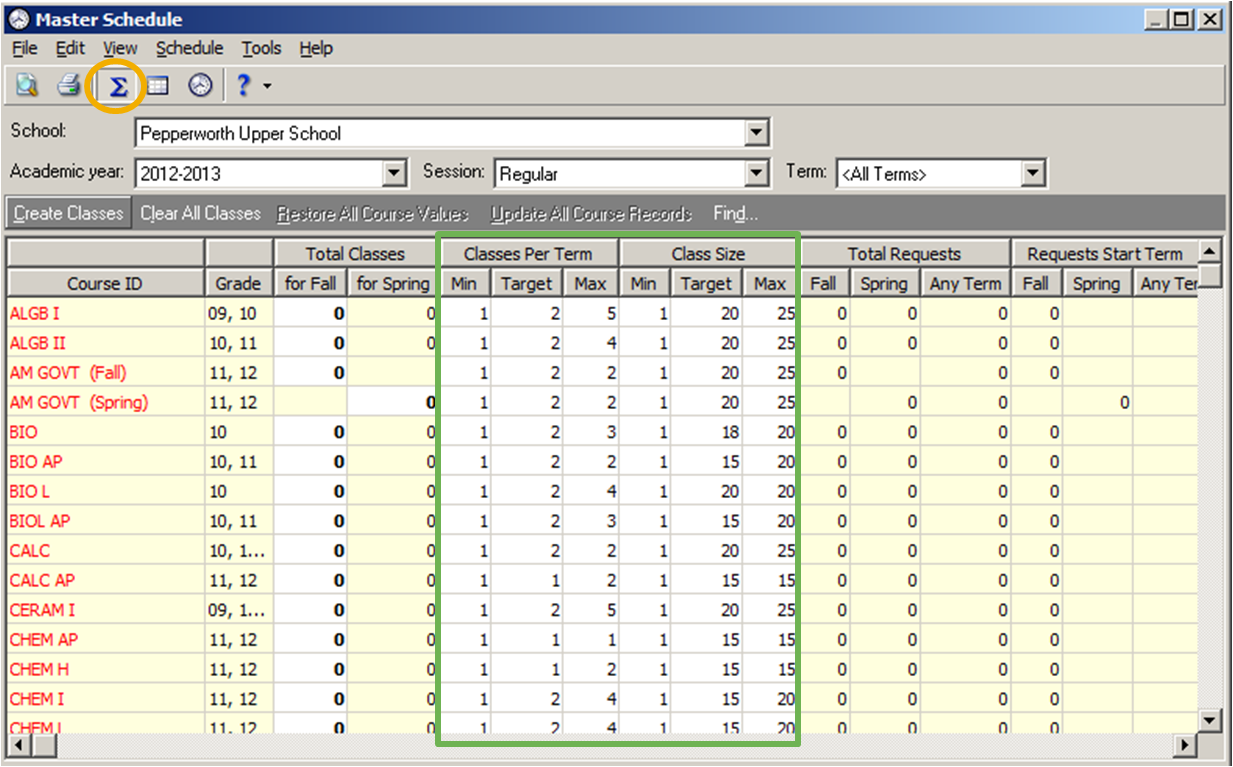
The Restrictions 1 tab of course records identifies the minimum, target, and maximum numbers for classes and class sizes per term. These numbers are known as the course limits.
As a best practice, ensure the course limits are correct for all courses before you start the scheduling process for a new academic year.
Need some convincing? Here's an example of what can happen if course limits are wrong:
- This year my school has enough resources for 88 students to take Biology (4 classes of 22 students) even though last year we could only accommodate a maximum of 60 students (3 classes of 20 students). If we don’t change the outdated course limits for Biology, 28 students won’t get enrolled in Biology because the maximum number of slots available is only 60.
- On the Scheduling page, click Edit master schedule.
- On the action bar, click Summary View.

- Review and update the values in the Classes Per Term and Class Size columns for each course.
- The program automatically transfers your updates to the Restrictions 1 tab of course records.
***
Turn to Knowledgebase for More Information- What do target, minimum, and maximum on a course record mean: BB701474.
- How to globally edit course limits and create or delete classes: BB191330.
- How to automatically create classes: BB153632.
***
Instructor-Led Online Classes About Scheduling in June- Registrar's Office Scheduling Tasks V: Manually Schedule Students
Wednesday, June 26: 2 pm - 3 pm EST
- Registrar's Office Scheduling Tasks VI: Automatically Schedule Students
Thursday, June 27: 4 pm - 5 pm EST
0
Categories
- All Categories
- 6 Blackbaud Community Help
- 209 bbcon®
- 1.4K Blackbaud Altru®
- 395 Blackbaud Award Management™ and Blackbaud Stewardship Management™
- 1.1K Blackbaud CRM™ and Blackbaud Internet Solutions™
- 15 donorCentrics®
- 359 Blackbaud eTapestry®
- 2.5K Blackbaud Financial Edge NXT®
- 646 Blackbaud Grantmaking™
- 563 Blackbaud Education Management Solutions for Higher Education
- 3.2K Blackbaud Education Management Solutions for K-12 Schools
- 934 Blackbaud Luminate Online® and Blackbaud TeamRaiser®
- 84 JustGiving® from Blackbaud®
- 6.4K Blackbaud Raiser's Edge NXT®
- 3.7K SKY Developer
- 243 ResearchPoint™
- 118 Blackbaud Tuition Management™
- 165 Organizational Best Practices
- 238 The Tap (Just for Fun)
- 33 Blackbaud Community Challenges
- 28 PowerUp Challenges
- 3 (Open) Raiser's Edge NXT PowerUp Challenge: Product Update Briefing
- 3 (Closed) Raiser's Edge NXT PowerUp Challenge: Standard Reports+
- 3 (Closed) Raiser's Edge NXT PowerUp Challenge: Email Marketing
- 3 (Closed) Raiser's Edge NXT PowerUp Challenge: Gift Management
- 4 (Closed) Raiser's Edge NXT PowerUp Challenge: Event Management
- 3 (Closed) Raiser's Edge NXT PowerUp Challenge: Home Page
- 4 (Closed) Raiser's Edge NXT PowerUp Challenge: Standard Reports
- 4 (Closed) Raiser's Edge NXT PowerUp Challenge: Query
- 779 Community News
- 2.9K Jobs Board
- 53 Blackbaud SKY® Reporting Announcements
- 47 Blackbaud CRM Higher Ed Product Advisory Group (HE PAG)
- 19 Blackbaud CRM Product Advisory Group (BBCRM PAG)