Here are the latest changes in Blackbaud Raiser's Edge NXT for January 7, 2026.
Global opt-in for generative AI
Organization admins can now enable all current and future generative AI features powered by Blackbaud AI with one global setting — giving your organization centralized control, clear compliance, and future-ready access to AI-powered tools that boost productivity and personalization.
If you don’t opt in, your organization remains opted out by default.
Learn more, including how to enable Generative AI features.
Greater flexibility for constituent name formatting in Standard reports
In response to your feedback, we’ve added a new way to customize how constituent names appear in Standard reports. Previously, you could only choose Individual’s name or Individual’s record as the name source. Now, you can select From configuration for even greater flexibility.
This enhancement allows you to apply any name format defined in Configuration, Addressees/Salutations in database view. For example, you can include a constituent’s ID in the name format — helping you tailor reports to your organization’s needs.
When you add or edit a Standard report, on the Formats tab, under Constituent, select From configuration and choose a name format from your configuration settings. This update gives you more control over how names display in reports, ensuring consistency and alignment with your organization’s standards.
Enhanced Luminate Online integration available in web view
Generally available to those with the integration, you can now manage several aspects of your Raiser's Edge and Luminate Online integration directly within Raiser's Edge NXT. While work continues on expanding web view integration, this update introduces a connection between Raiser's Edge NXT and Luminate Online, along with options for working with constituent and gift data.
Users with access to the database plugin will see the new top-level menu item labeled Data Management in web view with Luminate Online under it. The database view plugin remains unchanged, but the web view version offers a convenient experience for completing integration tasks.
For more information, see Raiser's Edge NXT and Luminate Online.
Unlock Smarter Fundraising with Chat for Blackbaud AI (for more of you)
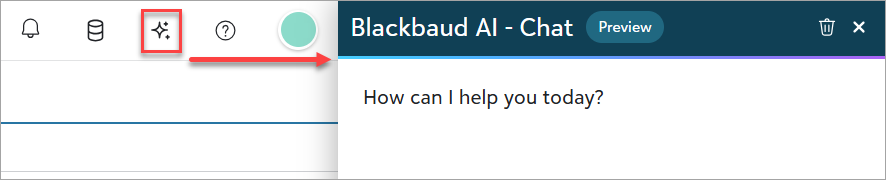
We’re excited to introduce Chat for Blackbaud AI, powered by generative AI. This feature is designed to save you time, improve donor engagement, and make smarter, data-driven decisions — all within Raiser's Edge NXT. With AI-powered assistance, you can focus on what matters most: building stronger relationships and driving your mission forward. Instead of manually searching for answers, simply ask the AI to draft content, suggest creative ideas, or provide actionable insights based on your data and best practices.
Think of it as having a helpful assistant:
- You provide a prompt or question.
- The system uses AI to generate a draft, suggestion, or summary.
You don’t need any AI technical knowledge to use this tool. Just type what you need, and the system will do the heavy lifting — saving you time and helping you focus on what matters most.
Note: Don’t see this yet? The ability to chat with Blackbaud AI is currently in Limited Availability (LA) for some of our customers. Look for full support and general availability in a future release.
How Can This Help You?
Here are some examples of what you can do with these new features:
Example “Write a thank-you email to donors.” Bonus! Give the chat some feedback about a detail you want added.Example "Suggest three creative ideas for a year-end fundraising campaign."Example “Summarize key details about [constituent name] for my next meeting.”Examples “What are some best practices for re-engaging lapsed donors?” or “What follow-up actions are recommended after a donor meeting?”- Examples “Show me my top prospects for major gifts this quarter.” or “Show me a list of constituents to contact this week.”
Example “Show me a total of all gifts received for the [campaign name] campaign.” Tip: Some answers may include a link so you can see how Chat for Blackbaud AI answered the question. For this one, you can select View list to confirm the information.Example “How do I customize the Home page?”
And this is only the beginning — AI can assist with many more tasks as you explore.
Tip: Keep the chat open as you navigate Raiser's Edge NXT. When new information is available, the chat will update automatically with summaries. For quick inspiration, try the suggested prompts to see what AI can do for you.
Tips for Better Results
- Be clear and specific in your prompts.
- Include context like donor name or campaign.
- Review and customize the AI-generated content before sending or publishing.
- Refine responses by asking follow-up questions.
- Use it as a starting point — your expertise makes it great!
Why It Matters
Chat for Blackbaud AI helps you:
- Save time by reducing manual research and drafting.
- Stay focused on strategy instead of repetitive tasks.
- Improve donor engagement with personalized content. Work confidently knowing you can edit and refine AI-generated content to match your tone and goals.
How to get started
- Enable generative AI features – Before you can use Chat for Blackbaud AI, your organization admin must opt in to generative AI features in your Blackbaud environment. Once enabled, the authorization applies to all current and future generative AI features across your Blackbaud products. For details, see Opt In to Generative AI Features Globally help. If you don’t opt in, your organization remains opted out by default.
- Set permissions – Solution admins must assign the Artificial intelligence role to users who need access to chat.
- Open the chat – In Raiser's Edge NXT, select the Chat for Blackbaud AI sparkle icon from the top navigation.
- Review the Quick Start guide – Learn how to write effective prompts, refine responses, and get better results with our step-by-step tutorial.