Adding Education Info Via WebAPI





I need help saving the 'Educational History Add Form 2'. It look like this.
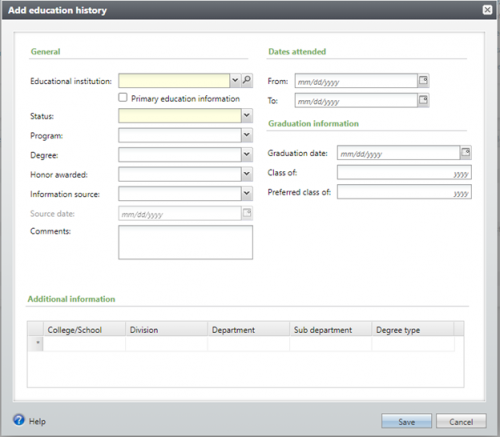
The upper fields are not a problem, the Additional Information field collection at the bottom is the issue. The datatype the field is XML. I don't know how to pass in the xml data as a collection.
Anyone have any advice on how to do that?
Comments
-
Bill - This is coming from a non-developer, but I know of a couple things that may help point you in the right direction.
- Collection fields are called via an XML data type, but you can see the data type of those individual fields within the collection by viewing the add form itself. If you take a look at the XML file for the Educational History Add Form 2, near the bottom of the form you can see the data types for the fields in the Additional information section.
- There is some additional information about how these collection fields work within batch from the Developer Help Guides.
0 -
Adding on to what Ashley said, specifically in the Batch Extension example there are instructions for generating all the functions for passing data back and forth through a collection field.
0 -
I am trying this in a standalone .Net application. The following is some sample code of what I am trying to do. I can set the values of all of the fields except the UNAFFILIATEDADDITIONALINFORMATION field. When I include that field I get this error.
Server was unable to process request. ---> Please enter a valid 'UNAFFILIATEDADDITIONALINFORMATION'.
//code
AppFxWebService appFxWebService = GetAppFxWebService("Test"); //Prod, Stage, Test, Dev, Local
ClientAppInfoHeader header = GetClientAppInfoHeader();
DataFormFieldValueSet fvSetE = new DataFormFieldValueSet();
fvSetE.Add("ISPRIMARYRECORD", true);
fvSetE.Add("EDUCATIONALINSTITUTIONID", "CBCFA8D3-BAD3-4475-B902-72B2626A77A8"); //Educational Institution (West Virginia University)
fvSetE.Add("EDUCATIONALPROGRAMCODEID", "A4319B87-BF7E-4CE5-92C1-BE0C211ED5A3"); //Program (bachelor’s, doctoral, master’s, etc)
fvSetE.Add("EDUCATIONALSOURCECODEID", "8E62D6F2-0889-4BD0-B550-9D762B94C804"); //Education Information Source (Admissions & Records Verified)
fvSetE.Add("EDUCATIONALHISTORYSTATUSID", "00000000-0000-0000-0000-000000000002"); //= Currently attending select * from dbo.EDUCATIONALHISTORYSTATUS
String AddInfo = @<UNAFFILIATEDADDITIONALINFORMATION>
<ITEM>
<EDUCATIONALCOLLEGECODEID>8CDF7802-20A1-4EBB-BDA3-5975A3F9D66E</EDUCATIONALCOLLEGECODEID>
<EDUCATIONALDEPARTMENTCODEID>AA9249A9-B7BC-40EC-990C-CBF2E2FCF703</EDUCATIONALDEPARTMENTCODEID>
<EDUCATIONALSUBDEPARTMENTCODE>9AE23B75-6C90-41CD-9A1B-6F616421C571</EDUCATIONALSUBDEPARTMENTCODE>
<EDUCATIONALDEGREETYPECODEID>0DF4B689-B8F5-4D3B-AB18-1678EFD2123E</EDUCATIONALDEGREETYPECODEID>
</ITEM>
</UNAFFILIATEDADDITIONALINFORMATION>";
fvSetE.Add("UNAFFILIATEDADDITIONALINFORMATION", AddInfo);DataFormItem dfiE = new DataFormItem();
dfiE.Values = fvSetE;DataFormSaveRequest dfsE = new DataFormSaveRequest();
dfsE.ClientAppInfo = header;
dfsE.ContextRecordID = "d8d6f522-4bb3-4ee3-ba3e-dd0e0ca42b05"; //test constit record
dfsE.DataFormItem = dfiE;
dfsE.FormID = new Guid("93d2d368-05eb-40b1-b5e6-bb9cc38117eb"); //Educational History Add Form 2DataFormSaveReply dfsrE = appFxWebService.DataFormSave(dfsE);
0 -
The <EDUCATIONALSUBDEPARTMENTCODE> tag should be <EDUCATIONALSUBDEPARTMENTCODEID>
0 -
Good eye, but unfortunately I still get the same error message after fixing that.
0 -
So running
select dbo.UFN_EDUCATIONALHISTORY_GETUNAFFILIATEDADDITIONALINFORMATION_TOITEMLISTXML(@EDUCATIONALHISTORYID)
with an existing educationalhistory record should return a properly formatted xml result like what you are attempting to pass. Judging from what this returns I think you need to supply an <ID> element:
<UNAFFILIATEDADDITIONALINFORMATION>
<ITEM>
<EDUCATIONALDEGREETYPECODEID>0DF4B689-B8F5-4D3B-AB18-1678EFD2123E</EDUCATIONALDEGREETYPECODEID>
<EDUCATIONALSUBDEPARTMENTCODEID>DB047BFF-FADC-42B0-9ADA-43AE3733CC8C</EDUCATIONALSUBDEPARTMENTCODEID>
<ID>5F163C5D-9B19-4264-99C8-8C8695AABB45</ID>
</ITEM>
</UNAFFILIATEDADDITIONALINFORMATION>This is the unique id for the record in the EDUCATIONADDITIONALINFORMATION table. If you are adding a new record you'll need to generate a new guid.
0 -
Looks like it may not be working because the DataFormFieldValue.Value field is of type DataFormItemArrayValue. The following VB.Net Code will correctly populate the collection field using your example.
Dim fvSetE As DataFormFieldValueSet = New DataFormFieldValueSet()
…Dim dffValue As New DataFormFieldValue
dffValue.ID = "UNAFFILIATEDADDITIONALINFORMATION"
Dim dfItems(0) As DataFormItem
Dim fieldIDs As IList(Of String) = {"ID", "EDUCATIONALCOLLEGECODEID", "EDUCATIONALDIVISIONCODEID", "EDUCATIONALDEPARTMENTCODEID", "EDUCATIONALSUBDEPARTMENTCODEID", "EDUCATIONALDEGREETYPECODEID"}
dfItems(0) = New DataFormItem(fieldIDs)
dfItems(0).SetValue("EDUCATIONALCOLLEGECODEID", New Guid("8CDF7802-20A1-4EBB-BDA3-5975A3F9D66E"))
dfItems(0).SetValue("EDUCATIONALDEPARTMENTCODEID", New Guid("AA9249A9-B7BC-40EC-990C-CBF2E2FCF703"))
dfItems(0).SetValue("EDUCATIONALSUBDEPARTMENTCODEID", New Guid("9AE23B75-6C90-41CD-9A1B-6F616421C571"))
dfItems(0).SetValue("EDUCATIONALDEGREETYPECODEID", New Guid("0DF4B689-B8F5-4D3B-AB18-1678EFD2123E"))dffValue.Value = New DataFormItemArrayValue(dfItems)
fvSetE.Add(dffValue)0 -
Hey Bill,
So the UNAFFILIATEDADDITIONALINFORMATION expects an UNAFFILIATEDADDITIONALINFORMATIONDATAITEM[]. So you need to set up an array of the different values you want to pass. I suggest construction a list of UNAFFILIATEDADDITIONALINFORMATION_DATAITEM, populating and then converting it to an array when you pass it to the API to make things easy on yourself. Here's a bit of an example of what I'm talking about
List<UNAFFILIATEDADDITIONALINFORMATION_DATAITEM> inputAdditionalInfo = new List<AddEducation.UNAFFILIATEDADDITIONALINFORMATION_DATAITEM>();
UNAFFILIATEDADDITIONALINFORMATION_DATAITEM ADDMAJORS = new AddEducation.UNAFFILIATEDADDITIONALINFORMATION_DATAITEM();
ADDMAJORS.EDUCATIONALDIVISIONCODEID_VALUETRANSLATION = “Some Value Here”;
ADDMAJORS.EDUCATIONALDEGREETYPECODEID_VALUETRANSLATION = "Major";
ADDMAJORS.EDUCATIONALDEPARTMENTCODEID_VALUETRANSLATION = “Some Value Here”;
ADDMAJORS.EDUCATIONALCOLLEGECODEID_VALUETRANSLATION = "Palmetto College";
inputAdditionalInfo.Add(ADDMAJORS);
sReq.RecordData.UNAFFILIATEDADDITIONALINFORMATION = inputAdditionalInfo.ToArray();
This should get you what you need. If not feel free to let me know.0 -
@Ashley Moose
good advice1













Categories
- All Categories
- 6 Blackbaud Community Help
- 213 bbcon®
- 1.4K Blackbaud Altru®
- 403 Blackbaud Award Management™ and Blackbaud Stewardship Management™
- 1.1K Blackbaud CRM™ and Blackbaud Internet Solutions™
- 15 donorCentrics®
- 360 Blackbaud eTapestry®
- 2.6K Blackbaud Financial Edge NXT®
- 656 Blackbaud Grantmaking™
- 577 Blackbaud Education Management Solutions for Higher Education
- 3.2K Blackbaud Education Management Solutions for K-12 Schools
- 939 Blackbaud Luminate Online® and Blackbaud TeamRaiser®
- 84 JustGiving® from Blackbaud®
- 6.6K Blackbaud Raiser's Edge NXT®
- 3.7K SKY Developer
- 249 ResearchPoint™
- 119 Blackbaud Tuition Management™
- 165 Organizational Best Practices
- 241 Member Lounge (Just for Fun)
- 34 Blackbaud Community Challenges
- 37 PowerUp Challenges
- 3 (Open) PowerUp Challenge: Grid View Batch
- 3 (Closed) PowerUp Challenge: Chat for Blackbaud AI
- 3 (Closed) PowerUp Challenge: Data Health
- 3 (Closed) Raiser's Edge NXT PowerUp Challenge: Product Update Briefing
- 3 (Closed) Raiser's Edge NXT PowerUp Challenge: Standard Reports+
- 3 (Closed) Raiser's Edge NXT PowerUp Challenge: Email Marketing
- 3 (Closed) Raiser's Edge NXT PowerUp Challenge: Gift Management
- 4 (Closed) Raiser's Edge NXT PowerUp Challenge: Event Management
- 3 (Closed) Raiser's Edge NXT PowerUp Challenge: Home Page
- 4 (Closed) Raiser's Edge NXT PowerUp Challenge: Standard Reports
- 4 (Closed) Raiser's Edge NXT PowerUp Challenge: Query
- 794 Community News
- 3K Jobs Board
- 54 Blackbaud SKY® Reporting Announcements
- 47 Blackbaud CRM Higher Ed Product Advisory Group (HE PAG)
- 19 Blackbaud CRM Product Advisory Group (BBCRM PAG)