Page ID for Functional Area





I am trying to locate the Page ID for a Functional Area, if it even exists. Specifically for the Constituent Functional Area.
I am trying to link back to the functional area from another page.
<PageHeader Caption="Constituent Help" ImageKey="RES:help" >
<ContextLinks>
<ContextLink ID="00000000-0000-0000-0000-000000000000" PageID="00000000-0000-0000-0000-000000000000">
<Caption Label="Constituent" />
</ContextLink>
</ContextLinks>
</PageHeader>
This works if I use a valid PageID. Is there a Valid Page ID for a functional area? What is the relationship between Pages and Functional Areas?
The functional area has a page type and functional area ID, but the functional area ID does not work when used in the above syntax.
fa&faId=
Thanks in advance.
Comments
-
Hi Ernest,
Functional areas are completely separate entities to pages as far as I am aware. The context links only work when referencing another page. You can tell this by the fact that the definitions for both entities are stored in different tables in the database.
Best,
Will0 -
Thanks @Will Mercer. This is helpful.
I understand that Functional Areas and Pages are two discreet objects. The content links only appear to point to a page ID.
I have found a Functional Area Spec for Duplicates. I'm not sure if this was custom built or if it is by Blackbaud. It is linked to from the Constituent Functional Area. I cannot find or inspect Duplicates. When I create a shortcut to this page, it is listed as a Functional Area. However it does not exist in our source code, nor does it exist in the Functional Area Catalog. This Functional Area (or page…it's not in the page catalog either) appears to have a context link that goes back to the Constituent Functional Area page. Here's a picture.
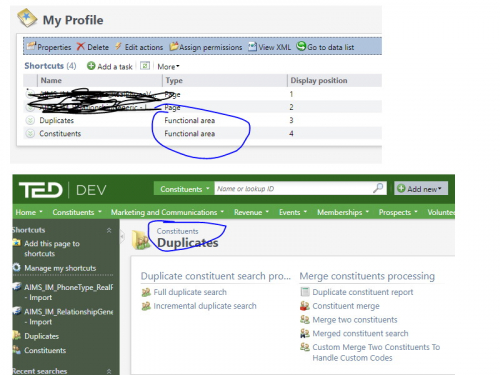
I know you are right. Functional Areas and Pages are different and discreet. There are different specs, and live in different catalogs. Context Links only appear to be applicable for Pages.
Why does this “Duplicates” functional area have what appears to be a working contect link. I cannot inspect the page in admin mode (not sure why). I cannot find this spec in the functional area or page catalog.
I'm not sure what I have here, but if this exists and works, I should be able to replicate it.
Thanks for the help. I truly appreciate it.
Ernie
0 -
Hey Ernest,
As everyone has mentioned before because it's a functional area having the traditional navigation to a page is most likely not going to work. What you could attempt to do is to link to an “external” page and then specify the url that way using the functional area id.
0 -
Hi Ernie,
We don't have that functional area, so I would guess it is not out of the box. I can't check of course but the fact that you can't inspect it in design mode suggests that it is a functional area rather than a page. It is possible to deploy a custom functional area using SDK so this might be what has happened here as I can't see a way to add a context link in the GUI.
I think a context link might be out of the question for you, but perhaps working out if it is possible to use the URL in some way might be a solution as Steven suggested. I'm not sure how this would work, but it would be great to know if you do make any progress.
Best,
Will0



Categories
- All Categories
- 6 Blackbaud Community Help
- 211 bbcon®
- 1.4K Blackbaud Altru®
- 402 Blackbaud Award Management™ and Blackbaud Stewardship Management™
- 1.1K Blackbaud CRM™ and Blackbaud Internet Solutions™
- 15 donorCentrics®
- 360 Blackbaud eTapestry®
- 2.6K Blackbaud Financial Edge NXT®
- 655 Blackbaud Grantmaking™
- 576 Blackbaud Education Management Solutions for Higher Education
- 3.2K Blackbaud Education Management Solutions for K-12 Schools
- 941 Blackbaud Luminate Online® and Blackbaud TeamRaiser®
- 84 JustGiving® from Blackbaud®
- 6.7K Blackbaud Raiser's Edge NXT®
- 3.7K SKY Developer
- 248 ResearchPoint™
- 120 Blackbaud Tuition Management™
- 165 Organizational Best Practices
- 240 Member Lounge (Just for Fun)
- 34 Blackbaud Community Challenges
- 37 PowerUp Challenges
- 3 (Open) PowerUp Challenge: Grid View Batch
- 3 (Closed) PowerUp Challenge: Chat for Blackbaud AI
- 3 (Closed) PowerUp Challenge: Data Health
- 3 (Closed) Raiser's Edge NXT PowerUp Challenge: Product Update Briefing
- 3 (Closed) Raiser's Edge NXT PowerUp Challenge: Standard Reports+
- 3 (Closed) Raiser's Edge NXT PowerUp Challenge: Email Marketing
- 3 (Closed) Raiser's Edge NXT PowerUp Challenge: Gift Management
- 4 (Closed) Raiser's Edge NXT PowerUp Challenge: Event Management
- 3 (Closed) Raiser's Edge NXT PowerUp Challenge: Home Page
- 4 (Closed) Raiser's Edge NXT PowerUp Challenge: Standard Reports
- 4 (Closed) Raiser's Edge NXT PowerUp Challenge: Query
- 796 Community News
- 3K Jobs Board
- 54 Blackbaud SKY® Reporting Announcements
- 47 Blackbaud CRM Higher Ed Product Advisory Group (HE PAG)
- 19 Blackbaud CRM Product Advisory Group (BBCRM PAG)