How does one pass a Section Field's field/column value to VB.NET (or C#) via the Infinity SDK?




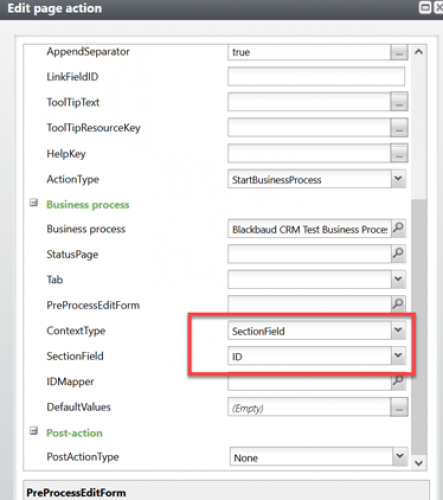
How does one pass a Section Field's field/column value (say, for example, “ID” as seen in this attached BB CRM page action screenshot) to VB.NET (or C#) code within the Infinity SDK?
So, for example, if one were to have multiple rows within a data list, and we were to pass a column value from the current row (via a page action), how does one refer to this specific Section Field in VB.NET (or C#)?
Thanks, in advance.
Comments
-
@Binoy S
Each spec is slightly different, add forms will take that context through the context parameter and an edit form will take it as the ID.Either way in the CLR inherited class you will have access to ProcessContext which will have either the ContextRecordID or RecordID properties. You can use that to get whatever value is passed.
1 -
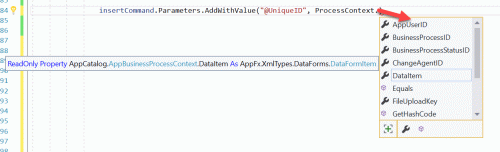
ProcessContext available options (#1) 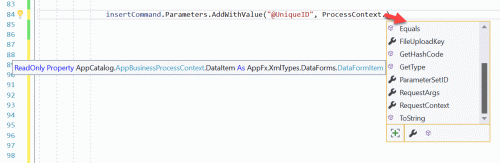
ProcessContext available options (#2) @Nick McGinnis Thank you so much for your response. I'm currently attempting to implement this with a BusinessProcessSpec Infinity SDK spec. Using VB.NET in the corresponding VB file, I tried to access the ContextRecordID or RecordID properties (using ProcessContext), but I don't see those choices available (ContextRecordID or RecordID). Maybe it's in there somewhere, and I have tried to drill through the various options, but somehow the choices are not obvious to me. If it helps to clarify, I'm attaching additional screenshots that indicate some of the options available via ProcessContext. Again, and regardless, thanks so much!
0 -
@Binoy S
My apologies, I did not realize you were wanting a business process. Before the business process can run a parameter set needs to be created for it. Then the business process could be run. So I think what you might want to do is instead of starting a business process with the action, use an edit form. Pass in the ID you want and create or update a parameter set with that form, then the post action type can redirect you to the business process status page where it can be started. I hope this makes sense!0 -
@Nick McGinnis
Thank you for your feedback, Nick!0




Categories
- All Categories
- 6 Blackbaud Community Help
- 211 bbcon®
- 1.4K Blackbaud Altru®
- 402 Blackbaud Award Management™ and Blackbaud Stewardship Management™
- 1.1K Blackbaud CRM™ and Blackbaud Internet Solutions™
- 15 donorCentrics®
- 360 Blackbaud eTapestry®
- 2.6K Blackbaud Financial Edge NXT®
- 657 Blackbaud Grantmaking™
- 577 Blackbaud Education Management Solutions for Higher Education
- 3.2K Blackbaud Education Management Solutions for K-12 Schools
- 941 Blackbaud Luminate Online® and Blackbaud TeamRaiser®
- 84 JustGiving® from Blackbaud®
- 6.7K Blackbaud Raiser's Edge NXT®
- 3.7K SKY Developer
- 248 ResearchPoint™
- 120 Blackbaud Tuition Management™
- 165 Organizational Best Practices
- 240 Member Lounge (Just for Fun)
- 34 Blackbaud Community Challenges
- 37 PowerUp Challenges
- 3 (Open) PowerUp Challenge: Grid View Batch
- 3 (Closed) PowerUp Challenge: Chat for Blackbaud AI
- 3 (Closed) PowerUp Challenge: Data Health
- 3 (Closed) Raiser's Edge NXT PowerUp Challenge: Product Update Briefing
- 3 (Closed) Raiser's Edge NXT PowerUp Challenge: Standard Reports+
- 3 (Closed) Raiser's Edge NXT PowerUp Challenge: Email Marketing
- 3 (Closed) Raiser's Edge NXT PowerUp Challenge: Gift Management
- 4 (Closed) Raiser's Edge NXT PowerUp Challenge: Event Management
- 3 (Closed) Raiser's Edge NXT PowerUp Challenge: Home Page
- 4 (Closed) Raiser's Edge NXT PowerUp Challenge: Standard Reports
- 4 (Closed) Raiser's Edge NXT PowerUp Challenge: Query
- 796 Community News
- 3K Jobs Board
- 54 Blackbaud SKY® Reporting Announcements
- 47 Blackbaud CRM Higher Ed Product Advisory Group (HE PAG)
- 19 Blackbaud CRM Product Advisory Group (BBCRM PAG)