Default AuthorID field on Interaction Note Add Form via a data form add in





I am trying to default the AuthorID on the Interaction Note Add Form using a data form add in. I can make the field required via the add in. I can default the Title field ("test3") successfully via the add in. In other add ins, I have been able to default a simple data list field to a specific guid. The AuthorID field of the Interaction Note Add Form is a search list field and defaulting the value to a specific guid does not appear to work. I don't know what I'm doing wrong.
(The guid is not my actual guid. The actual guid I am using is the guid that the field is set to if I set it manually):
Snippet from Add In:
Private Sub OnInit()
'This method is called when the UI model is created to allow any initialization to be performed.
AUTHORID.Value = New Guid("AAAAAAAA-D39A-4E9D-8F58-AAAAAAAAAAAA")
AUTHORID.Required = True
TITLE.Value = "test3"
End Sub
Comments
-
Hi @Kevin Hamling
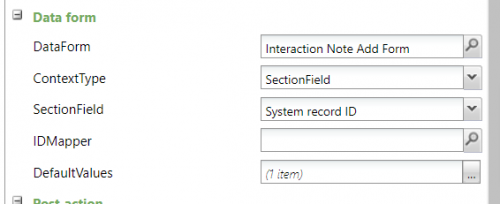
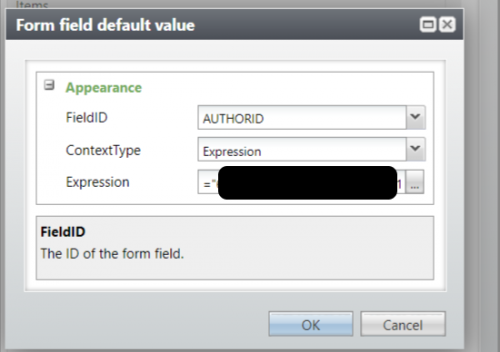
Have you tried using the default values on the Edit Action form?You can find the GUID of the person from the URL of their record, it will be the last string on the URL
recordId=0xxxxxxxx-0xxx-0xxx-0xxx-0xxxxxxxxxxx
Then, add a default value for AUTHORID, Context Type Expression and use
="GUID"
Hope that helps!
 0
0 -
@Liz Hackett
I appreciate the response. I did not fully explain. I need to default the AUTHORID based on the logged in user, but I need the Author to be different from the logged in user for one specific user. I found that the OOB form sets the AUTHORID to the logged in user in the xml and it takes precedence over logic I put in my add in. I ended up making a copy of the form and set the AUTHORID (for my special case) in the xml immediately after the OOB logic that defaults the Author to the logged in User. My custom form still uses the OOB UIModel, so there is some minor risk there, but it works for me for now. Your response got me thinking that there might be a way to use the default values in design mode like you mentioned, but only set it if a certain user is logged in. I don't know if that is possible in design mode, but I will take a look.1 -
Could you try an expression like this in the default value on the Add button:
==IF(Globals.CurrentAppUserName="Name of User", “Name of other user”)
0 -
@Kevin Hamling
I was able to get this to work in a similar scenario to you -
= IIF(Globals.CurrentAppUserName = "username", "GUID", Fields("Default Field"))
This inserts the hard coded GUID when the when the evaluated expression is true and a value from the data list when the expression is false. The expression appears to be case sensitive so if your usernames have capitals in them then this will impact what needs to searched for.1









Categories
- All Categories
- 6 Blackbaud Community Help
- 211 bbcon®
- 1.4K Blackbaud Altru®
- 402 Blackbaud Award Management™ and Blackbaud Stewardship Management™
- 1.1K Blackbaud CRM™ and Blackbaud Internet Solutions™
- 15 donorCentrics®
- 360 Blackbaud eTapestry®
- 2.6K Blackbaud Financial Edge NXT®
- 655 Blackbaud Grantmaking™
- 576 Blackbaud Education Management Solutions for Higher Education
- 3.2K Blackbaud Education Management Solutions for K-12 Schools
- 940 Blackbaud Luminate Online® and Blackbaud TeamRaiser®
- 84 JustGiving® from Blackbaud®
- 6.7K Blackbaud Raiser's Edge NXT®
- 3.7K SKY Developer
- 248 ResearchPoint™
- 120 Blackbaud Tuition Management™
- 165 Organizational Best Practices
- 240 Member Lounge (Just for Fun)
- 34 Blackbaud Community Challenges
- 37 PowerUp Challenges
- 3 (Open) PowerUp Challenge: Grid View Batch
- 3 (Closed) PowerUp Challenge: Chat for Blackbaud AI
- 3 (Closed) PowerUp Challenge: Data Health
- 3 (Closed) Raiser's Edge NXT PowerUp Challenge: Product Update Briefing
- 3 (Closed) Raiser's Edge NXT PowerUp Challenge: Standard Reports+
- 3 (Closed) Raiser's Edge NXT PowerUp Challenge: Email Marketing
- 3 (Closed) Raiser's Edge NXT PowerUp Challenge: Gift Management
- 4 (Closed) Raiser's Edge NXT PowerUp Challenge: Event Management
- 3 (Closed) Raiser's Edge NXT PowerUp Challenge: Home Page
- 4 (Closed) Raiser's Edge NXT PowerUp Challenge: Standard Reports
- 4 (Closed) Raiser's Edge NXT PowerUp Challenge: Query
- 796 Community News
- 3K Jobs Board
- 54 Blackbaud SKY® Reporting Announcements
- 47 Blackbaud CRM Higher Ed Product Advisory Group (HE PAG)
- 19 Blackbaud CRM Product Advisory Group (BBCRM PAG)