PowerBi - Embed





Is anyone using the PowerBI embedded licensing and embedding PowerBI reports in BBCRM?
Also, I have used the embed link in the webpage section type. Has anyone gotten rid of the white space that is always showing on the left hand side? Thanks.
Comments
-
@Arlette Slachmuylder - we use Power BI Embedded here at Georgia Tech and has created a BBIS part to leverage PBI-E on our BBIS sites. For BBCRM we're just using the normal secure embedding of the URL into BBCRM because all of our GT users have a Power BI Pro license.
0 -
@hmong lee
Thanks for the response. Is it not cheaper to get rid of the PowerBI pro licenses and just have the embed, or does the licensing not work that way? Trying to figure out what our cost would be if we just went with embed and reduced our Pro licenses to just those doing report development… Do you think the embed would work in BBCRM seemlessly?0 -
@Arlette Slachmuylder I forwarded your question to a couple colleagues here at Blackbaud and one suggested a recent session from our last bbdevdays conference might be helpful - here's the link Blackbaud Developers' Conference Blackbaud CRM Session Track - Day 3 - YouTube
0 -
@William Burke
Thanks! That is very relevant. For anyone else, here is the link to where the interesting stuff starts: (ignore the image here…)1 -
@Arlette Slachmuylder - From a license perspective it depends on what you current have and what your requirements are. The school (not us Foundation) already have the Power BI Pro Premium Capacity license. If we were only to use PBI for the school and us then we would not have a need for Embedded since the school already have the Pro license. But because we wanted to use PBI for public as well as our donors it made more sense for us (Foundation) to go with PBI-E instead of acquiring a PBI Pro Capacity license which we was quoted at around $15k/month. For PBI-E we are currently at the lowest tier at around $700/month.
As for working seamlessly in BBCRM, with the pro license it's just a matter of embedded the URL into BBCRM since it is going to require a user to have a pro licenses and log into their PBI account to view the dashboards. As for PBI-E, we needed to create a custom UI to host and render the dashboards. PBI-E will not require users to log into PBI because it will use the web app's authentication to control security instead.
Hopefully this helps. Happy to take this offline if you'd like to discuss more.0 -
I was able to get the embed to work with a custom UI object in BBCRM that refreshes the token before it loads. One thing I had to do though, was reference the powerbi javascript file within the html, rather than from the javascript file that the html file references, in order for my script to be able to leverage it. Is this a best practice for referencing an external library? Is there a better way to do this?
0 -
@hmong lee, back to this powerbi embed discussion.
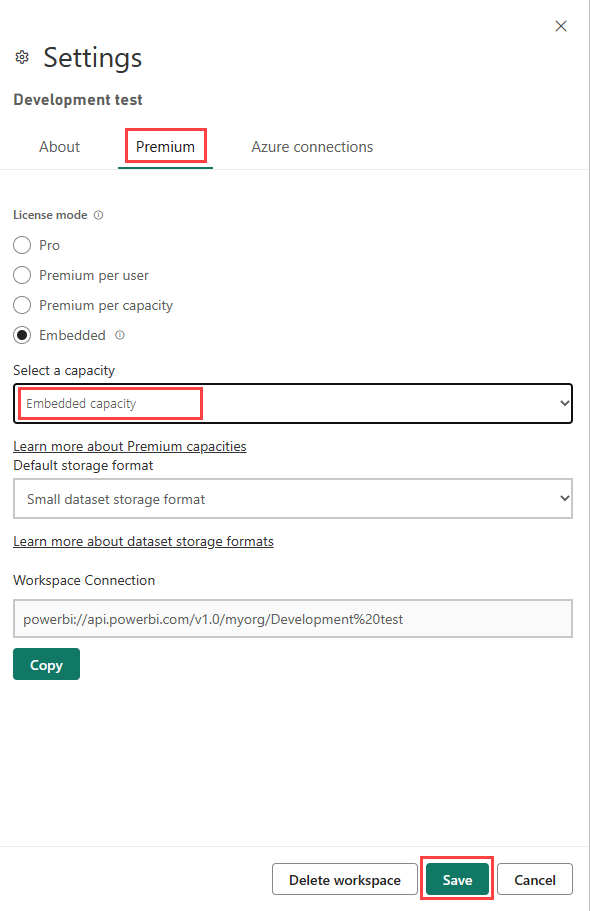
Once you enabled embedded, did you change your workspace to use the embed option rather than the premium as described here. Or since you are also using the premium licenses, you left it as is? We are confused on what to do here if we are also in a mixed use environment. Thanks!
https://learn.microsoft.com/en-us/power-bi/developer/embedded/move-to-production
 0
0




Categories
- All Categories
- 6 Blackbaud Community Help
- 209 bbcon®
- 1.4K Blackbaud Altru®
- 394 Blackbaud Award Management™ and Blackbaud Stewardship Management™
- 1.1K Blackbaud CRM™ and Blackbaud Internet Solutions™
- 15 donorCentrics®
- 359 Blackbaud eTapestry®
- 2.5K Blackbaud Financial Edge NXT®
- 646 Blackbaud Grantmaking™
- 563 Blackbaud Education Management Solutions for Higher Education
- 3.2K Blackbaud Education Management Solutions for K-12 Schools
- 934 Blackbaud Luminate Online® and Blackbaud TeamRaiser®
- 84 JustGiving® from Blackbaud®
- 6.4K Blackbaud Raiser's Edge NXT®
- 3.7K SKY Developer
- 243 ResearchPoint™
- 118 Blackbaud Tuition Management™
- 165 Organizational Best Practices
- 238 The Tap (Just for Fun)
- 33 Blackbaud Community Challenges
- 28 PowerUp Challenges
- 3 (Open) Raiser's Edge NXT PowerUp Challenge: Product Update Briefing
- 3 (Closed) Raiser's Edge NXT PowerUp Challenge: Standard Reports+
- 3 (Closed) Raiser's Edge NXT PowerUp Challenge: Email Marketing
- 3 (Closed) Raiser's Edge NXT PowerUp Challenge: Gift Management
- 4 (Closed) Raiser's Edge NXT PowerUp Challenge: Event Management
- 3 (Closed) Raiser's Edge NXT PowerUp Challenge: Home Page
- 4 (Closed) Raiser's Edge NXT PowerUp Challenge: Standard Reports
- 4 (Closed) Raiser's Edge NXT PowerUp Challenge: Query
- 779 Community News
- 2.9K Jobs Board
- 53 Blackbaud SKY® Reporting Announcements
- 47 Blackbaud CRM Higher Ed Product Advisory Group (HE PAG)
- 19 Blackbaud CRM Product Advisory Group (BBCRM PAG)