Adding a Carriage Return to a default





I have a task set up to add new staff records, it default adds all sorts of fields including address block. I can't work out how to add a carriage return so that address line 1 is first and address line 2 is on the next line. Any expression ideas please?
Comments
-
Replying to my own thread hoping it may bump it to be seen…. ?
0 -
@Lisa Fields
Just to clarify, are you asking how to add that default from within the Expression syntax of a task? Would you mind sharing some of what you have to do those defaults today?0 -
@Joseph Styons sorry, I don't quite understand the question?
I am adding the address field to the new individual constituent record. I have a task set up to ShowAddDataForm (Individual, Spouse, Business Add Form) and that has 10 defaults set. All defaults are fine except for the one that adds ADDRESS_ADDRESSBLOCK. I have it set to expression with text for my address lines but I want the text to show as 2 rows.
Hope my explanation helps ?
0 -
@Joseph Styons did you see my reply? Any help would be appreciated ?
0 -
@Lisa Fields Hi Lisa, I think you can do it with an expression like this
= String.Concat(Fields!ADDRESSLINE1, vbCrLf, Fields!ADDRESSLINE2)
Where you plug in your fields, and add in a vbCrLf to add a new line between them.
0 -
Thanks @Benjamin Seitz
I can't get that to work. It just adds this in the address:

Here is how I added it: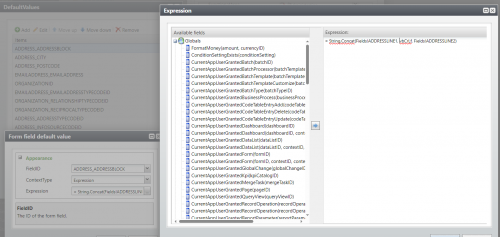 0
0






Categories
- All Categories
- 6 Blackbaud Community Help
- 211 bbcon®
- 1.4K Blackbaud Altru®
- 402 Blackbaud Award Management™ and Blackbaud Stewardship Management™
- 1.1K Blackbaud CRM™ and Blackbaud Internet Solutions™
- 15 donorCentrics®
- 360 Blackbaud eTapestry®
- 2.6K Blackbaud Financial Edge NXT®
- 656 Blackbaud Grantmaking™
- 577 Blackbaud Education Management Solutions for Higher Education
- 3.2K Blackbaud Education Management Solutions for K-12 Schools
- 941 Blackbaud Luminate Online® and Blackbaud TeamRaiser®
- 84 JustGiving® from Blackbaud®
- 6.7K Blackbaud Raiser's Edge NXT®
- 3.7K SKY Developer
- 248 ResearchPoint™
- 120 Blackbaud Tuition Management™
- 165 Organizational Best Practices
- 240 Member Lounge (Just for Fun)
- 34 Blackbaud Community Challenges
- 37 PowerUp Challenges
- 3 (Open) PowerUp Challenge: Grid View Batch
- 3 (Closed) PowerUp Challenge: Chat for Blackbaud AI
- 3 (Closed) PowerUp Challenge: Data Health
- 3 (Closed) Raiser's Edge NXT PowerUp Challenge: Product Update Briefing
- 3 (Closed) Raiser's Edge NXT PowerUp Challenge: Standard Reports+
- 3 (Closed) Raiser's Edge NXT PowerUp Challenge: Email Marketing
- 3 (Closed) Raiser's Edge NXT PowerUp Challenge: Gift Management
- 4 (Closed) Raiser's Edge NXT PowerUp Challenge: Event Management
- 3 (Closed) Raiser's Edge NXT PowerUp Challenge: Home Page
- 4 (Closed) Raiser's Edge NXT PowerUp Challenge: Standard Reports
- 4 (Closed) Raiser's Edge NXT PowerUp Challenge: Query
- 796 Community News
- 3K Jobs Board
- 54 Blackbaud SKY® Reporting Announcements
- 47 Blackbaud CRM Higher Ed Product Advisory Group (HE PAG)
- 19 Blackbaud CRM Product Advisory Group (BBCRM PAG)