AP Invoice Import





Hello,
Does anyone have experience with the new Payables invoice import feature?
I am attempting to validate a test file but keep receiving this error: "Validation error: The total percent distributed must equal 100%."
I need the import file to also contain both Project IDs and Grant codes.
Documentation from Blackbaud seems quite limited as to how to get this up and running.
Any guidance would be appreciated.
Comments
-
@Chris Uzun
in the section on the fields tab , where you pick project ID and Grant , there is a bold Amount. This is to tell FE how much money from the debit to associate with the project or grant. Even if you're using the same amount as the debit account, you still have to pick this. The error is saying FENXT doesn't see the amount so it considers it not totally distributed.
The other item is as you pick anything for distribution, the extension columns light up. Make sure they show the same number for the same groups. If this is an invoice with a single distribution, then they should all say 00 as that is the starting point.0 -
@Kevin Brazell
Thanks for your post.While I no longer receive the error saying total percent distributed must equal 100%, I am now receiving a different error: “Validation error: At least one primary account number required.”
The debit account number is already defined in the below screenshot - what am I missing here?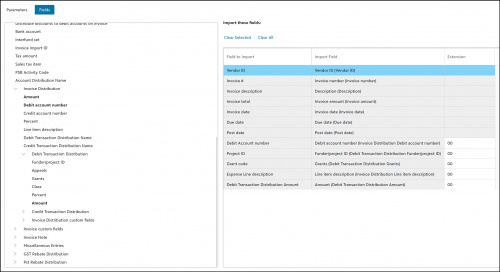 0
0 -
@Chris Uzun
primary account usually means in AP , the AP account, so the credit. Normally not needed unless there isn't a default defined. If you go to Payables/Settings/Default accounts, is there one defined for your AP? If not, I'd try that first. If there is, while you shouldn't have to define the credit, you can add corresponding columns and fill them out for the credit side, just like the debit.0 -
I truly appreciate your guidance on this. I seem to have resolved the issue with the primary account number, however I am back to the problem with this error: "The total percent distributed must equal 100%".
I have a feeling the data may be set up incorrectly. If I have one invoice with multiple lines of distribution, how should that be organized?
For example, a $100 invoice split $45/$55 across two lines of distribution.
The invoice number & vendor ID match, the Invoice Total shows $100 for both lines, but line 1 shows $45 for the Invoice Distribution Amount and $45 for the Debit Transaction Distribution Amount, while line 2 shows $55 respectively. These two distributions equal $100 for the same invoice, but FE is flagging this as not equalling 100%.
Do you have any ideas why this could be occurring?
0 -
invoice_distribution (1).csv@Chris Uzun look at this file. You use 1 row per invoice. Then you duplicate all the columns for debits, credits ( if needed), then projects and t codes. Then when mapping you use the extension column in FE to group them starting with extension 00. So if you have 4/ or 5 columns for the 1st percentage breakout, you'll use 00 on all 5. Then the next set of 5 use 01. And so on. Limit originally was 100 sets as the extensions go 00-99.
0 -
@Kevin Brazell
This was very helpful and exactly where I was going wrong.Multiple columns per distribution is an interesting development choice, considering the JE distribution upload is by row.
Thank you so much for your help with this, Kevin! Much appreciated!
1 -
@Kevin Brazell Do you know if there is a way to do this using the Distribution Set Creator Excel Add-In? Some articles allude to this but can't find specific instructions.
0 -
@Aurora Holder
that add in only creates bank adjustment distributions and Transaction distributions sets. Both of which you don't use in the AP invoice imports.0 -
@Kevin Brazell
Hi Kevin - I am having a similar issue with my AP import and getting the “Validation error: At least one primary account number required" can you help with this?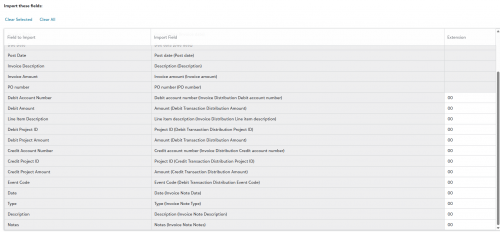 0
0





Categories
- All Categories
- 6 Blackbaud Community Help
- 206 bbcon®
- 1.4K Blackbaud Altru®
- 394 Blackbaud Award Management™ and Blackbaud Stewardship Management™
- 1.1K Blackbaud CRM™ and Blackbaud Internet Solutions™
- 15 donorCentrics®
- 357 Blackbaud eTapestry®
- 2.5K Blackbaud Financial Edge NXT®
- 646 Blackbaud Grantmaking™
- 561 Blackbaud Education Management Solutions for Higher Education
- 3.2K Blackbaud Education Management Solutions for K-12 Schools
- 934 Blackbaud Luminate Online® and Blackbaud TeamRaiser®
- 84 JustGiving® from Blackbaud®
- 6.4K Blackbaud Raiser's Edge NXT®
- 3.6K SKY Developer
- 242 ResearchPoint™
- 117 Blackbaud Tuition Management™
- 165 Organizational Best Practices
- 238 The Tap (Just for Fun)
- 33 Blackbaud Community Challenges
- 28 PowerUp Challenges
- 3 (Open) Raiser's Edge NXT PowerUp Challenge: Product Update Briefing
- 3 (Closed) Raiser's Edge NXT PowerUp Challenge: Standard Reports+
- 3 (Closed) Raiser's Edge NXT PowerUp Challenge: Email Marketing
- 3 (Closed) Raiser's Edge NXT PowerUp Challenge: Gift Management
- 4 (Closed) Raiser's Edge NXT PowerUp Challenge: Event Management
- 3 (Closed) Raiser's Edge NXT PowerUp Challenge: Home Page
- 4 (Closed) Raiser's Edge NXT PowerUp Challenge: Standard Reports
- 4 (Closed) Raiser's Edge NXT PowerUp Challenge: Query
- 777 Community News
- 2.9K Jobs Board
- 53 Blackbaud SKY® Reporting Announcements
- 47 Blackbaud CRM Higher Ed Product Advisory Group (HE PAG)
- 19 Blackbaud CRM Product Advisory Group (BBCRM PAG)