Sharing my Power Automate template: Get Query results from the new Query API





As of 10/23/2024 this is officially out of date. Please refer to my newest post which offers a template using the new Query Connectors.
Description - This flow will take the results of a query and save them to OneDrive.
Required connections -
- Blackbaud SKY Add-ins
- OneDrive for Business
Skill level - Beginner/intermediate
Note: More of a beginner skill level to run this template but moving into more intermediate skills to manipulate the data from the query.
Configuration details - You need to identify the ID of the Query to run in the flow. There are two ways to identify the Query ID:
1. From the query link:
- Open the query into the Query editor
- Click Copy Link
- Paste the copied value somewhere (i.e. a notepad)
- Copy the value after queryid=.
https://host.nxt.blackbaud.com/query/renxt?queryid=252&envid=p-sadasdasdsadas-_qw&svcid=renxt
2. Using the Get Query List endpoint
Instructions
- Import the attached .zip file into Power Automate
- Modify the Recurrence trigger for whenever you want the query results to be pulled
- Add the Query ID to the Initialize variable queryID action
- Update the Initialize variable fileName action to include the name of the file you want saved to OneDrive. The file name should include the extension.
- Update the Initialize variable product action to reference your product.
- Note: At the time of this posting, 02/29/2024, only RE is supported.
- If this is for FE, update the Initialize variable module action to reference the name of the module. If this is not for FE, this step can be skipped.
- Update the Create file action to point to where you want the file saved.
Note: For information on the valid values to use for Product and Module refer to the Get Query Execution Job endpoint documentation.
Comments
-
@Ashley Moose
you are quick, only just got the announcement on the public availability.2 -
@Alex Wong I may have had a head's up about when the announcement was coming out ?
2 -
@Ashley Moose
it's all cool. It's great for others who wasn't part of EAP that get some good info to start off with. Query API wasn't the easiest to use after all.Great work ?
1 -
@Ashley Moose
I have modified all my Query API flow after getting some error last week due to “status”=Failed or Throttled.Here are my modification, and reason for this is so that the flow doesn't run “forever” (X number of minutes or X number of times wasting more API calls and not knowing it failed for too long).
- execute query
- do until status = Completed or Failed or Cancelled
- there is no need to loop and check when any of these 3 statuses are reached
- delay X seconds (min 30 seconds)
- get job status
- condition if status = Throttled
- if yes, do an extra delay of X seconds
- once outside the do until loop condition on sas_uri being empty
- if yes, send error message (for error handling) and terminate the flow
- download (this step will not happen if sas_uri is missing b/c it would have been terminated in the last step)

the 4 steps mentioned above 
inside the Do Until 1 -
@Ashley Moose Thanks so much Ashley! This is brillant! Love it so much and it is so sleak and easy to use. Thanks for sharing.
1 -
@Ashley Moose Thank you so much! It was quick and easy. I got stuck on the related resources and I had to go to Microsoft Power Automate Blog for Importing the package steps.
0 -
@Todd Peyton Glad you figured it out! Want to share that we have an on-demand BBU course that walks through importing a template into Power Automate in case others run into challenges with the import.
0 -
@Ashley Moose this is brilliant thank you so much! I tested it on a small query and it worked great but when I tried it with a query with lots of data being generated it came back with an error
Http request failed as there is an error:
'Cannot write more bytes to the buffer than the configured maximum buffer size: 104857600.'.
Is there any way around this for larger query results?0 -
Hi @Mark Palfrey - Unfortunately there is not, this is a Power Automate limitation, not a Query limitation. That said, there are 2 things to consider:
1. On the Create file action, make sure Allow chunking is enabled. This can allow larger files to be created (Microsoft documentation for reference: https://learn.microsoft.com/en-us/power-automate/limits-and-config#message-size )
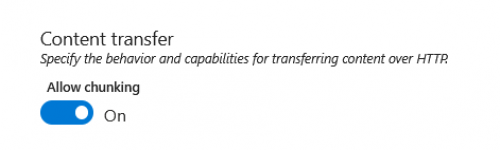
2. If the error still occurs, the only other solution is to break your query up into smaller parts.0 -
@Ashley Moose thanks for getting back to me so quickly. I had chunking already enabled but to be honest with you looking at it more closely I was trying to query out 800k rows of data so I think I can streamline that a bit. I ran another test and managed to generate a file of assigned appeals with 500k rows and the flow took about 1min to run! This will be so powerful for us in our PowerBI reporting requirements at the moment.
1 -
@Ashley Moose, This is amazing thank you! It is working perfectly for me. I am wondering though, if I swap out One Drive for Sharepoint is an additional step required for the file to work in sharepoint.
I modified this flow to include both one drive and sharepoint and the one drive file works and opens correctly however the sharepoint file just gives a URL but doesnt actually transfer to data.
Any idea what additional step i might need to use to get it to work in sharepoint?
EDIT: I was able to figure it out! it is working perfectly. Thank you for this template!0 -
@Louise Williams Glad to hear you got it working!! ?
0 -
Thank you for this information, and thank you to @Alex Wong and @Dan Snyder for suggesting that I use Query API rather than List API to identify the specific gifts that we want to acknowledge.
If I am updating the Query manually, will this cause the flow to generate the acknowledgement letters for the gift? (The Power Automate information that I've seen set the acknowledgements to run daily at a certain time and this may not be help if I'd like to add the gift information to the query and then have the acknowledgements generated.)
Thank you again for your help as I'm starting this Power Automate journey!
0 -
Hi @Kate Thomas-Tielke - Most of the acknowledgement flows do have the Trigger as a schedule/recurrence trigger to allow the letters to automatically generate. If you're not able to set your query criteria in a way that can follow that structure, you can change the Trigger to a Manual trigger which will allow you to run the Flow when you want to. (Just delete the existing Recurrence trigger and then you can add a new Manual trigger).
0 -
not sure what you mean by "updating the query manually".. but here's what your flow logic can be like this:
- trigger every week (can be every day if you want)
- execute a saved query (or use ad hoc query) where criteria is all gift that is not acknowledged based on any timeframe you want (say this calendar year or this fiscal year, or last 3 or 6 months), along with any other criteria you need
- apply to each gift returned
- generate acknowledgement (different type of letter can be used depending on your business needs) pdf
- attach pdf to gift record
- if email available, send email with receipt pdf attachment
- if no email, add to "batch" (array of gift for mailing use)
- mark gift as acknowledged
- use array of gift for mailing to merge using repeat control (meaning create 1 document for all gifts un-emailable)
0















Categories
- All Categories
- 6 Blackbaud Community Help
- 210 bbcon®
- 1.4K Blackbaud Altru®
- 395 Blackbaud Award Management™ and Blackbaud Stewardship Management™
- 1.1K Blackbaud CRM™ and Blackbaud Internet Solutions™
- 15 donorCentrics®
- 360 Blackbaud eTapestry®
- 2.5K Blackbaud Financial Edge NXT®
- 649 Blackbaud Grantmaking™
- 567 Blackbaud Education Management Solutions for Higher Education
- 3.2K Blackbaud Education Management Solutions for K-12 Schools
- 937 Blackbaud Luminate Online® and Blackbaud TeamRaiser®
- 84 JustGiving® from Blackbaud®
- 6.5K Blackbaud Raiser's Edge NXT®
- 3.7K SKY Developer
- 247 ResearchPoint™
- 118 Blackbaud Tuition Management™
- 165 Organizational Best Practices
- 239 The Tap (Just for Fun)
- 33 Blackbaud Community Challenges
- 31 PowerUp Challenges
- 3 (Open) PowerUp Challenge: Data Health
- 3 (Closed) Raiser's Edge NXT PowerUp Challenge: Product Update Briefing
- 3 (Closed) Raiser's Edge NXT PowerUp Challenge: Standard Reports+
- 3 (Closed) Raiser's Edge NXT PowerUp Challenge: Email Marketing
- 3 (Closed) Raiser's Edge NXT PowerUp Challenge: Gift Management
- 4 (Closed) Raiser's Edge NXT PowerUp Challenge: Event Management
- 3 (Closed) Raiser's Edge NXT PowerUp Challenge: Home Page
- 4 (Closed) Raiser's Edge NXT PowerUp Challenge: Standard Reports
- 4 (Closed) Raiser's Edge NXT PowerUp Challenge: Query
- 783 Community News
- 2.9K Jobs Board
- 53 Blackbaud SKY® Reporting Announcements
- 47 Blackbaud CRM Higher Ed Product Advisory Group (HE PAG)
- 19 Blackbaud CRM Product Advisory Group (BBCRM PAG)