Participant Center 3 Now Available in Blackbaud TeamRaiser®





Blackbaud TeamRaiser® customers now have access to upgrade to Participant Center 3 (PC3), a newly designed Participant Center which is mobile responsive and a major upgrade to the Participant Center. It is optimized to display and function well on the devices your participants prefer, including smartphones and tablets. Click the title to learn more.Blackbaud TeamRaiser® customers now have access to upgrade to Participant Center 3 (PC3), a newly designed Participant Center which is mobile responsive and a major upgrade to the Participant Center.
It is optimized to display and function well on the devices your participants prefer, including smartphones and tablets. Your participants will find the new email interface simplifies email sending while maintaining your organizational styles with suggested message templates in the WYSIWYG editor. Even better- your participants will never lose their work again thanks to new “autosave” of draft messages in the email editor!
PC3’s new “Profile View” allows supporters to do more “self service” updates –they can edit their own profile (constituent record), privacy preferences, and change their password–all within the Participant Center. Participants also have the power to join a team after registration –or leave a team!
Upgrading to Participant Center 3
We recommend that you create and upgraded copy of your Participant Center. This will allow you to verify that your Participant Center design isn’t impacted by the upgrade in the event your current Participant Center has customizations. Below are the steps on how to safely upgrade your Participant Center.
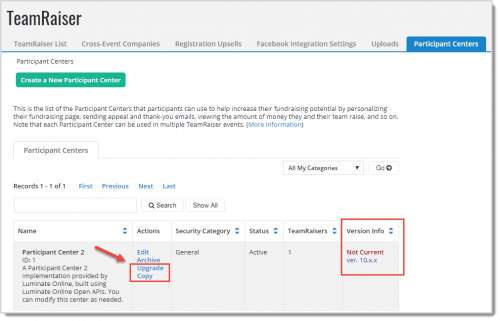
1. To upgrade to Participant Center 3, go to Fundraising>TeamRaiser and click Participant Center. Find the Participant Center you wish to upgrade and click Upgrade.
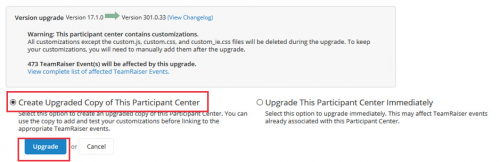
2.Select Create Upgrade Copy of This Participant Center and click Upgrade.
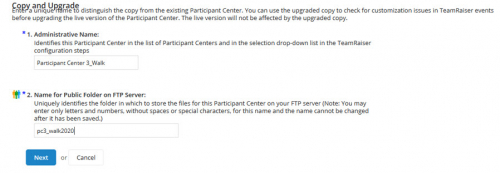
3. Next rename your Participant Center to something recognizable.
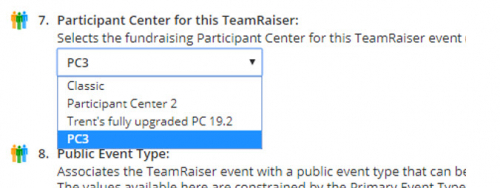
4. Go to your TeamRaiser event, click Edit, and choose Step. 3 Select Event Options. Scroll down to item 7. Participant Center for this TeamRaiser and select your upgraded copy of your Participant Center.
5. Review by logging into your Participant Center. If you are not already a registered participant for this event, register in order to create a login for the Participant Center to test. Login to the Participant Center to see if any styling changes are needed.
Preparing Your Participants
If you plan to use the updated Participant Center in a current, live TeamRaiser event after upgrading and testing it, you should plan an appropriate time to switch it. Don't forget to notify all current participants about the new look and feel and functionality of their Participant Center. Also update any fundraising or "how to" documentation you may have that refers to Participant Center tools.
Learn more about Participant Center 3 during our Product Adoption Session.
It is optimized to display and function well on the devices your participants prefer, including smartphones and tablets. Your participants will find the new email interface simplifies email sending while maintaining your organizational styles with suggested message templates in the WYSIWYG editor. Even better- your participants will never lose their work again thanks to new “autosave” of draft messages in the email editor!
PC3’s new “Profile View” allows supporters to do more “self service” updates –they can edit their own profile (constituent record), privacy preferences, and change their password–all within the Participant Center. Participants also have the power to join a team after registration –or leave a team!
Upgrading to Participant Center 3
We recommend that you create and upgraded copy of your Participant Center. This will allow you to verify that your Participant Center design isn’t impacted by the upgrade in the event your current Participant Center has customizations. Below are the steps on how to safely upgrade your Participant Center.
1. To upgrade to Participant Center 3, go to Fundraising>TeamRaiser and click Participant Center. Find the Participant Center you wish to upgrade and click Upgrade.

2.Select Create Upgrade Copy of This Participant Center and click Upgrade.

3. Next rename your Participant Center to something recognizable.

4. Go to your TeamRaiser event, click Edit, and choose Step. 3 Select Event Options. Scroll down to item 7. Participant Center for this TeamRaiser and select your upgraded copy of your Participant Center.

5. Review by logging into your Participant Center. If you are not already a registered participant for this event, register in order to create a login for the Participant Center to test. Login to the Participant Center to see if any styling changes are needed.
Preparing Your Participants
If you plan to use the updated Participant Center in a current, live TeamRaiser event after upgrading and testing it, you should plan an appropriate time to switch it. Don't forget to notify all current participants about the new look and feel and functionality of their Participant Center. Also update any fundraising or "how to" documentation you may have that refers to Participant Center tools.
Learn more about Participant Center 3 during our Product Adoption Session.
3
Comments
-
Hi Jennifer,
I do not see the "upgrade copy" button on my current PC. Is it safe to assume that I have the current version?
TIA!0 -
Hi Kadesha Washington -
It looks like you are using the current version of the PC3. If I recall, if you had a later version the version number there in the last column would be in red type. Kent Gilliam does that sound right to you? I know you look at these a little more these days than I do.
Thanks!
Jen0 -
Jennifer Peters you're correct. It's showing the version is current so no need to upgrade it.0




Categories
- All Categories
- 6 Blackbaud Community Help
- 211 bbcon®
- 1.4K Blackbaud Altru®
- 402 Blackbaud Award Management™ and Blackbaud Stewardship Management™
- 1.1K Blackbaud CRM™ and Blackbaud Internet Solutions™
- 15 donorCentrics®
- 360 Blackbaud eTapestry®
- 2.6K Blackbaud Financial Edge NXT®
- 656 Blackbaud Grantmaking™
- 577 Blackbaud Education Management Solutions for Higher Education
- 3.2K Blackbaud Education Management Solutions for K-12 Schools
- 941 Blackbaud Luminate Online® and Blackbaud TeamRaiser®
- 84 JustGiving® from Blackbaud®
- 6.7K Blackbaud Raiser's Edge NXT®
- 3.7K SKY Developer
- 248 ResearchPoint™
- 120 Blackbaud Tuition Management™
- 165 Organizational Best Practices
- 240 Member Lounge (Just for Fun)
- 34 Blackbaud Community Challenges
- 37 PowerUp Challenges
- 3 (Open) PowerUp Challenge: Grid View Batch
- 3 (Closed) PowerUp Challenge: Chat for Blackbaud AI
- 3 (Closed) PowerUp Challenge: Data Health
- 3 (Closed) Raiser's Edge NXT PowerUp Challenge: Product Update Briefing
- 3 (Closed) Raiser's Edge NXT PowerUp Challenge: Standard Reports+
- 3 (Closed) Raiser's Edge NXT PowerUp Challenge: Email Marketing
- 3 (Closed) Raiser's Edge NXT PowerUp Challenge: Gift Management
- 4 (Closed) Raiser's Edge NXT PowerUp Challenge: Event Management
- 3 (Closed) Raiser's Edge NXT PowerUp Challenge: Home Page
- 4 (Closed) Raiser's Edge NXT PowerUp Challenge: Standard Reports
- 4 (Closed) Raiser's Edge NXT PowerUp Challenge: Query
- 796 Community News
- 3K Jobs Board
- 54 Blackbaud SKY® Reporting Announcements
- 47 Blackbaud CRM Higher Ed Product Advisory Group (HE PAG)
- 19 Blackbaud CRM Product Advisory Group (BBCRM PAG)