What's New In Raiser's Edge NXT The Week Of September 20





This week, Raiser's Edge NXT updates with several enhancements to how you manage constituent relationships, as well as some clarification when working with campaigns, funds, and appeals!
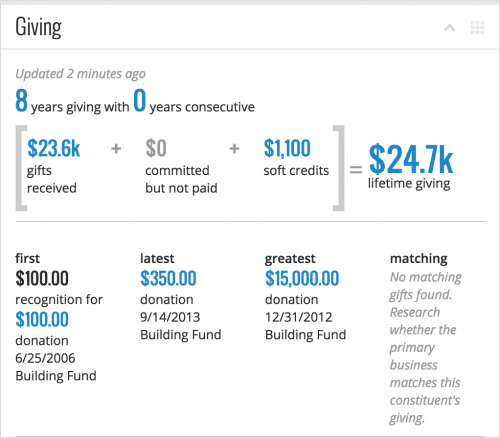 View additional recognition in constituent giving. As previously discussed, Giving totals on constituent records and in constituent lists now include soft credits and commitments such as pledges and matching gifts to better recognize the impact donors have on your organization. Similarly, the Giving filters in constituent lists now use both soft credits and gifts to include donors based on details on any single gift — including their first, latest, or greatest. For more information, see the Constituent Giving Help and Constituent List Filters Help.
Filter inactive or deceased constituents in lists. By default, constituent lists include those marked as inactive or deceased. To choose whether to include only current, active constituents or previously active constituents, such as for re-acquisition or planned giving efforts, you can now use new Include inactive and Include deceased filters under Donor characteristics. (For any saved lists, these filters are automatically selected. To best meet your needs, choose whether to include inactive or deceased constituents in those lists.) For more information, check out the Constituent List Filters Help.
View profile pictures in search results. To help determine whether you've found the right record when you search for constituents, the detailed results now include their initials and profile pictures. To view them, enter the criteria in the Search for a constituent field and select View all results. For more information, see the Search for Constituents Help.
Prioritize constituents who need attention. Under Overview in Fundraising, Work, you can view and act on constituents tagged with situations to be aware of — such as upcoming birthdays or lapses in giving or interactions — under Needs attention. To better focus on these constituents:
Differentiate campaign, fund, and appeal records. To help as you track the effectiveness of your fundraising efforts, you can now view whether a record is for a campaign, fund, or appeal under its description. Previously, you used cues like the description, ID, or link of a record to determine its type of fundraising effort. For more information, see the Campaigns, Funds, and Appeals Help.
For more information about these features, or to catch up on previous releases, check out the What's New Help and What's Recent Help.
 View additional recognition in constituent giving. As previously discussed, Giving totals on constituent records and in constituent lists now include soft credits and commitments such as pledges and matching gifts to better recognize the impact donors have on your organization. Similarly, the Giving filters in constituent lists now use both soft credits and gifts to include donors based on details on any single gift — including their first, latest, or greatest. For more information, see the Constituent Giving Help and Constituent List Filters Help.
Filter inactive or deceased constituents in lists. By default, constituent lists include those marked as inactive or deceased. To choose whether to include only current, active constituents or previously active constituents, such as for re-acquisition or planned giving efforts, you can now use new Include inactive and Include deceased filters under Donor characteristics. (For any saved lists, these filters are automatically selected. To best meet your needs, choose whether to include inactive or deceased constituents in those lists.) For more information, check out the Constituent List Filters Help.
View profile pictures in search results. To help determine whether you've found the right record when you search for constituents, the detailed results now include their initials and profile pictures. To view them, enter the criteria in the Search for a constituent field and select View all results. For more information, see the Search for Constituents Help.
Prioritize constituents who need attention. Under Overview in Fundraising, Work, you can view and act on constituents tagged with situations to be aware of — such as upcoming birthdays or lapses in giving or interactions — under Needs attention. To better focus on these constituents:
- They now appear in priority order — with more urgent tags first — rather than the previous random order.
- Those marked as inactive no longer appear.
- Their records now appear within Work Center when you select their name. (To go to the constituent's record like before, select their name and then View full record.)
Differentiate campaign, fund, and appeal records. To help as you track the effectiveness of your fundraising efforts, you can now view whether a record is for a campaign, fund, or appeal under its description. Previously, you used cues like the description, ID, or link of a record to determine its type of fundraising effort. For more information, see the Campaigns, Funds, and Appeals Help.
For more information about these features, or to catch up on previous releases, check out the What's New Help and What's Recent Help.
0
Comments
-
Is there any update when the following will be available in NXT:
We just made the change to NXT and hosting. Users cannot see the following items in NXT, but can see them in the classic view:
-Queries
-Exports
-Reports
-Mail
-Batches
2. When will users be able to update address information in NXT?0 -
Hey Thomas, great questions! Looks like Jarod responded to your similar inquiry in the Discussion threads at https://community.blackbaud.com/forums/viewtopic/143/30210. Thanks!0
-
I'm not seeing anything pertaining to "enhancements to how you manage constituent relationships"?
Ariel0 -
Hey Ariel! In a general sense, most of these recent enhancements are related to how you manage YOUR relationships with constituents, from those who appear in lists or as needing attention, to how you search for constituents and gauge their giving.
If you were expecting enhancements around managing a constituent's relationships with OTHERS (and I can see why you may've read it as such), nothing this week, but expect some enhancements there soon as well! ;-)0


Categories
- All Categories
- 6 Blackbaud Community Help
- 213 bbcon®
- 1.4K Blackbaud Altru®
- 403 Blackbaud Award Management™ and Blackbaud Stewardship Management™
- 1.1K Blackbaud CRM™ and Blackbaud Internet Solutions™
- 15 donorCentrics®
- 360 Blackbaud eTapestry®
- 2.6K Blackbaud Financial Edge NXT®
- 656 Blackbaud Grantmaking™
- 577 Blackbaud Education Management Solutions for Higher Education
- 3.2K Blackbaud Education Management Solutions for K-12 Schools
- 939 Blackbaud Luminate Online® and Blackbaud TeamRaiser®
- 84 JustGiving® from Blackbaud®
- 6.6K Blackbaud Raiser's Edge NXT®
- 3.7K SKY Developer
- 249 ResearchPoint™
- 119 Blackbaud Tuition Management™
- 165 Organizational Best Practices
- 241 Member Lounge (Just for Fun)
- 34 Blackbaud Community Challenges
- 37 PowerUp Challenges
- 3 (Open) PowerUp Challenge: Grid View Batch
- 3 (Closed) PowerUp Challenge: Chat for Blackbaud AI
- 3 (Closed) PowerUp Challenge: Data Health
- 3 (Closed) Raiser's Edge NXT PowerUp Challenge: Product Update Briefing
- 3 (Closed) Raiser's Edge NXT PowerUp Challenge: Standard Reports+
- 3 (Closed) Raiser's Edge NXT PowerUp Challenge: Email Marketing
- 3 (Closed) Raiser's Edge NXT PowerUp Challenge: Gift Management
- 4 (Closed) Raiser's Edge NXT PowerUp Challenge: Event Management
- 3 (Closed) Raiser's Edge NXT PowerUp Challenge: Home Page
- 4 (Closed) Raiser's Edge NXT PowerUp Challenge: Standard Reports
- 4 (Closed) Raiser's Edge NXT PowerUp Challenge: Query
- 794 Community News
- 3K Jobs Board
- 54 Blackbaud SKY® Reporting Announcements
- 47 Blackbaud CRM Higher Ed Product Advisory Group (HE PAG)
- 19 Blackbaud CRM Product Advisory Group (BBCRM PAG)