What's New In Raiser's Edge NXT The Week Of February 27





This week, Raiser's Edge NXT updates with enhancements to Fundraising, Analyze and constituent lists.
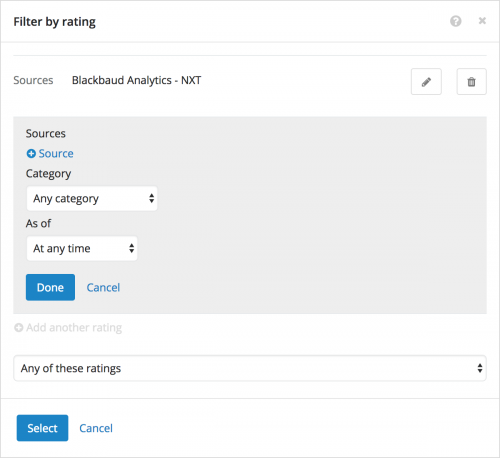 Filter constituent lists by any or all of multiple custom ratings. As previously discussed, when you filter a constituent list, you can now choose whether to include those who have any or all of multiple custom ratings — — such as Wealth or Affinity versus Wealth and Affinity. To filter a constituent list by custom rating, select Filters, Wealth & ratings, and then select Rating under Custom ratings. For more information, see the Wealth and Ratings Filters Help.
Copy others on your scheduled PDFs of Analyze tabs. In Fundraising, Analyze, you can choose to receive a PDF of a tab's metrics as an email — at the address used with your Blackbaud ID — at regular intervals, such as to track and compare fundraising effectiveness over time. To easily share your analysis with others, you can now copy additional recipients on your email. To schedule an emailed PDF of a tab in Fundraising, Analyze, set the filters on the tab as necessary on your desktop (not mobile), and then select Schedule email of this dashboard. To copy others on the email, select Add recipients or define custom subject and message, and — in the Send a copy to field – enter the email address of the recipients, separated by commas. For more information, see the PDFs of Analyze Metrics Help.
For more information about these features, or to catch up on previous releases, check out the What's New Help and What's Recent Help. Enjoy!
 Filter constituent lists by any or all of multiple custom ratings. As previously discussed, when you filter a constituent list, you can now choose whether to include those who have any or all of multiple custom ratings — — such as Wealth or Affinity versus Wealth and Affinity. To filter a constituent list by custom rating, select Filters, Wealth & ratings, and then select Rating under Custom ratings. For more information, see the Wealth and Ratings Filters Help.
Copy others on your scheduled PDFs of Analyze tabs. In Fundraising, Analyze, you can choose to receive a PDF of a tab's metrics as an email — at the address used with your Blackbaud ID — at regular intervals, such as to track and compare fundraising effectiveness over time. To easily share your analysis with others, you can now copy additional recipients on your email. To schedule an emailed PDF of a tab in Fundraising, Analyze, set the filters on the tab as necessary on your desktop (not mobile), and then select Schedule email of this dashboard. To copy others on the email, select Add recipients or define custom subject and message, and — in the Send a copy to field – enter the email address of the recipients, separated by commas. For more information, see the PDFs of Analyze Metrics Help.
For more information about these features, or to catch up on previous releases, check out the What's New Help and What's Recent Help. Enjoy!
2
Comments
-
YAY!! The ability to copy others on scheduled PDFs of Analyze tabs is HUGE! Last summer at the K12 conference, I was visibly perturbed in a large, overcrowded session where we were sitting on the floor, to find out we couldn't copy others' email with reports from NXT. The presenter said the workaround would be for us to just have the report sent to ourselves and then have our email program auto-forward the email to whomever we wanted. The reason I was so upset is that our email system's security settings doesn't allow us to auto-forward anything, and IT was not going to change that security level, since we are a PK3 to 12 school, and we're protecting our student email users. Ultimately, what I had to do was go to each person that wants to receive the report and set up the report from scratch on their NXT so it would send the email to them. So thank you for changing this so that it's way more usable for real life situations!0




Categories
- All Categories
- 6 Blackbaud Community Help
- 213 bbcon®
- 1.4K Blackbaud Altru®
- 400 Blackbaud Award Management™ and Blackbaud Stewardship Management™
- 1.1K Blackbaud CRM™ and Blackbaud Internet Solutions™
- 15 donorCentrics®
- 360 Blackbaud eTapestry®
- 2.6K Blackbaud Financial Edge NXT®
- 655 Blackbaud Grantmaking™
- 576 Blackbaud Education Management Solutions for Higher Education
- 3.2K Blackbaud Education Management Solutions for K-12 Schools
- 939 Blackbaud Luminate Online® and Blackbaud TeamRaiser®
- 84 JustGiving® from Blackbaud®
- 6.6K Blackbaud Raiser's Edge NXT®
- 3.7K SKY Developer
- 248 ResearchPoint™
- 119 Blackbaud Tuition Management™
- 165 Organizational Best Practices
- 241 Member Lounge (Just for Fun)
- 34 Blackbaud Community Challenges
- 34 PowerUp Challenges
- 3 (Open) PowerUp Challenge: Chat for Blackbaud AI
- 3 (Closed) PowerUp Challenge: Data Health
- 3 (Closed) Raiser's Edge NXT PowerUp Challenge: Product Update Briefing
- 3 (Closed) Raiser's Edge NXT PowerUp Challenge: Standard Reports+
- 3 (Closed) Raiser's Edge NXT PowerUp Challenge: Email Marketing
- 3 (Closed) Raiser's Edge NXT PowerUp Challenge: Gift Management
- 4 (Closed) Raiser's Edge NXT PowerUp Challenge: Event Management
- 3 (Closed) Raiser's Edge NXT PowerUp Challenge: Home Page
- 4 (Closed) Raiser's Edge NXT PowerUp Challenge: Standard Reports
- 4 (Closed) Raiser's Edge NXT PowerUp Challenge: Query
- 790 Community News
- 2.9K Jobs Board
- 53 Blackbaud SKY® Reporting Announcements
- 47 Blackbaud CRM Higher Ed Product Advisory Group (HE PAG)
- 19 Blackbaud CRM Product Advisory Group (BBCRM PAG)