What's New In Raiser's Edge NXT The Week Of May 19

Jillian Vrba
Blackbaud Employee




This week, Raiser's Edge NXT introduces new payment methods and improvements for Gifts. Also, you can now automate recurring gifts that have skipped payments in the past. For more of you, the ability to send an automated email series from Workflow Designer is available.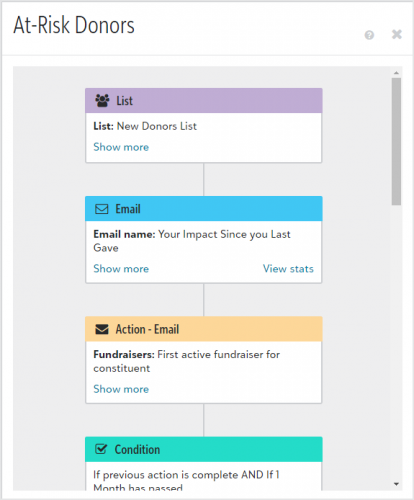 Send an automated email series in Workflow Designer (for more of you)
To easily communicate with your constituents, you can now create a workflow to send an automated series of emails from Raiser’s Edge NXT. This allows you to have a truly automated workflow, see how many people received your emails in the workflow, and view statistics on each email sent.
From Marketing, Email, select Workflow designer emails, then create an email from a blank layout or from a template. In the Email Designer, under Set the purpose, select Use this email for a workflow. Enter the rest of the details then publish your email. Continue to create and publish emails for your workflow, then navigate to Workflow Designer.
Create a new workflow and add an email as the first step. Select one of the emails you created, and then add an action or condition as the next step.
Tip: When you set conditions, make sure to space emails out over a few days to prevent your constituents from receiving too many emails too quickly.
After you create your workflow and you’re ready to send the first email, activate it. To see how many recipients received your workflow, select the active workflow name in Workflow Designer.
To see email statistics, select View workflow from the workflow’s menu, then select View stats on an email step. For more information, check out this video or see Workflows.
Automate recurring gifts with past skipped payments
You can now automate recurring gifts that have skipped payments in the past. Previously, manual recurring gifts with skipped payments weren't eligible to be converted.
After you convert a recurring gift, payments are automatically generated based on its payment schedule. For more information, see Automate Manual Recurring Gifts.
Note: You can't automate a recurring gift if it's scheduled to skip payments today or in the future.
Add gifts paid by PayPal and Venmo
To help you track gifts with payments processed outside of Raiser's Edge NXT, and to support upcoming changes in online donation forms, you can now add gifts paid by PayPal and Venmo.
When you add a gift from Fundraising, Home, or a constituent record, select PayPal or Venmo under Payment method. You can also save and view any reference number and date your organization uses to track gifts. For more information, see Payment Information.
Note: PayPal and Venmo payments currently process outside of Raiser's Edge NXT — use these payment methods for record-keeping purposes only. In the future, donors will be able to process PayPal and Venmo payments through donation forms built with Donation form designer. These gifts will appear in batches under Gift management for you to review and approve.
Improvements to Add gift (for some)
To save time when you add a gift from Fundraising, Home, or a constituent record, we made changes to the way you enter a gift's details. Under Gift splits, you can now directly enter details into the fields that help your organization track gifts — such as the campaign, fund, and appeal. For more information, see Gifts.
 Send an automated email series in Workflow Designer (for more of you)
To easily communicate with your constituents, you can now create a workflow to send an automated series of emails from Raiser’s Edge NXT. This allows you to have a truly automated workflow, see how many people received your emails in the workflow, and view statistics on each email sent.
From Marketing, Email, select Workflow designer emails, then create an email from a blank layout or from a template. In the Email Designer, under Set the purpose, select Use this email for a workflow. Enter the rest of the details then publish your email. Continue to create and publish emails for your workflow, then navigate to Workflow Designer.
Create a new workflow and add an email as the first step. Select one of the emails you created, and then add an action or condition as the next step.
Tip: When you set conditions, make sure to space emails out over a few days to prevent your constituents from receiving too many emails too quickly.
After you create your workflow and you’re ready to send the first email, activate it. To see how many recipients received your workflow, select the active workflow name in Workflow Designer.
To see email statistics, select View workflow from the workflow’s menu, then select View stats on an email step. For more information, check out this video or see Workflows.
Automate recurring gifts with past skipped payments
You can now automate recurring gifts that have skipped payments in the past. Previously, manual recurring gifts with skipped payments weren't eligible to be converted.
After you convert a recurring gift, payments are automatically generated based on its payment schedule. For more information, see Automate Manual Recurring Gifts.
Note: You can't automate a recurring gift if it's scheduled to skip payments today or in the future.
Add gifts paid by PayPal and Venmo
To help you track gifts with payments processed outside of Raiser's Edge NXT, and to support upcoming changes in online donation forms, you can now add gifts paid by PayPal and Venmo.
When you add a gift from Fundraising, Home, or a constituent record, select PayPal or Venmo under Payment method. You can also save and view any reference number and date your organization uses to track gifts. For more information, see Payment Information.
Note: PayPal and Venmo payments currently process outside of Raiser's Edge NXT — use these payment methods for record-keeping purposes only. In the future, donors will be able to process PayPal and Venmo payments through donation forms built with Donation form designer. These gifts will appear in batches under Gift management for you to review and approve.
Improvements to Add gift (for some)
To save time when you add a gift from Fundraising, Home, or a constituent record, we made changes to the way you enter a gift's details. Under Gift splits, you can now directly enter details into the fields that help your organization track gifts — such as the campaign, fund, and appeal. For more information, see Gifts.
2
Comments
-
How do you connect Venmo to your online donation process?0
-
Hello Emma,
Thanks for reaching out. Unfortunately, RENXT webview donation forms do not offer Venmo at this time.
Juliana0 -
Has the status of this changed yet?
“In the future, donors will be able to process PayPal and Venmo payments through donation forms built with Donation form designer.”0






Categories
- All Categories
- 6 Blackbaud Community Help
- 213 bbcon®
- 1.4K Blackbaud Altru®
- 402 Blackbaud Award Management™ and Blackbaud Stewardship Management™
- 1.1K Blackbaud CRM™ and Blackbaud Internet Solutions™
- 15 donorCentrics®
- 360 Blackbaud eTapestry®
- 2.6K Blackbaud Financial Edge NXT®
- 655 Blackbaud Grantmaking™
- 576 Blackbaud Education Management Solutions for Higher Education
- 3.2K Blackbaud Education Management Solutions for K-12 Schools
- 939 Blackbaud Luminate Online® and Blackbaud TeamRaiser®
- 84 JustGiving® from Blackbaud®
- 6.6K Blackbaud Raiser's Edge NXT®
- 3.7K SKY Developer
- 248 ResearchPoint™
- 119 Blackbaud Tuition Management™
- 165 Organizational Best Practices
- 241 Member Lounge (Just for Fun)
- 34 Blackbaud Community Challenges
- 34 PowerUp Challenges
- 3 (Open) PowerUp Challenge: Chat for Blackbaud AI
- 3 (Closed) PowerUp Challenge: Data Health
- 3 (Closed) Raiser's Edge NXT PowerUp Challenge: Product Update Briefing
- 3 (Closed) Raiser's Edge NXT PowerUp Challenge: Standard Reports+
- 3 (Closed) Raiser's Edge NXT PowerUp Challenge: Email Marketing
- 3 (Closed) Raiser's Edge NXT PowerUp Challenge: Gift Management
- 4 (Closed) Raiser's Edge NXT PowerUp Challenge: Event Management
- 3 (Closed) Raiser's Edge NXT PowerUp Challenge: Home Page
- 4 (Closed) Raiser's Edge NXT PowerUp Challenge: Standard Reports
- 4 (Closed) Raiser's Edge NXT PowerUp Challenge: Query
- 792 Community News
- 2.9K Jobs Board
- 53 Blackbaud SKY® Reporting Announcements
- 47 Blackbaud CRM Higher Ed Product Advisory Group (HE PAG)
- 19 Blackbaud CRM Product Advisory Group (BBCRM PAG)