Blackbaud Raiser’s Edge NXT®: Enhanced Event Capacity Management (Global)





Your website is a vital tool for driving supporter registration and participation, but it can be challenging to monitor in real-time. Based on your feedback, we have re-envisioned event capacity management functionality in Raiser’s Edge NXT. The new capacity management approach allows you to easily set limits on both registration and other fees. By automating capacity tracking by fee category, this update simplifies the process and ensures smoother, more organized event execution.
What's new?
Previously, you could limit the number of registrants per registration form. We have replaced the form limit with the ability to set limits per fee. By tracking capacity at the fee level rather than the form level, and introducing new capabilities, we’ve improved the experience for both you and your supporters.
Fee-level capacity tracking will allow you to limit and automatically manage the capacity of any fee for your events without the need for constant monitoring, including:
- Set limits for each registration type or other fee as needed
- View the number sold and pending for each fee category in real-time
- Fees will automatically display “Sold Out” (or a custom message) on registration forms
- Fee capacity limits are honored across all registration forms and the back-office
What about current/active registration forms?
If you are using the legacy feature to limit capacity per registration form, it will continue to function as-is on your existing active forms. However, the old capacity management feature will not be available on new registration forms.
If we copy a previous registration form, with limited capacity enabled, what capacity capabilities will the new form include?
New registration forms will not offer the prior capacity limit options; they will offer only fee-level capacity. However, if you copy an existing registration form that had limited capacity capabilities, the new form will keep those limits, alongside the new fee-level capacity. The limited capacity capability can be disabled while saving the form.
How does fee-level capacity work on new registration forms?
Going forward, registration capacity will be tracked and limited per fee rather than at the form level.

For example, if your event has only one available Gold Sponsor slot, you can set the capacity limit for this fee to one.

Once purchased, it will automatically be marked as “Sold Out” across all registration forms. Additionally, the new limits apply to the fee count, not the registration count. For instance, if you have one Gold Sponsor fee that includes 12 registrants, purchasing this fee will include 12 attendees automatically.

What if a supporter tries to purchase more than the available capacity?
If a supporter attempts to buy more than the remaining available tickets, the system will notify them that their desired quantity exceeds the available limit, preventing the purchase.
What if we try to enter more than the available capacity in the back-office?
The capacity limits will be honored across all registration forms for the event, as well as when participants and fees are added via the back-office. This ensures that you won’t oversell fees with set limits.

Can we offer multiple pricing tiers to incentivize early tickets purchases?
Yes, you can set different pricing options with a specific number of tickets allocated to each fee tier. Once those tickets sell out, supporters will no longer be able to purchase beyond that limit. After the discounted tickets are sold, only full-price tickets will remain available for purchase.
Can we track how fee sales are progressing?
Absolutely. You can monitor real-time data on the performance of each fee. Under Fees, you can easily review fee limits and sold amounts.

Fee-level capacity management for events is an intuitive tool that provides administrative relief and consistency, while offering real-time data to adjust goals as your event evolves. Fee-level capacity limits ensure uniformity across all registration forms and support back-office reconciliation, preventing overselling in any category. With so many moving parts in event planning, overselling is one less concern you’ll need to worry about.
We hope that your year-end event season is successful and helps elevate your mission. For a more detailed breakdown, check out additional information about Fees.
Comments
-
@Erik Leaver @Tanya Fitzgerald if we can get your attention to the following will be great.
I understand and love the change that we can limit capacity by fee, a long-asked for functionality.
However, I don't think removing the “event level capacity limit" is the right thing to do.
For example: we may have a gala dinner, the venue capcity is 1,000.
We will have sponsorship level fee that comes with 10 tickets/seats (1 table) to the event. We may have additional sponsorship level fee that comes with 20 tickets/seats (2 tables) to the event, and then we have normal single ticket. In this case, we don't really care how many single or sponsorship is sold, rather, we want to keep the full event limit at 1000.
With your new change, we will have to make judgement call on how many sponsorship to limit and how many single ticket to limit.
From technicality perspective, it is additional logic on keeping both, but it is very much needed.
Please consider, thank you.
0 -
@Alex Wong thank you for your feedback. I will deliver this information to the appropriate person and I will be in touch.
0 -
Hi @Alex Wong, thank you for the feedback! I wanted to get clarify a few things and ask a follow up question.
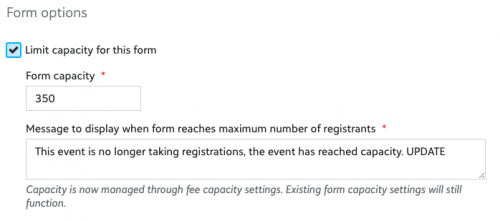
We are not removing this Event Capacity field on the event record, it will still remain. However, it is important to note that this field is only informational. Event Capacity will not prevent registrants from signing up for the event using an Event Registration Form. Nor will the Event Capacity limit the overall number of participant records that can be added to the event.
The field we are removing is Form Capacity. It only offered a per form maximum of registrants and the way it calculated registrants did not meet most customers needs.
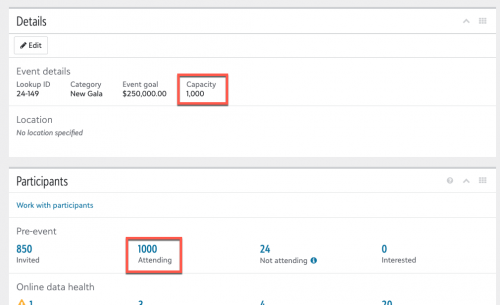
Regarding your use case, would tying the Event Capacity field to the # Attending in the Participants tile potentially address the issue?
For example, if the Event Capacity field was set to 1000 and the # Attending reached 1000 then all registration forms would no longer accept registrations and no additional participants could be added or marked as Attending in the back-office.
 0
0 -
I am aware that the previous option was “per form” based, and we were working with it knowing that fact.
What you suggest I think is a better option, allowing the Event's property of Capacity be the limit for online registration form to stop. If not already obvious, we should be allow to config the message that get displayed on the registration form to visitor. The “sold out” message I think should be recorded on the registration form, but “can” also make sense to be on the event record, though if on event record, will have a larger implication on the event object from web to API.
Also, the event property of Capacity should NOT stop someone that is a user of RE NXT to register a constituent to the event, a warning message (like one in the dbview) should be display instead (if not already working like this).
0 -
@Tanya Fitzgerald any update on this, this change of capacity on fee level and removal from event form level is preventing us moving forward to use RE NXT Event registration form. @Erik Leaver anything you can do to help push this a bit?
0 -
Hi@Alex Wong! I've added the ability to limit the overall event capacity to our roadmap, but I don't have an ETA at this time. I will be sure to update you once we start working on it.
CC @Tanya Fitzgerald @Erik Leaver0 -
thank you
0 -
I agree with @Alex Wong , that the new fee capacities are not helpful to our event. With our golf tournament, we are unsure who is going to register as an individual and who is going to register as a team making it tricky to set limits on either.
Also, if I'm reading this correctly, I will be unable to enter individuals or teams over the capacity? This is also unhelpful as we track cash and cheque payments outside of the online registration form.
Setting form capacity gave me the flexibility to manage online registrations and my data-entry to stay within the tournament's total capacity.
0 -
@Tanya Fitzgerald Can you please address this issue? The change is making event management more difficult for our organization, as now we cannot set a ticket limit at the event level with teeth. While we understand how a fee-level limit could be useful as well, it makes no sense to remove the form-level limit. Our request is that you either reinstate the form-level limit or have the event capacity number enforce the limit by prohibiting total event registrations beyond that number. Thank you.
0 -
@Marc Friedman @Allison Reville I serve as the product manager for RENXT Events and wanted to share some information and ask a question.
We removed the previous form level capacity because it was counting registrations and not the actual number of people attending. This led to confusion and problems with events being oversold.
The current fee-level capacity management allows you to ensure each fee is not oversold via registration forms or in back office if a limit is set. However, I understand that if an event can have 100 people and tickets are sold individually and in groups of 2 or more, then there is no way to know how many of each fee will be sold.
We have plans to add the ability to set an overall event capacity limit in the future, but I don't have an ETA at this time. For example, if you could enforce an event capacity of 100 people and not have to set a limit per fee would this meet your event needs?
0 -
@Kimberly Hammer Thanks for the quick response and update. That makes sense why the form-level limit was creating confusion.
Yes, a top-level enforceable event capacity would meet our needs. Additionally, it would be helpful for when an event is full to have some control over the messaging on the form and potentially have support for an alternate waitlist registration.
0 -
We contacted support back in October 2024 to complain about this issue because this “enhanced” capacity event management does not work at all for us. We have a set total event capacity of 150 seats in auditorium but we do not have each price point limited to a specific capacity. We cannot predict who will pay at member price vs non member price. The only think we can limit is the total capacity of the event. We encountered several issues since the capacity feature change (overbooking or underselling). It is not operationally sustainable. Please add a total capacity for the event not matter the price points. It was working well before. You have to have this feature! Thank you. An ETA when available would be most helpful.
0 -
@Kimberly Hammer Thanks for the response and update.
Yes, event capacity would be more helpful than fee capacity.
0













Categories
- All Categories
- 6 Blackbaud Community Help
- 211 bbcon®
- 1.4K Blackbaud Altru®
- 403 Blackbaud Award Management™ and Blackbaud Stewardship Management™
- 1.2K Blackbaud CRM™ and Blackbaud Internet Solutions™
- 15 donorCentrics®
- 360 Blackbaud eTapestry®
- 2.6K Blackbaud Financial Edge NXT®
- 658 Blackbaud Grantmaking™
- 579 Blackbaud Education Management Solutions for Higher Education
- 3.2K Blackbaud Education Management Solutions for K-12 Schools
- 943 Blackbaud Luminate Online® and Blackbaud TeamRaiser®
- 84 JustGiving® from Blackbaud®
- 6.7K Blackbaud Raiser's Edge NXT®
- 3.8K SKY Developer
- 250 ResearchPoint™
- 120 Blackbaud Tuition Management™
- 165 Organizational Best Practices
- 241 Member Lounge (Just for Fun)
- 34 Blackbaud Community Challenges
- 37 PowerUp Challenges
- 3 (Open) PowerUp Challenge: Grid View Batch
- 3 (Closed) PowerUp Challenge: Chat for Blackbaud AI
- 3 (Closed) PowerUp Challenge: Data Health
- 3 (Closed) Raiser's Edge NXT PowerUp Challenge: Product Update Briefing
- 3 (Closed) Raiser's Edge NXT PowerUp Challenge: Standard Reports+
- 3 (Closed) Raiser's Edge NXT PowerUp Challenge: Email Marketing
- 3 (Closed) Raiser's Edge NXT PowerUp Challenge: Gift Management
- 4 (Closed) Raiser's Edge NXT PowerUp Challenge: Event Management
- 3 (Closed) Raiser's Edge NXT PowerUp Challenge: Home Page
- 4 (Closed) Raiser's Edge NXT PowerUp Challenge: Standard Reports
- 4 (Closed) Raiser's Edge NXT PowerUp Challenge: Query
- 798 Community News
- 3K Jobs Board
- 55 Blackbaud SKY® Reporting Announcements
- 47 Blackbaud CRM Higher Ed Product Advisory Group (HE PAG)
- 19 Blackbaud CRM Product Advisory Group (BBCRM PAG)