Creating an Effective Welcome Series for New Donors Using Workflow Designer





.
Step 1: Define Your Goals
.
Before diving into the technical setup, it's essential to outline the goals of your welcome series. Common objectives include:
- Expressing gratitude: Thank donors for their support.
- Introducing your organization: Share your mission, vision, and impact.
- Encouraging further engagement: Invite donors to follow your social media, subscribe to newsletters, or attend events.
- Gathering feedback: Ask for their preferences and interests to tailor future communications.
Step 2: Plan Your Welcome Series
.
Decide on the number of emails and the content for each.
- Timing: The first message should be sent as soon as the triggering event happens. The timing of messages should be balanced so as not to overwhelm the reader.
- Content: The content should focus on a few key elements proving why a relationship with your organization is worth continuing. Some elements you may want to include are:
- Welcome: A warm thank you and introduction to your organization.
- Impact Story: Share a story that highlights the difference their donation makes.
- Engagement Invitation: Encourage them to connect on social media or attend an event.
- Feedback Request: Ask for their input on how they’d like to hear from you.
- Expectations: Set expectations and set the tone for the future of the relationship. This may include a message from a program recipient or VIP.
Step 3: Create Your Email Content
- Under Marketing > Email, Create your emails for the series. Make sure to set the purpose on the Finalize your email tab to “Use this email for a workflow” – this will make it available in Workflow Designer. Also be sure to select the Email address type you wish to send the welcome series to.
- You also have the option on the Finalize your email tab to send test emails to yourself and colleagues to check for any issues with formatting, links, or personalization before you set up your Workflow.
- Message Goals: The welcome series has an overarching goal of building engagement, but each message in the series should also have a goal. Breaking the content into manageable parts with clear goals in mind will keep you focused as you create content.
- Repeat Important Information: Recipients may not read the entire email, don't be afraid to include your most important information in more than one of the emails in the welcome series for emphasis and reinforcement.
- Design Elements: When creating the content for your welcome series, plan for these specific design elements for visual appeal and readability such as graphics, photos with captions, white space, calls to action, sidebars, responsive design, and bullet points.
Step 4: Set Up Workflow Designer
.
Log in to your Blackbaud account and navigate to Tools then Workflow Designer. Here’s how to set up your welcome series:
- Create a New Workflow: Start by clicking on New Workflow to create a workflow and name it appropriately, such as New Donor Welcome Series.
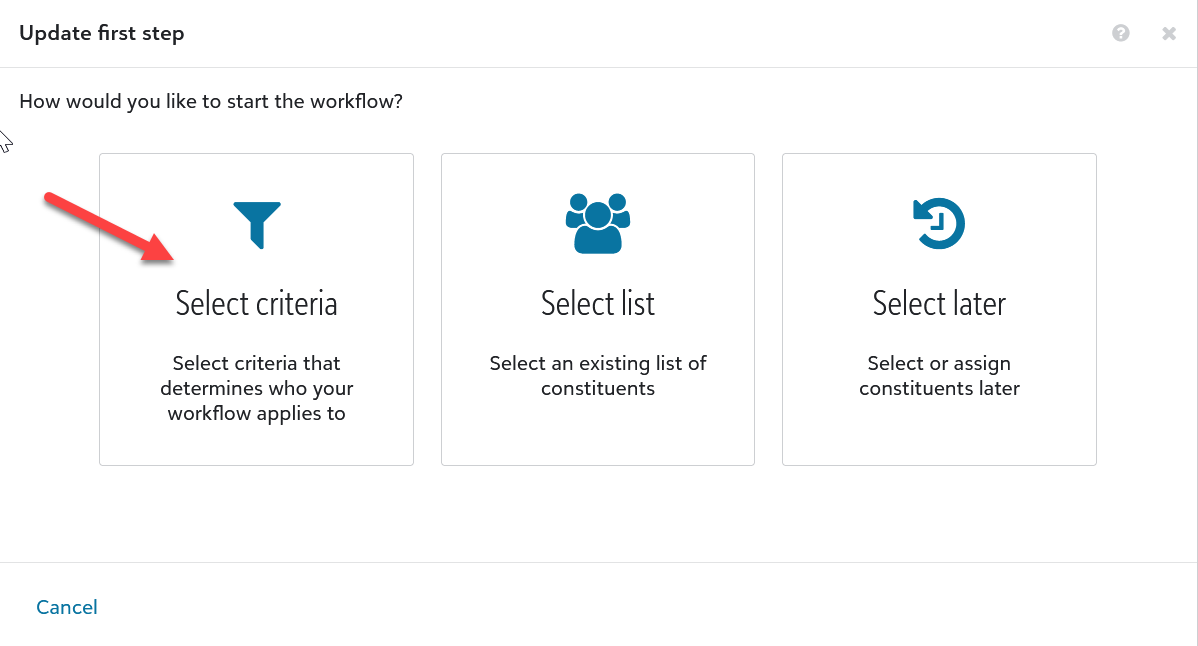
- Under How would you like to start the workflow click on Select criteria.
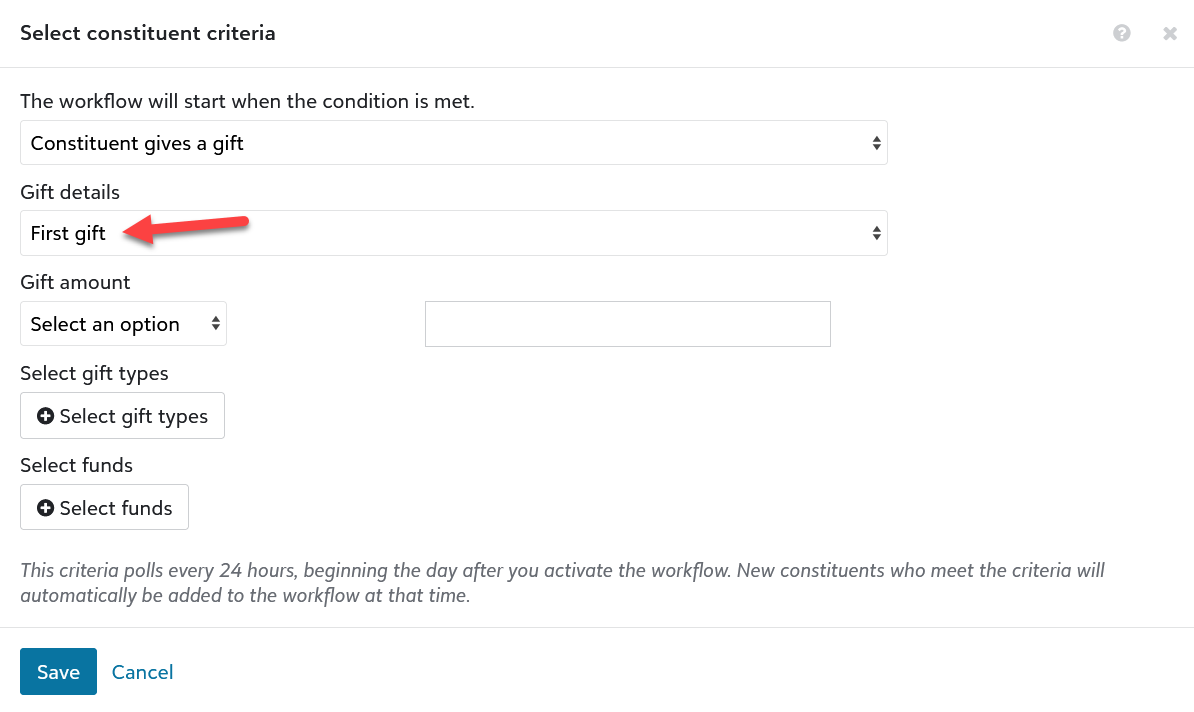
- On the Select constituent criteria screen select First Gift under the Gift details menu, make any other selections, and click Save.
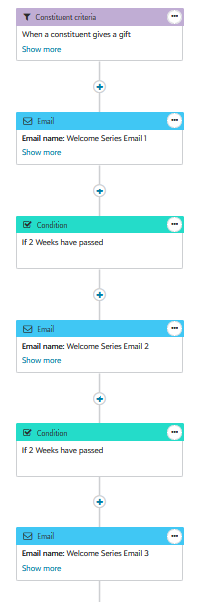
- Click on the plus sign under the Constituent criteria box and select Add an email. Select the first email for your welcome series and click on Select email.
- Click on the plus sign under that email and select Add a condition. Mark the box next to Wait and choose how many days or weeks you want to wait before the next email is sent out.
- Click on the plus sign under the Condition and select Add an email to select the next email in the series. Repeat those steps until all your emails and waiting periods in between them have been entered.
- Once the Workflow is complete, click on Activate workflow to make your new Welcome Series live.


.
Creating a welcome series using Raiser's Edge NXT Workflow Designer is a powerful way to engage new donors and build strong relationships from the start. By following these steps, you can ensure that new donors feel appreciated and connected to your mission, setting the stage for long-term support.
Feel free to share your experiences or ask questions in the comments below. Happy fundraising!
Comments
-
Thank you for laying out all the steps so clearly Amanda!
0 -
Is there a way to send a welcome series but have the trigger be manual rather than automatic? As in, we could build a static list each month and start the welcome series there?
0 -
You can build a list and base a workflow on a list. I wouldn't recommend doing it on a monthly basis for a new donor welcome series as that would give donors at the beginning of the month potentially a whole month until they start receiving the welcome series. Ideally we want to engage them right away after they donate.
But after you select the list option, on the next window that opens, there is a box that is labeled “Apply workflow to new constituents added to this list” if you leave that unmarked then the workflow will treat the List as static and only apply to the people who were in the list at the time the workflow was activated.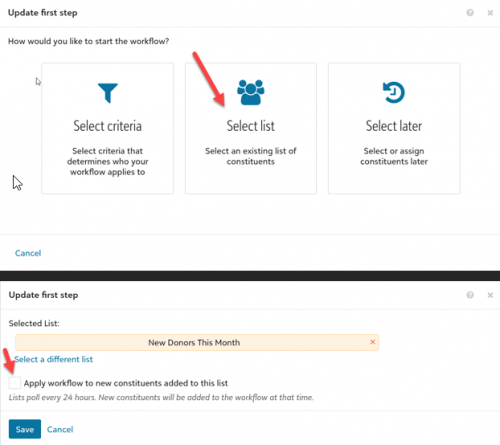 0
0 -
Thanks for this Amanda, I created a new donor journey following your steps however it hasn't picked up my test donor. Below it was I have set up, it is active and the test donor gave exactly £1, they were not on our database until this donation. Do you have any ideas as to why the workflow hasn't picked them up?
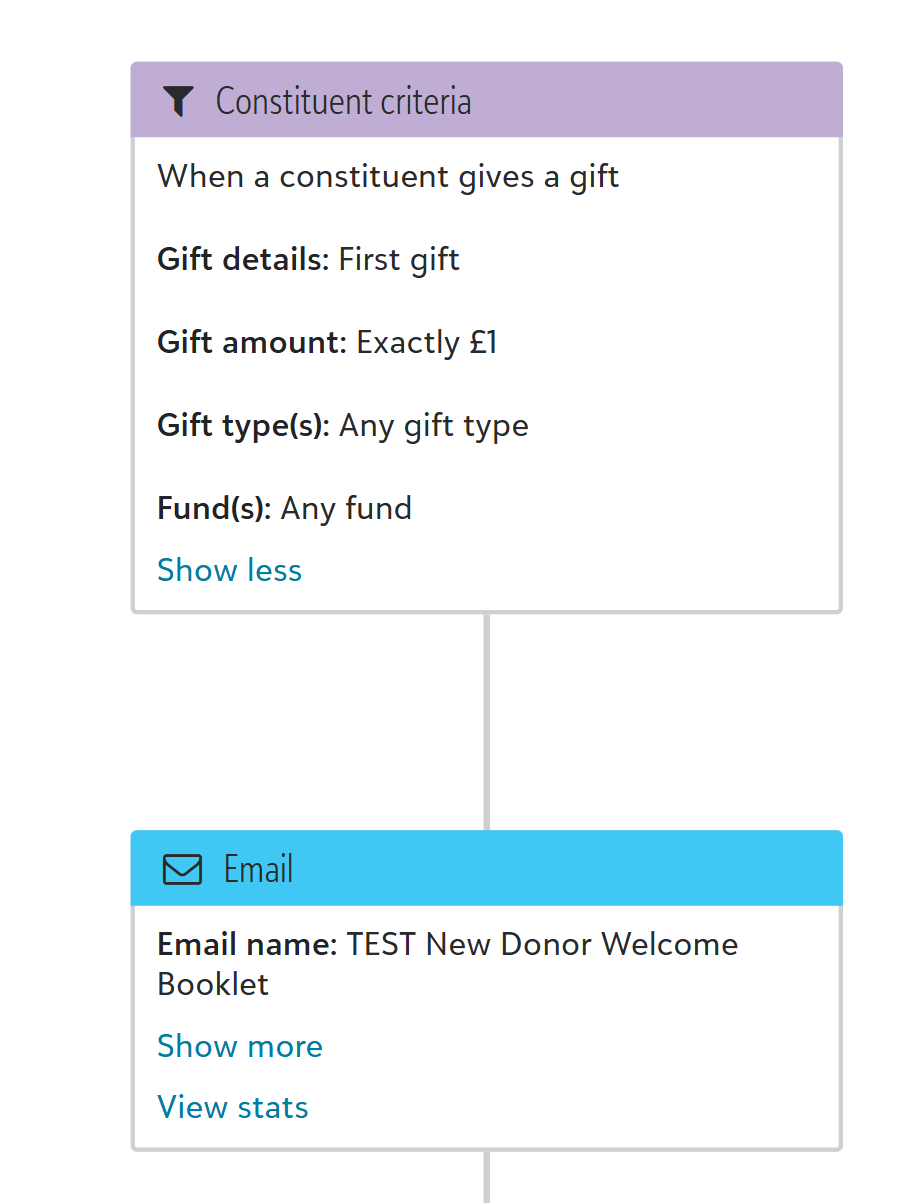 0
0 -
Hi! I followed these steps as well and it has not sent to my test donors either. Any advice?
0









Categories
- All Categories
- 6 Blackbaud Community Help
- 211 bbcon®
- 1.4K Blackbaud Altru®
- 403 Blackbaud Award Management™ and Blackbaud Stewardship Management™
- 1.2K Blackbaud CRM™ and Blackbaud Internet Solutions™
- 15 donorCentrics®
- 360 Blackbaud eTapestry®
- 2.6K Blackbaud Financial Edge NXT®
- 658 Blackbaud Grantmaking™
- 579 Blackbaud Education Management Solutions for Higher Education
- 3.2K Blackbaud Education Management Solutions for K-12 Schools
- 943 Blackbaud Luminate Online® and Blackbaud TeamRaiser®
- 84 JustGiving® from Blackbaud®
- 6.7K Blackbaud Raiser's Edge NXT®
- 3.8K SKY Developer
- 250 ResearchPoint™
- 120 Blackbaud Tuition Management™
- 165 Organizational Best Practices
- 241 Member Lounge (Just for Fun)
- 36 Blackbaud Community Challenges
- 37 PowerUp Challenges
- 3 (Open) PowerUp Challenge: Grid View Batch
- 3 (Closed) PowerUp Challenge: Chat for Blackbaud AI
- 3 (Closed) PowerUp Challenge: Data Health
- 3 (Closed) Raiser's Edge NXT PowerUp Challenge: Product Update Briefing
- 3 (Closed) Raiser's Edge NXT PowerUp Challenge: Standard Reports+
- 3 (Closed) Raiser's Edge NXT PowerUp Challenge: Email Marketing
- 3 (Closed) Raiser's Edge NXT PowerUp Challenge: Gift Management
- 4 (Closed) Raiser's Edge NXT PowerUp Challenge: Event Management
- 3 (Closed) Raiser's Edge NXT PowerUp Challenge: Home Page
- 4 (Closed) Raiser's Edge NXT PowerUp Challenge: Standard Reports
- 4 (Closed) Raiser's Edge NXT PowerUp Challenge: Query
- 798 Community News
- 3K Jobs Board
- 56 Blackbaud SKY® Reporting Announcements
- 47 Blackbaud CRM Higher Ed Product Advisory Group (HE PAG)
- 19 Blackbaud CRM Product Advisory Group (BBCRM PAG)