Pro tips for associating awards with a group

Derek Nichols
Blackbaud Employee




This month, we launched a small feature that we thought could use a little extra explanation: the ability to associate a student award with a group. With this feature, you can specify on student records and transcripts that an award was related to the student’s performance in a specific class, sport, activity, or advisory group.
This setting is optional, and it associates awards with groups in the same way that the old Manage Awards page did. If you select an Academic, Activity, Advisory, or Athletics group, then it becomes a part of the award for that student. If you select a Dorm group, that dormitory will not be associated with the award; the Dorm group simply functions as a filter to search for a student.
Here’s how it works. While in Academics, go to Grades and select Grades management. To record an award for a student, you can either stay on the Overview tab and select + Record award (if that option is available to you) or go to the Manage awards tab and select Record award.
Either way, you will see a modal that looks like this:
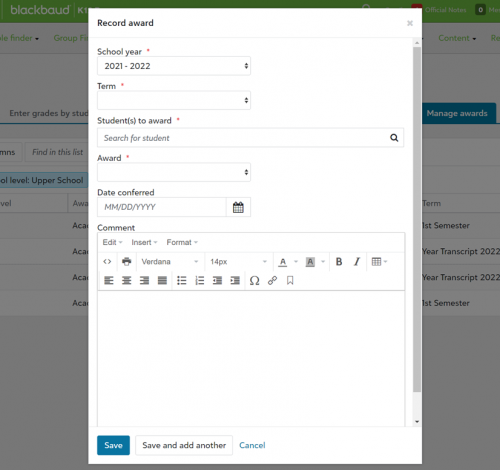
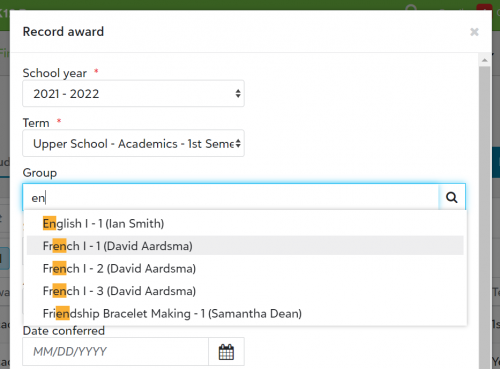
You will notice that the Group menu does not appear yet. You should start from the first dropdown menu and work your way down. Once you have chosen a School year and Term, the Group search bar will appear. Start typing the name of the appropriate group until it appears, then choose it.
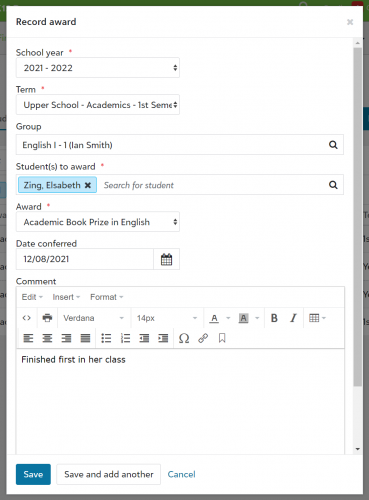
The Group setting is optional, but the Student(s) to award and Award fields are still required. You can also add a Date conferred and Comment (both optional), then select Save or Save and add another. The award is now assigned to the student, and the record of the award will show that it was associated with the group you chose.
That’s all for this week. If you have any tips to share or feedback on how we can improve this feature, sound off in the comments below.
This setting is optional, and it associates awards with groups in the same way that the old Manage Awards page did. If you select an Academic, Activity, Advisory, or Athletics group, then it becomes a part of the award for that student. If you select a Dorm group, that dormitory will not be associated with the award; the Dorm group simply functions as a filter to search for a student.
Here’s how it works. While in Academics, go to Grades and select Grades management. To record an award for a student, you can either stay on the Overview tab and select + Record award (if that option is available to you) or go to the Manage awards tab and select Record award.
Either way, you will see a modal that looks like this:

You will notice that the Group menu does not appear yet. You should start from the first dropdown menu and work your way down. Once you have chosen a School year and Term, the Group search bar will appear. Start typing the name of the appropriate group until it appears, then choose it.

The Group setting is optional, but the Student(s) to award and Award fields are still required. You can also add a Date conferred and Comment (both optional), then select Save or Save and add another. The award is now assigned to the student, and the record of the award will show that it was associated with the group you chose.

That’s all for this week. If you have any tips to share or feedback on how we can improve this feature, sound off in the comments below.
3
Comments
-
Linking awards to specific groups is a thoughtful addition that adds more context to student achievements. It’s great to see how a student’s success in a particular class or activity can now be highlighted more clearly. This kind of transparency helps both students and educators track performance and growth more meaningfully. On a related note, if you're into football and enjoy tracking performance in real time,
offers an incredible football livescore experience. It’s a perfect way to stay updated with detailed stats, team form, and live match updates from around the world.
0



Categories
- All Categories
- 6 Blackbaud Community Help
- 211 bbcon®
- 1.4K Blackbaud Altru®
- 403 Blackbaud Award Management™ and Blackbaud Stewardship Management™
- 1.2K Blackbaud CRM™ and Blackbaud Internet Solutions™
- 15 donorCentrics®
- 360 Blackbaud eTapestry®
- 2.6K Blackbaud Financial Edge NXT®
- 658 Blackbaud Grantmaking™
- 579 Blackbaud Education Management Solutions for Higher Education
- 3.2K Blackbaud Education Management Solutions for K-12 Schools
- 943 Blackbaud Luminate Online® and Blackbaud TeamRaiser®
- 84 JustGiving® from Blackbaud®
- 6.7K Blackbaud Raiser's Edge NXT®
- 3.8K SKY Developer
- 250 ResearchPoint™
- 120 Blackbaud Tuition Management™
- 165 Organizational Best Practices
- 241 Member Lounge (Just for Fun)
- 36 Blackbaud Community Challenges
- 37 PowerUp Challenges
- 3 (Open) PowerUp Challenge: Grid View Batch
- 3 (Closed) PowerUp Challenge: Chat for Blackbaud AI
- 3 (Closed) PowerUp Challenge: Data Health
- 3 (Closed) Raiser's Edge NXT PowerUp Challenge: Product Update Briefing
- 3 (Closed) Raiser's Edge NXT PowerUp Challenge: Standard Reports+
- 3 (Closed) Raiser's Edge NXT PowerUp Challenge: Email Marketing
- 3 (Closed) Raiser's Edge NXT PowerUp Challenge: Gift Management
- 4 (Closed) Raiser's Edge NXT PowerUp Challenge: Event Management
- 3 (Closed) Raiser's Edge NXT PowerUp Challenge: Home Page
- 4 (Closed) Raiser's Edge NXT PowerUp Challenge: Standard Reports
- 4 (Closed) Raiser's Edge NXT PowerUp Challenge: Query
- 798 Community News
- 3K Jobs Board
- 56 Blackbaud SKY® Reporting Announcements
- 47 Blackbaud CRM Higher Ed Product Advisory Group (HE PAG)
- 19 Blackbaud CRM Product Advisory Group (BBCRM PAG)