Bulk-adding Students To Diploma Tracks

Derek Nichols
Blackbaud Employee




Bulk uploading certainly makes life easier, especially when working with data or groups of individuals. With that in mind, lets go over how life is now easier for diploma managers and other faculty.As a diploma manager, you can associate a diploma with multiple students at once. We launched this feature earlier in the year, enabling you to start a group of students using graduation requirements.
There are a few scenarios in which you might find this tool helpful. For example, if your school is setting up graduation requirements via Blackbaud Education Management for the first time, you can use the bulk-add feature to place multiple students on a diploma track at once. You might also use this feature at the start of a new academic year to place a class of incoming freshmen on a diploma track, rather than setting them up one at a time.
In today’s blog post, we’ll walk you through the steps of associating a diploma with students in bulk. For more information about setting up diplomas, enabling diploma managers, and adding diploma requirements, see the help topic Diplomas in our online help.
To get started, make sure you are in Academics and logged in as a user with the Diploma Manager role. Select Grades, then Grades management. The Overview tab will open by default.
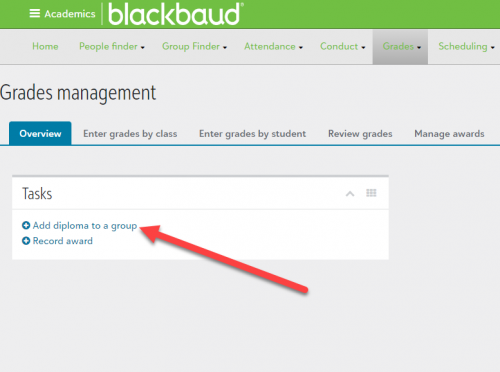
Select + Add diploma to a group. This will open a new set of menu options.
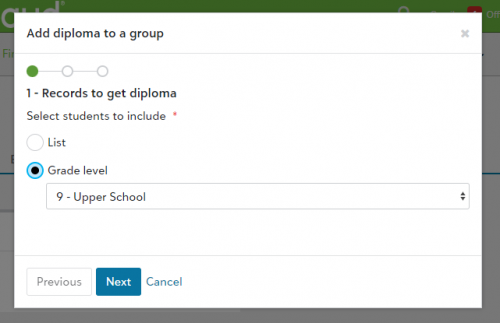
Choose which type of category you will use to select students:
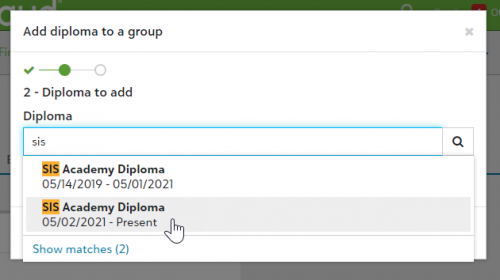
Use the search bar to select a Diploma to associate with the students. Select Next.
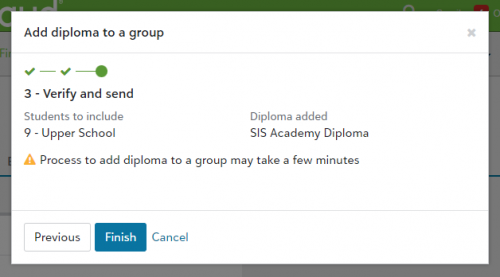
The final step is a verification check. Once you have confirmed that the selected students and the name of the diploma are accurate, select Finish. A notification will appear at the bottom right of your browser window indicating that the process has begun.
When the process is complete, the diploma you selected will be applied to students in the grade or list you selected. The students can now apply credits toward completion of the diploma.
For more information and step-by-step instructions, check out the help topics Diplomas, Requirements, and Diploma Audit.
There are a few scenarios in which you might find this tool helpful. For example, if your school is setting up graduation requirements via Blackbaud Education Management for the first time, you can use the bulk-add feature to place multiple students on a diploma track at once. You might also use this feature at the start of a new academic year to place a class of incoming freshmen on a diploma track, rather than setting them up one at a time.
In today’s blog post, we’ll walk you through the steps of associating a diploma with students in bulk. For more information about setting up diplomas, enabling diploma managers, and adding diploma requirements, see the help topic Diplomas in our online help.
To get started, make sure you are in Academics and logged in as a user with the Diploma Manager role. Select Grades, then Grades management. The Overview tab will open by default.

Select + Add diploma to a group. This will open a new set of menu options.

Choose which type of category you will use to select students:
- List: Select an existing Student List.
- Grade level: Select one of the grade levels at your school.

Use the search bar to select a Diploma to associate with the students. Select Next.

The final step is a verification check. Once you have confirmed that the selected students and the name of the diploma are accurate, select Finish. A notification will appear at the bottom right of your browser window indicating that the process has begun.
When the process is complete, the diploma you selected will be applied to students in the grade or list you selected. The students can now apply credits toward completion of the diploma.
For more information and step-by-step instructions, check out the help topics Diplomas, Requirements, and Diploma Audit.
0
Comments
-
When will the Process Credits Toward Requirements be available to do in bulk? It is too time consuming to have to manually process credits for each individual student at the end of each semester/year.
0 -
When diplomas are added in bulk, they are also processed as part of that action. When updates are made to a student that would affect an already assigned diploma, the diploma should get processed next time the Requirements tab is loaded. If you are finding cases where this isn't happening, please connect with Support and let us know.
0







Categories
- All Categories
- 6 Blackbaud Community Help
- 211 bbcon®
- 1.4K Blackbaud Altru®
- 402 Blackbaud Award Management™ and Blackbaud Stewardship Management™
- 1.1K Blackbaud CRM™ and Blackbaud Internet Solutions™
- 15 donorCentrics®
- 360 Blackbaud eTapestry®
- 2.6K Blackbaud Financial Edge NXT®
- 655 Blackbaud Grantmaking™
- 576 Blackbaud Education Management Solutions for Higher Education
- 3.2K Blackbaud Education Management Solutions for K-12 Schools
- 940 Blackbaud Luminate Online® and Blackbaud TeamRaiser®
- 84 JustGiving® from Blackbaud®
- 6.7K Blackbaud Raiser's Edge NXT®
- 3.7K SKY Developer
- 248 ResearchPoint™
- 120 Blackbaud Tuition Management™
- 165 Organizational Best Practices
- 240 Member Lounge (Just for Fun)
- 34 Blackbaud Community Challenges
- 37 PowerUp Challenges
- 3 (Open) PowerUp Challenge: Grid View Batch
- 3 (Closed) PowerUp Challenge: Chat for Blackbaud AI
- 3 (Closed) PowerUp Challenge: Data Health
- 3 (Closed) Raiser's Edge NXT PowerUp Challenge: Product Update Briefing
- 3 (Closed) Raiser's Edge NXT PowerUp Challenge: Standard Reports+
- 3 (Closed) Raiser's Edge NXT PowerUp Challenge: Email Marketing
- 3 (Closed) Raiser's Edge NXT PowerUp Challenge: Gift Management
- 4 (Closed) Raiser's Edge NXT PowerUp Challenge: Event Management
- 3 (Closed) Raiser's Edge NXT PowerUp Challenge: Home Page
- 4 (Closed) Raiser's Edge NXT PowerUp Challenge: Standard Reports
- 4 (Closed) Raiser's Edge NXT PowerUp Challenge: Query
- 796 Community News
- 3K Jobs Board
- 54 Blackbaud SKY® Reporting Announcements
- 47 Blackbaud CRM Higher Ed Product Advisory Group (HE PAG)
- 19 Blackbaud CRM Product Advisory Group (BBCRM PAG)