Following and Subscribing to Categories/Content






There are a variety of ways that your community experience can be personalized based on the content you follow and the notifications you’ve set. For example, you’ll see followed content on your community home page.
Following Discussion and Blog Categories
Following discussions and blogs helps personalize your community experience and will surface the content you care about as you navigate around the site, including on your home page.
Following does NOT subscribe you to notifications, however, so it's important to make sure to subscribe to any discussion forums or product blogs you'd like to stay up to date with (see the next section in this article).
Note - If you are a Blackbaud customer, your account has automatically been assigned to follow the product categories associated with the products your organization owns. You can easily edit these or follow any additional categories by following the below instructions.
Following New Categories
- Navigate to the discussion area or blog you’d like to follow.
- Click the “follow” bell to subscribe to that discussion area or blog. You’ll also see a pop-up option to set notification preferences as well. Note that simply following a category does not set up in-platform or email notifications.

Editing Followed Categories
If you’d like to unfollow a specific category, you can do so in two ways:
- Click the Unfollow button on the revelant discussion or blog category page.
- Manage from your profile
- Click on your profile photo or image in the top right corner, then Account & Privacy Settings
- Click on the Followed Content link in the list on the right side of the page
- Click on the bell next to a category name to change follow and notification preferences
You will see a pop up for your notification preferences:

You can set your preferences for notifications for new comments, new posts, or new or updated events. You can always change these later in your notification preferences.
Setting and Managing Content Notifications
Setting up notifications is critical if you’d like to get email updates about new discussion posts, new product blogs, direct messages from other community members, or more. There are a few ways you can set up or edit notifications:
- From the discussion or blog category page: Clicking on the Follow button on the relevant page will surface a pop-up that will allow you to choose how you’d like to be notified.

- From the Followed Content page (under Account & Privacy settings): Click on the bell next to the category you’d like to set or change notification preferences for
- From the Notification Preferences page (under Account & Privacy settings) : Manage notifications for all types of community activity, including for private messages, your posts, earning new badges, and more.
When setting notifications, you’ll have the ability to select if you’d like to be notified via email, on the platform, or both.
NOTE: As notifications are sent when content is posted, for discussions we recommend selecting “Notify me of new posts” and “Notify me of new or updated events” but not
“Notify me of new comments.” You can separately select to receive notifications for comments only on the discussions you start on the Notification Preferences page.
Managing Email Digest Notifications
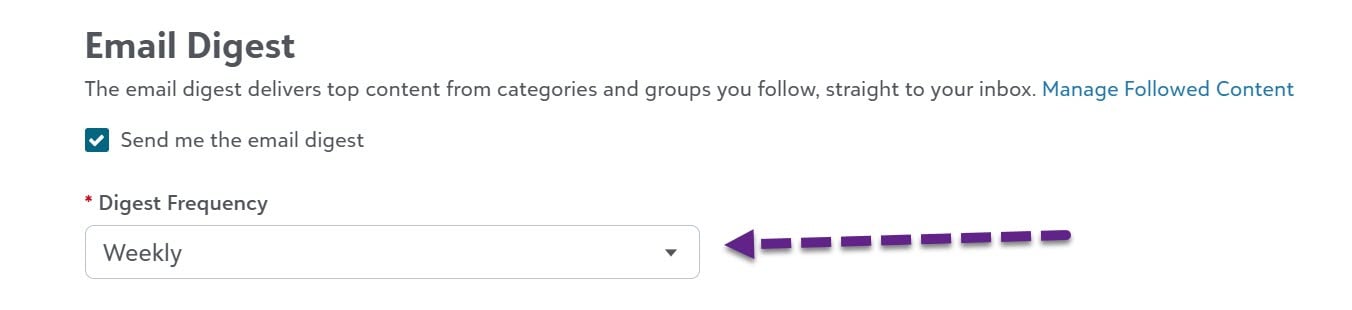
By default, community members will receive a weekly digest featuring top content. If you’d like to change the frequency to daily or monthy, or unsubscribe, go to notification preferences (under Account & Privacy settings) and click the box under “Email digest” titled “Send me the email digest.”
Comments
-
Thank you! I need to keep getting the K-12 Education Solutions weekly release notes to my email and I think I set it up correctly.
0 -
@Crystal Bruce I have not been receiving daily digests of my followed content. I've been out of the office, so between preparation and being away, I didn't really notice. I have my settings configured as listed above and nothing has become stuck in quarantine or junk mail as best I can tell. Is there anything else I should try?
0 -
I've been getting next to no emails since platform was down for update. From what I can see I'm 'following' things. Nothing in junk folder either.
Like Karen I've been out of office for several days and quite busy catching up. But wondering if everyone converted to Fb instead. :)
1 -
Me too. I just sent a message to my Community Manager asking for assistance.
0 -
@Karen Diener are you still finding that you are not receiving daily updates? I checked your settings and confirmed you have it set for daily. Thanks!
0 -
@JoAnn Strommen I see you have yours set at weekly, did you want daily?
 0
0 -
I just changed it to daily this morning, so will have a better sense tomorrow morning. Thanks for responding!
1










Categories
- All Categories
- 6 Blackbaud Community Help
- 211 bbcon®
- 1.4K Blackbaud Altru®
- 403 Blackbaud Award Management™ and Blackbaud Stewardship Management™
- 1.2K Blackbaud CRM™ and Blackbaud Internet Solutions™
- 15 donorCentrics®
- 360 Blackbaud eTapestry®
- 2.6K Blackbaud Financial Edge NXT®
- 659 Blackbaud Grantmaking™
- 579 Blackbaud Education Management Solutions for Higher Education
- 3.2K Blackbaud Education Management Solutions for K-12 Schools
- 943 Blackbaud Luminate Online® and Blackbaud TeamRaiser®
- 84 JustGiving® from Blackbaud®
- 6.7K Blackbaud Raiser's Edge NXT®
- 3.8K SKY Developer
- 250 ResearchPoint™
- 120 Blackbaud Tuition Management™
- 165 Organizational Best Practices
- 241 Member Lounge (Just for Fun)
- 36 Blackbaud Community Challenges
- 37 PowerUp Challenges
- 3 (Open) PowerUp Challenge: Grid View Batch
- 3 (Closed) PowerUp Challenge: Chat for Blackbaud AI
- 3 (Closed) PowerUp Challenge: Data Health
- 3 (Closed) Raiser's Edge NXT PowerUp Challenge: Product Update Briefing
- 3 (Closed) Raiser's Edge NXT PowerUp Challenge: Standard Reports+
- 3 (Closed) Raiser's Edge NXT PowerUp Challenge: Email Marketing
- 3 (Closed) Raiser's Edge NXT PowerUp Challenge: Gift Management
- 4 (Closed) Raiser's Edge NXT PowerUp Challenge: Event Management
- 3 (Closed) Raiser's Edge NXT PowerUp Challenge: Home Page
- 4 (Closed) Raiser's Edge NXT PowerUp Challenge: Standard Reports
- 4 (Closed) Raiser's Edge NXT PowerUp Challenge: Query
- 798 Community News
- 3K Jobs Board
- 56 Blackbaud SKY® Reporting Announcements
- 47 Blackbaud CRM Higher Ed Product Advisory Group (HE PAG)
- 19 Blackbaud CRM Product Advisory Group (BBCRM PAG)