Batch Happens: High-Speed Gift Entry in Blackbaud Raiser’s Edge NXT®





Grid View Batch is rolling out in waves, and we know you’re eager to dive in. Here’s what’s in it for you: a faster, more efficient way to handle large-scale gift entry. This enhanced interface is designed to save you time and improve accuracy with features like streamlined keyboard navigation, reusable templates, pre-filled default fields, and simplified tools for reviewing and managing individual gifts.
This initial release matches the functionality of current web view capabilities. We’re already working on additional updates to support the complete range of gift-processing workflows.
Key features include:
- Single Grid Display: View and review all gifts in a batch within one streamlined grid layout.
- Faster Entry: Leverage intuitive keyboard navigation for quicker, uninterrupted data entry.
- Customizable Columns: Add, remove, rearrange, and hide columns to configure the grid to match your workflow.
- Locked Status Column: A dedicated status column highlights validation errors in real time, helping you quickly identify and resolve issues.
- Advanced Constituent Search: Search and select constituents using advanced lookup. You can also open and edit constituent records directly from the grid.
- Reusable Templates: Based on your feedback, web view now includes fully managed batch templates. Templates can be created, managed, customized, and reused outside of a batch. Configure default values and column layouts once, then apply them when creating new batches.
Getting Started with Grid View Batch
From the Gift Management Overview page, select Add and choose New Grid Batch. You’ll see the familiar batch creation experience, now enhanced with a template selector.

Enter batch details like a description, the anticipated number of gifts, and the expected total. If templates are available, choose one to streamline your setup with preconfigured columns and defaults. (We’ll explore templates in more depth below). Once created, you’ll jump straight into the grid view experience.
By default, only required fields are visible, helping you stay focused and work faster. You can easily add or remove fields with Configure Columns and rearrange them using simple drag-and-drop functionality.

Streamlined Batch Workflows
Each row is one gift, with built-in validation in the locked status column to guide accuracy. Some important features:
- Tabbing through fields keeps data entry quick and seamless. When you tab past the last column, a new row appears, enabling uninterrupted, efficient entry.
- As you enter a constituent, relevant details appear inline to help you quickly and confidently select the correct record.
- Click the person icon next to the constituent field to open a fly-out. Here, you can easily access the record and make necessary updates.

Additional capabilities include:
- Splitting gifts across fund, appeal, campaign, and package
- Populating fundraiser credits automatically (editable as needed)
- Applying gifts to outstanding pledges (automatically updating gift type)
- Deleting gift rows (when no transactions are associated)
- Using a dynamic scheduler for recurring gifts, the system automatically recognizes the selected gift type and guides you to the appropriate scheduling option.

Grid view batches can also be accessed from the batch list or batch details page by selecting Edit in Grid View.

Templates and Defaults
Batch Templates are designed to simplify your workflow and save time, shaped directly by your feedback. From the Gift Management Overview page, you can easily create, edit, or delete templates by selecting Batch Templates. The setup experience is intuitive and closely mirrors the column configuration process in Grid View Batch.

When creating a new grid batch, applying a template instantly streamlines both structure and default values. Templates affect only newly added rows, ensuring existing gifts remain unchanged.

You can also refine a template, directly within a batch and save it for future use, by choosing Save as Template.

What’s Next for Grid View Batch?
- Additional Fields: Greater flexibility with new fields, like gift code.
- Advanced Workflows: Connect gifts to benefits, opportunities, tributes, matching gifts, events, memberships, and even gift aid—all within a single batch.
- Direct Gift Import into Batch: Centralized staging area that simplifies mass gift entry and enables global field updates for consistency and efficiency.
Ongoing Support and Resources:
We know Grid View Batch has been highly anticipated, so we’ve created a variety of resources to help you build knowledge and get started quickly.
- Introducing High-Speed Batch in Blackbaud Raiser's Edge NXT® Unified View (Webinar with Anthony Gallo, Principal Product Management, and Amanda Elsner, Customer Success) Feb. 25 @ 11 a.m. EST/4 p.m. GMT
- Grid View Batch Town Halls with Principal Product Manager, Anthony Gallo:
- March 4 @ 11 a.m. EST/4 p.m. GMT Blackbaud Raiser’s Edge NXT Town Hall #1: Grid View Batch in Web View (MARCH 4 TOWN HALL IS AT CAPACITY)
- March 25 @ 11 a.m. EST/4 p.m. GMT Blackbaud Raiser’s Edge NXT Town Hall #2: Grid View Batch in Web View
- April 1 @ 11 a.m. EST/4 p.m. GMT Blackbaud Raiser’s Edge NXT Town Hall #3: Grid View Batch in Web View
Note: All Grid View Batch town halls will be the same. We are offering three sessions for flexibility.
- On demand:
This is just the beginning
This release represents the first phase of Grid View Batch in web view. As workflows transition into the unified view, we’ll continue enhancing your experience. While we have a clear roadmap for this development, you may influence it by sharing your ideas through the Idea Bank.
As we continue building complete workflows in web view, all functionality in database view will remain available. As shared during the November Product Update Briefings, database view will stay active until it is fully retired. This means you can confidently learn Grid View Batch in web view while continuing to rely on database view whenever needed.
Comments
-
Hi, we just discovered that you can't apply a batch template to online gift batches, which is an issue for us since we have to edit all of the gifts that are coming in online. It has added a significant amount of time to our daily online gift approval process.
3 -
@Chris Earle This item came in during our early adopter program and that group helped prioritize it to the top of our list. We are working on it now and it should be out by early March. The functionality will allow you to create a template with the fields you want in the order you need and then apply a template to any existing batch. This should shorten the workflow back to where you expect it to be.
7 -
This is good to know @Anthony Gallo, can I ask if this will also be the case for being able to see the supporters latest appeal and the issue that doesn't choose the package that is connected to the appeal but gives you an option of all of them that are named the same? It's really impacting the length of time it's taking to batch gifts and an appeal has just landed for us.
2 -
The latest package option we do not have planned yet but the issue where you see all the packages is something we are working on now. We consider that a bug and it should be resolved in a day or two.
2 -
Great, thank you for your response.
0 -
@Anthony Gallo Is there a limit on registration? I tried to register for the first one and it says the event has reached capacity.
0 -
@Marie Stark the March 4 town hall is at capacity. Teams caps the event at 1,000 attendees. There is still room in the March 25 and April 1 town halls.
1 -
Today's What's new 2/24/2026 state this is "generally available for everyone!" We appear to still only have the batch form available, though we are looking forward to Grid Batch once it is available to us. When should the rest of us who still have not received Grid Batch expect the release?
2 -
Same here!
1 -
@Chris Earle - Can you move gifts from your online gift batch into another batch? We use an API form that batches by day so we are now creating a new batch, appylying a template, then moving the gifts from the automatically created web batch into it. This is faster than selecting and reordering all the columns we need for each web batch. We are also using the Split Gift button as a work around for the package bug because then the search is limited to the packages of the selected appeal.
2 -
Like a couple of others who have posted here, the 02/24/2026 "What's new" is telling me my org should finally have access to the new grid view batch…but we don't. Is there a setting I need to enable? If not, when can we expect the grid view functionality to show up? We have been waiting patiently for grid view since it was previewed during the November '25 PUB!
0 -
We also do not have grid view batch. I have been checking every morning since the beginning of February hoping that today would be the day with no luck. Would love to have an update on when this will be showing up.
0 -
@Catherine Burns - thanks so much for the suggestion! We've explored it a bit and it's definitely a time saver.
0 -
Can we create batch templates that also pre-fill advanced fields like constituent codes, gift codes, and custom fields for faster reporting?
3 -
Yes, you can create templates. I have not seen ability to edit templates so hopefully that is coming too. Hope to be able to change 1 or 2 fields and not have to create so many.
You do have the option for defaults in each batch.
0 -
As a PaperSave user, this is very frustrating. We've been having issues with the batching API for a couple weeks and now that we have lost access to the previous "form view" we can no longer confirm data is flowing into the PaperSave tile correctly before committing a gift. Support has gone silent on our open cases around batching issues and seems unaware of the limitations of grid view batch and "known bugs" that they are working to address.
I was very much looking forward to using the new batching capabilities, but not at the expense of how we have built our functionality and paid-for 3rd party services that expand our capacity. 😞
2 -
Any update on this?
0 -
Almost there. We have the disablement part done but the filtering gave us some trouble. I think we should have this resolved before the week is out.
2 -
We need a look up option for Fund & Appeal. IDs are working, but when searching by name, the "smart" search returns the results in alphabetical order with everything with the search term in the Fund Description, not with the most accurate match. We are a health organization that supports more than 23 facilities across the province, so every one of our 500+ funds has the name of the facility in the name of the fund, plus a designation at the beginning of the Fund Description.
For instance, if the name of the general fund for a facility is "XYZ Hospital," and I search "XYZ Hospital," the top result is "Acute Care at XYZ Hospital" then "Bariatric Surgery at XYZ Hospital" then "Cardiac Unit at XYZ Hospital" and so on until "XYZ Hospital" shows up in alphabetical order. On top of that, you can use the down arrow on the keyboard to select one of the first 3 or so funds, but the menu/list does not scroll up with the down arrow, so even though your cursor is selecting a fund, you can't see what it is without a manual scroll of the mouse.4 -
So excited to see this released!
Can't wait to test a few batches this week. I was able to get in and build some templates after some user error.
0 -
Will you please fix it so you CAN apply a batch template to auto-created batches for online gifts?
Is there a way to bring back the ability to see the most recently assigned appeal?
Why are ALL the packages in the whole world showing up after I've chosen a specific appeal? Why aren't the packages tied to the appeal the only options?
Somehow, I accidentally unchecked "Anonymous" which has never happened before in all my too-many-years-to-mention of gift entry.
I could be wrong, but it seems like the defaults I am selecting in my templates are not applying?
The custom field category I used was in the record after posting, but not the description I chose. And there was an extra random custom field added. The extra random custom field was in all of the gifts I posted, even if I didn't choose a description. I think this needs some work.
I know rolling out a new product is a tremendous amount of work, so I am sending my best.
5 -
Experiencing the same problems as Lee. 😔
3 -
We would like to request an additional functionality. Please allow us to add defaults to Custom Fields in grid batch. We have required Custom Fields on each gift record.
2 -
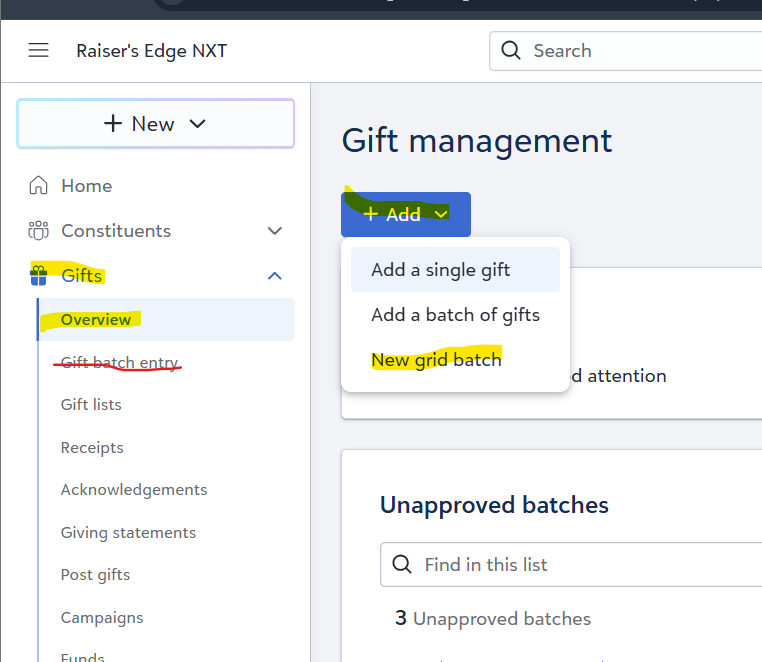
To all the people who can't find grid batch:
It is not where you would expect it to be. Do not look under Gifts>Gift Batch Entry. Look under Gifts>Overview!
 3
3 -
So no longer are we able to process Credit Card payments via BBMS directly into the Batch then? Or am I missing something? Seems to be the case from what we can now see on our side. When editing the Gift Batch to add a Gift, it used to be the case that we could process via BBMS directly into that Batch. Can anyone advise?
1 -
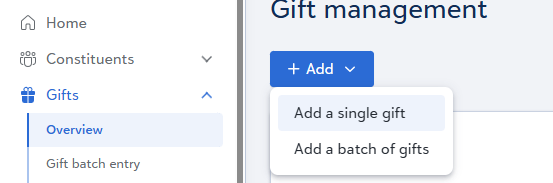
this is really helpful thank you - but also evidences that we still cannot see it 😔
 2
2 -
Where in the user interface of the grid-view can we choose between which previously-created Batch template we wish to have applied to the current view?
(OMG - talking with Support, it seems like you have to 'declare' which Batch template you wish to have applied to a Gift Batch … as each Gift Batch is manually created. Thereafter, Batch template columns are "fixed" on the Gift Batch - one may not rotate-through a series of Batch templates on an existing Gift Batch. But you can manually rearrange the columns on each Gift Batch.
Also, no provision for a default Gift Batch to be applied to any new Gift Batch that gets created. And no provision for Gift Batches created automatically by some external feature like, say, Raiser's Edge's own Online Donation forms. Sheesh. And we bring in Gift Batches through Cloud API via OMatic Cloud, so it looks like there is no opportunity to influence the Gift Batch's Batch template through that pathway.
What we're left with is manually executing the same 25-30 clicks, check and drags to re-arrange the columns on… EACH … and… EVERY Gift Batch we process in NXT web view.
Oh My… can't wait to discuss this with our gift processor. Can't think of a worse strategy for reducing their dependence on database view gift processing than this.
Really hoping I have wrong information or am missing something)
3 -
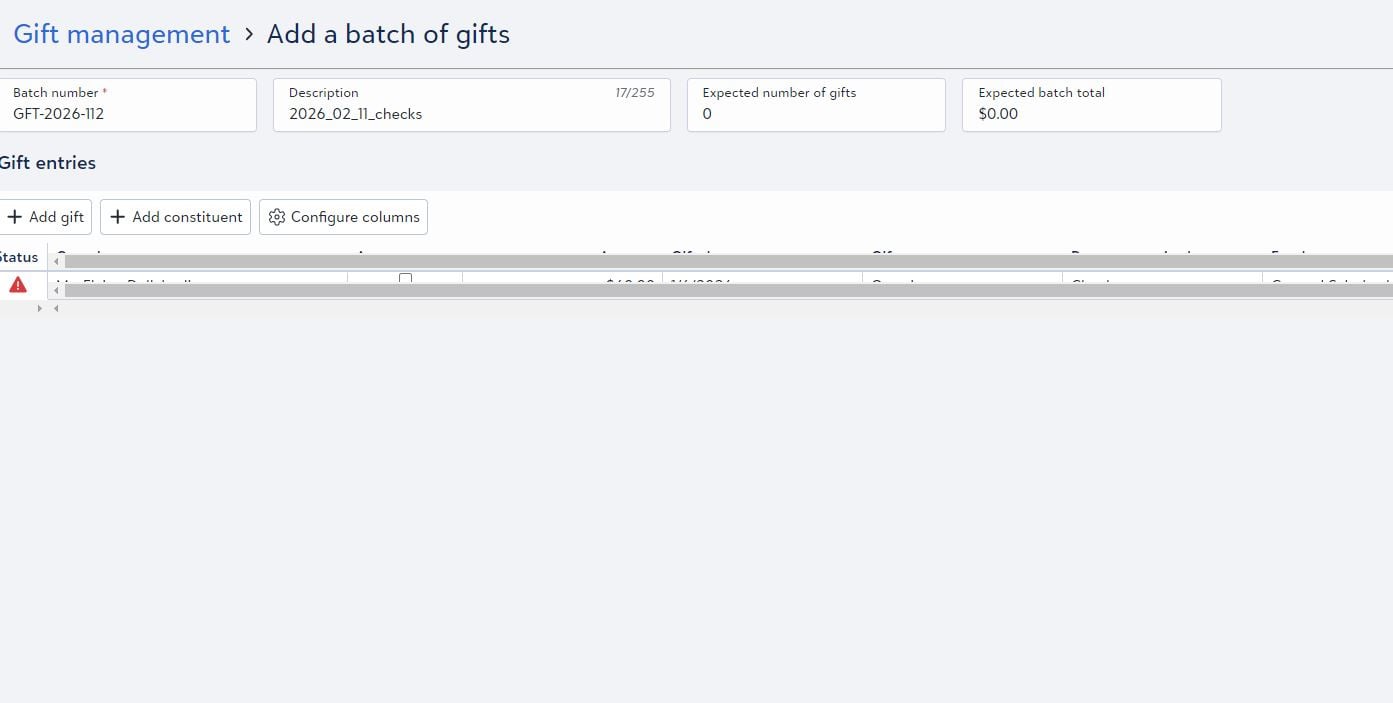
Is this new update affecting the regular gift batch entry tab? And does the update only work with certain operating systems? The desktops in our office are on the older side (Windows 7), and when I try to enter a gift into the batch it comes up looking like a glitch where the scroll bars block the gift entry and I can't enter anything (I've attached an image). However, when I tried it on my phone and my surface pro I was able to see all of the fields. With our account we don't have access to the new grid batch which is fine, I was just wondering if it could be affecting our regular gift entry process since we've never had this issue before? Thanks!
 1
1 -
I use Omatic to create NXT batches. I'm having trouble setting my columns so they're the same every time. I see there is not currently a way to apply a batch template to existing batches… Is there a business rule or setting somewhere so that I can use the same columns every time?
1 -
As per my session with Support this a.m. - no, not at this time.
2
































Categories
- All Categories
- 6 Blackbaud Community Help
- 211 bbcon®
- 1.4K Blackbaud Altru®
- 402 Blackbaud Award Management™ and Blackbaud Stewardship Management™
- 1.1K Blackbaud CRM™ and Blackbaud Internet Solutions™
- 15 donorCentrics®
- 360 Blackbaud eTapestry®
- 2.6K Blackbaud Financial Edge NXT®
- 657 Blackbaud Grantmaking™
- 578 Blackbaud Education Management Solutions for Higher Education
- 3.2K Blackbaud Education Management Solutions for K-12 Schools
- 942 Blackbaud Luminate Online® and Blackbaud TeamRaiser®
- 84 JustGiving® from Blackbaud®
- 6.7K Blackbaud Raiser's Edge NXT®
- 3.8K SKY Developer
- 250 ResearchPoint™
- 120 Blackbaud Tuition Management™
- 165 Organizational Best Practices
- 240 Member Lounge (Just for Fun)
- 34 Blackbaud Community Challenges
- 37 PowerUp Challenges
- 3 (Open) PowerUp Challenge: Grid View Batch
- 3 (Closed) PowerUp Challenge: Chat for Blackbaud AI
- 3 (Closed) PowerUp Challenge: Data Health
- 3 (Closed) Raiser's Edge NXT PowerUp Challenge: Product Update Briefing
- 3 (Closed) Raiser's Edge NXT PowerUp Challenge: Standard Reports+
- 3 (Closed) Raiser's Edge NXT PowerUp Challenge: Email Marketing
- 3 (Closed) Raiser's Edge NXT PowerUp Challenge: Gift Management
- 4 (Closed) Raiser's Edge NXT PowerUp Challenge: Event Management
- 3 (Closed) Raiser's Edge NXT PowerUp Challenge: Home Page
- 4 (Closed) Raiser's Edge NXT PowerUp Challenge: Standard Reports
- 4 (Closed) Raiser's Edge NXT PowerUp Challenge: Query
- 797 Community News
- 3K Jobs Board
- 54 Blackbaud SKY® Reporting Announcements
- 47 Blackbaud CRM Higher Ed Product Advisory Group (HE PAG)
- 19 Blackbaud CRM Product Advisory Group (BBCRM PAG)