Total Gifts Raised question





Hi, We are having a difficulty in simplifying our reporting. For example we have a donor who makes a gift through his company so he is soft credited for the gift. Our gifts raised report does not include soft credits, The reason being is that we have individual's partners coded as getting soft credits so we do not want to include those soft credits in the total. The question is how do we include some soft credits and not.
Thanks
Mark
Comments
-
Hi @Mark Bezanson , I had a similar case, and here's how I solved it using Power BI. I had two queries from RE: one for Hard Credits (Gifts) and another for Soft Credits.
To combine these two, I created two new tables in Power BI that contain the same columns and then applied a JOIN to merge the two tables.
Step 1: Create a Table for Hard Credits
First, I created a new table from the Gifts query (Dim_Gift), extracting the necessary columns for Hard Credits:
Hard Credits =
SELECTCOLUMNS(Dim_Gifts,
"Gift System ID", Dim_Gifts[System Record ID],
"Gift Lookup ID", Dim_Gifts[Gift ID],
"Donor ID", Dim_Gifts[Constituent ID],
"Gift Amount", Dim_Gifts[$ Final Amount],
"Recognition Credit Type", Dim_Gifts[Recognition Credit Type]
)//This table now contains all the information related to Hard Credits from the original Dim_Gift query.
Step 2: Combine Hard Credits and Soft Credits
Next, I joined the Hard Credits table with the Soft Credits query using the UNION function to create a new table that contains both Hard and Soft Credit data. Here's the code for the combined table:
Recognition Credits =
UNION(
SELECTCOLUMNS(
'Hard Credits',
"Gift System ID", 'Hard Credits'[Gift System ID],
"Gift Lookup ID", 'Hard Credits'[Gift Lookup ID],
"Donor ID", 'Hard Credits'[Donor ID],
"Gift Amount", 'Hard Credits'[Gift Amount],
"Recognition Credit Type", 'Hard Credits'[Recognition credit Type]
),
SELECTCOLUMNS(
PBI_SOFT,
"Gift System ID", PBI_SOFT[System Record ID],
"Gift Lookup ID", PBI_SOFT[Gift ID],
"Donor ID", PBI_SOFT[Soft Credit Recipient ID],
"Gift Amount", PBI_SOFT[Soft Credit Amount],
"Recognition Credit Type", PBI_SOFT[Recognition credit Type]
)
)
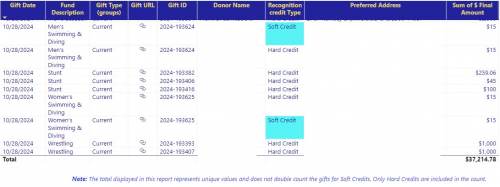
Step 3: Final OutputThe final result is a new table called Recognition Credits, which contains data from both the Hard Credits and Soft Credits queries. The table now includes both types of records and differentiates between them using the Recognition Credit Type column.
The final table looks like this, where you have the same Gift ID and Recognition Credit Type (Hard/Soft)
This way, you can analyze both Hard and Soft Credits in one unified table without losing any data. Hope this helps!
 3
3 -
@Mark Bezanson The only way I've ever gotten close to that was to exclude the spouse and count all soft credits. It's not ideal, but it's closer to what you're trying to do.
1 -
@Mark Bezanson Ongoing issue since before I started using RE. I'm sure there are a number of post in the idea bank on being able to specify what SC to include. Definitely not possible in any canned report - they are all or nothing.
It can be a challenging process. For our lifetime giving we list spouses/partners as one named unit in report/listing so we can include spouse SC.
If you export all your summary gift amounts could you subtract spouse2 HC gifts from spouse1 gift amount? Tedious process.2 -
@Mark Bezanson
Thank you everyone for your suggestions. We will give it a try, Mark1 -
@Mark Bezanson
Hi, from what I see in your post, if I am understanding correctly, you cannot simply use “soft credit” option b/c some soft credit should not be counted, while others should be counted.This (as others said) cannot be done with any default reporting, so custom report is needed, either through Power BI or other visualization tool, or can be done in Excel too.
However, the assumption is there IS SOME indicator (tag, code, etc) that systematically tells you which “soft credit” can be counted, which cannot be. If all rules are known and data is stored in RE, then you will be able to produce this report, if not, then you need to first start thinking about policy/rule and data recording.
2 -
@Mark Bezanson
Thank you Alex1











Categories
- All Categories
- 6 Blackbaud Community Help
- 209 bbcon®
- 1.4K Blackbaud Altru®
- 394 Blackbaud Award Management™ and Blackbaud Stewardship Management™
- 1.1K Blackbaud CRM™ and Blackbaud Internet Solutions™
- 15 donorCentrics®
- 359 Blackbaud eTapestry®
- 2.5K Blackbaud Financial Edge NXT®
- 646 Blackbaud Grantmaking™
- 563 Blackbaud Education Management Solutions for Higher Education
- 3.2K Blackbaud Education Management Solutions for K-12 Schools
- 934 Blackbaud Luminate Online® and Blackbaud TeamRaiser®
- 84 JustGiving® from Blackbaud®
- 6.4K Blackbaud Raiser's Edge NXT®
- 3.7K SKY Developer
- 243 ResearchPoint™
- 118 Blackbaud Tuition Management™
- 165 Organizational Best Practices
- 238 The Tap (Just for Fun)
- 33 Blackbaud Community Challenges
- 28 PowerUp Challenges
- 3 (Open) Raiser's Edge NXT PowerUp Challenge: Product Update Briefing
- 3 (Closed) Raiser's Edge NXT PowerUp Challenge: Standard Reports+
- 3 (Closed) Raiser's Edge NXT PowerUp Challenge: Email Marketing
- 3 (Closed) Raiser's Edge NXT PowerUp Challenge: Gift Management
- 4 (Closed) Raiser's Edge NXT PowerUp Challenge: Event Management
- 3 (Closed) Raiser's Edge NXT PowerUp Challenge: Home Page
- 4 (Closed) Raiser's Edge NXT PowerUp Challenge: Standard Reports
- 4 (Closed) Raiser's Edge NXT PowerUp Challenge: Query
- 779 Community News
- 2.9K Jobs Board
- 53 Blackbaud SKY® Reporting Announcements
- 47 Blackbaud CRM Higher Ed Product Advisory Group (HE PAG)
- 19 Blackbaud CRM Product Advisory Group (BBCRM PAG)