Best practice for setting up Incoming Students to access Course Requests





This is our first year where we have Incoming Students that currently don't have a school issued email address for BBID and we would prefer not to provide them with an address until much closer to the beginning of the school year. But, without a BBID they can't login and they can't use their parent's login to access course requests. What are your best practice suggestions for obtaining course requests? If need be, I will create an active email for the incoming students but as most of you are aware a good portion of those students enroll now only to drop out before the year begins.
Comments
-
@Derek Parker When I served as Academic Dean at my former school, I would manually enter the incoming students' course requests. Once we opened course registration, I would email the incoming families a packet containing a tentative 4-year academic plan for the student, an accounting of transfer credits and how they would apply towards our graduation requirements, and the school's course recommendations (with some options if appropriate) for the upcoming year. Families would then email me back their requests. We found thought this would be the most efficient way because those communications needed to come from my office anyway.
Hope that helps.
Scott
1 -
@Scott Chrysler thanks for your suggestions. I was really hoping to keep our course selection digital and via the SIS interface. It was easy in the past to simply provide a username and temporary password and then have the students register and completer their requests. BBID has certainly complicated the process. I think providing parents with access to complete the course requests makes the most sense but that functionality doesn't exist either.
2 -
@Derek Parker - we use a school form that the parents access and complete “with” the student. We do this for our 7th grade incoming because we on board about 100 students - our retention is good for the higher grades so minimal new students - they work with their advisors, usually when they are on campus to take their math placement exam. The school form works GREAT!! The form only includes 2 choice electives and a PE course and 2 alternative electives if first 2 not available (the alternatives is for finalizing schedules). The core courses (English, SS, Science, Math) are added at the time of data import. Nice thing is the import only requires the Course's title, not an ID - so the form works great and NO parent complaints lol
3 -
@Derek Parker - We have incoming Upper School students submit course requests online. We send the school email account info in mid-May, and they have about two weeks to submit course requests. (We find it convenient for them to have access to email and to the LMS over the summer.)
However, since you don't want incoming students to have that access yet, their parents can submit the requests for them (assuming that the parents of incoming students have their own BB-ID already). There are just a couple of things to do in the SIS.
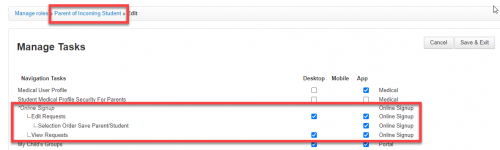
- When you are ready for incoming families to submit course requests, change the permissions on the Parent of Incoming Student role. Select all of the boxes under Online Signup.
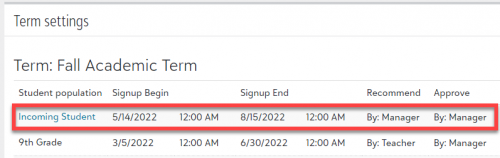
- Set appropriate dates for course requests for Incoming Student. We allow parents of current students to view - but not edit - course requests. If the dates for incoming and current students overlap, then a parent who has both a current and incoming student will be able to edit requests for the current student. (Even though the Parent role does not have those permissions, the user gets the permission from the Parent of Incoming Student role, and that permission allows them to edit requests for both current and incoming students.)
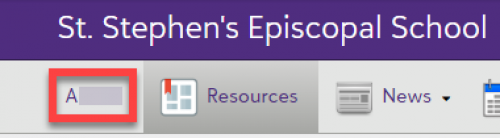
- The parent signs into the SIS, and clicks on the student's name in the top left.
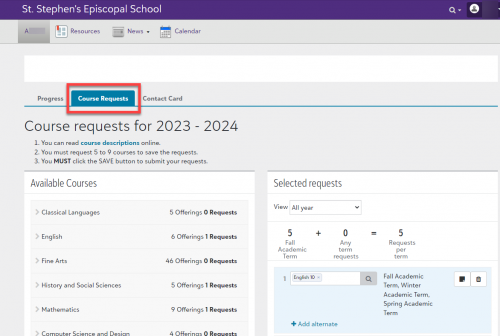
On the page that loads, the parent clicks on Course Requests and submits the requests in the same way that current students would.
 3
3 -
@Brian Gray Thank you very much. This solution fits our current situation very well. Other than the minor inconvenience of access because of overlapping dates (current student/new student access) this is exactly what I was hoping for.
0 -
@Kathy Hannon thank you for this information. I can definitely see the benefit of using a form to gather the information and perhaps next year this will be something to consider as it allows for earlier access to course requests without providing login details too early.
1 -
@Brian Gray We do it like this Brian and it works perfectly. No hiccups at all this year and it was the first time we did it with incoming families
0 -
@Derek Parker Hi Derek - we do it like Brian outlined below. Incoming parents login and do it with their child with guidance from our counselling office. Worked like a charm
 0
0












Categories
- All Categories
- 6 Blackbaud Community Help
- 209 bbcon®
- 1.4K Blackbaud Altru®
- 394 Blackbaud Award Management™ and Blackbaud Stewardship Management™
- 1.1K Blackbaud CRM™ and Blackbaud Internet Solutions™
- 15 donorCentrics®
- 359 Blackbaud eTapestry®
- 2.5K Blackbaud Financial Edge NXT®
- 646 Blackbaud Grantmaking™
- 563 Blackbaud Education Management Solutions for Higher Education
- 3.2K Blackbaud Education Management Solutions for K-12 Schools
- 934 Blackbaud Luminate Online® and Blackbaud TeamRaiser®
- 84 JustGiving® from Blackbaud®
- 6.4K Blackbaud Raiser's Edge NXT®
- 3.7K SKY Developer
- 243 ResearchPoint™
- 118 Blackbaud Tuition Management™
- 165 Organizational Best Practices
- 238 The Tap (Just for Fun)
- 33 Blackbaud Community Challenges
- 28 PowerUp Challenges
- 3 (Open) Raiser's Edge NXT PowerUp Challenge: Product Update Briefing
- 3 (Closed) Raiser's Edge NXT PowerUp Challenge: Standard Reports+
- 3 (Closed) Raiser's Edge NXT PowerUp Challenge: Email Marketing
- 3 (Closed) Raiser's Edge NXT PowerUp Challenge: Gift Management
- 4 (Closed) Raiser's Edge NXT PowerUp Challenge: Event Management
- 3 (Closed) Raiser's Edge NXT PowerUp Challenge: Home Page
- 4 (Closed) Raiser's Edge NXT PowerUp Challenge: Standard Reports
- 4 (Closed) Raiser's Edge NXT PowerUp Challenge: Query
- 779 Community News
- 2.9K Jobs Board
- 53 Blackbaud SKY® Reporting Announcements
- 47 Blackbaud CRM Higher Ed Product Advisory Group (HE PAG)
- 19 Blackbaud CRM Product Advisory Group (BBCRM PAG)