Creating a distribution list of candidates that have not signed their contract.





Anyone know how to do this?? We want to email parents that have not signed their contract and give them a little nudge?
Comments
-
@Richard You can run a contract list. Use filters to identify contracts that have a status indicating they have not been received. Look for statuses like "Pending" or "Saved."
2. Make sure to include fields for the parent’s email address along with any other relevant details, such as the parent's name and contract details.
3. After applying the filters and selecting the appropriate fields, generate the report or list. You may need to export the data to a CSV or Excel file for easier manipulation.
4. Once the list is generated, review it to ensure all necessary information is included, and then export it to your preferred format.
5. With this list, you can reach out to the parents whose contracts have not been received.
Hope this helps.
1 -
@Richard Pan
Thank you, yes but can I create an email distribution list out of it?0 -
@Barbara V Glass So it sounds like I can't create an internal list to be used with Blackbaud Pushpages??
0 -
@Barbara V Glass Ok thanks so you're basically saying that Blackbaud pushpages cannot do this job.
0 -
@Richard Pan you can create an advanced list to pull students with a contract status of none or started and their parent information, which you can use to set up a distribution group. Here is an example list setup (none of the contract fields need to be displayed for the purposes of the distribution group, I just add them to use for reporting):
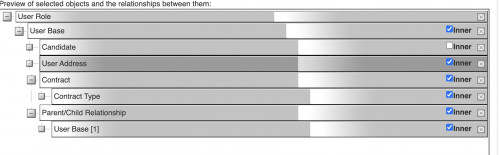
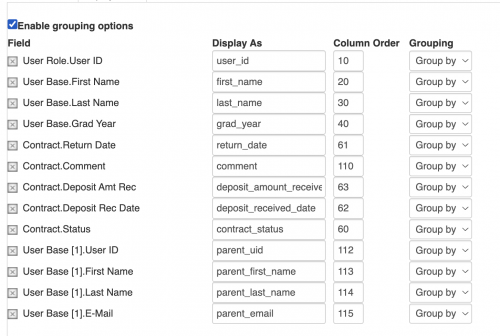
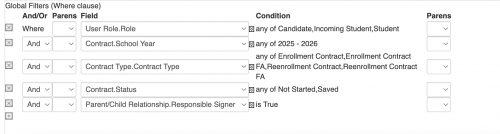
Once you have the list set up and add it to the distribution group, you would just specify that the recipient is User Base [1].
2 -
@Richard Pan I use the lists under “Contracts Lists” and filter for contracts with for “none” or “saved”, include the parents emails (responsible signers) and send out through our Commincations Office (since do not use pushpages). Hope this helps!
0 -
@Troy Burki @Richard Pan We usually create an Advanced List exactly how Troy laid out here. Great post Troy. Once your list is all set then you can do a Pushpage and point the Distribution List to your Adv. List.
0










Categories
- All Categories
- 6 Blackbaud Community Help
- 209 bbcon®
- 1.4K Blackbaud Altru®
- 394 Blackbaud Award Management™ and Blackbaud Stewardship Management™
- 1.1K Blackbaud CRM™ and Blackbaud Internet Solutions™
- 15 donorCentrics®
- 359 Blackbaud eTapestry®
- 2.5K Blackbaud Financial Edge NXT®
- 646 Blackbaud Grantmaking™
- 563 Blackbaud Education Management Solutions for Higher Education
- 3.2K Blackbaud Education Management Solutions for K-12 Schools
- 934 Blackbaud Luminate Online® and Blackbaud TeamRaiser®
- 84 JustGiving® from Blackbaud®
- 6.4K Blackbaud Raiser's Edge NXT®
- 3.7K SKY Developer
- 243 ResearchPoint™
- 118 Blackbaud Tuition Management™
- 165 Organizational Best Practices
- 238 The Tap (Just for Fun)
- 33 Blackbaud Community Challenges
- 28 PowerUp Challenges
- 3 (Open) Raiser's Edge NXT PowerUp Challenge: Product Update Briefing
- 3 (Closed) Raiser's Edge NXT PowerUp Challenge: Standard Reports+
- 3 (Closed) Raiser's Edge NXT PowerUp Challenge: Email Marketing
- 3 (Closed) Raiser's Edge NXT PowerUp Challenge: Gift Management
- 4 (Closed) Raiser's Edge NXT PowerUp Challenge: Event Management
- 3 (Closed) Raiser's Edge NXT PowerUp Challenge: Home Page
- 4 (Closed) Raiser's Edge NXT PowerUp Challenge: Standard Reports
- 4 (Closed) Raiser's Edge NXT PowerUp Challenge: Query
- 779 Community News
- 2.9K Jobs Board
- 53 Blackbaud SKY® Reporting Announcements
- 47 Blackbaud CRM Higher Ed Product Advisory Group (HE PAG)
- 19 Blackbaud CRM Product Advisory Group (BBCRM PAG)