Adding Total Credits to a Transcript





Does anyone know how to add total cummulative credits to a transcript? I see the field to add but it breaks it down by grade but I just want one number. Thanks
Comments
-
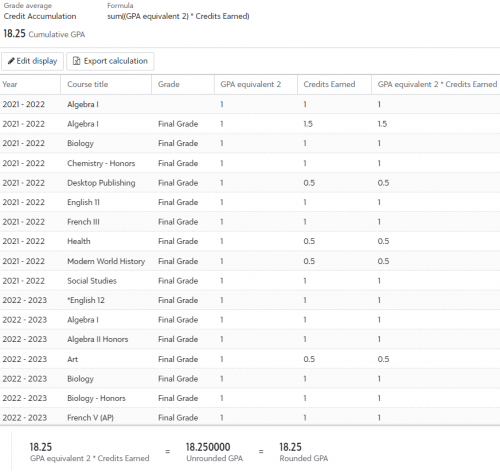
@Mary Cummings it's not an option in the new builder. I've used a work around for a few schools. If you're not utilizing GPA Equiv 1 or GPA Equiv 2 in the grade translation tables, you can plug in a 1 for every grade on the translation table. Then set up the following cumulative GPA formula: sum((GPA equivalent 1) * Credits Earned) OR sum((GPA equivalent 2) * Credits Earned)
You can create a section on the transcript and set this to display the cumulative GPA “Credit Accumulation”. I've attached an image of the GPA breakdown to give you a visual:
 0
0 -
@Kristen Duval as always, an amazing solution! At my previous school I stuck with the old transcript builder for this reason. Great idea!
1 -
@Jennifer Welch I have also implemented something similar for a school that needed the new builder to list out credits by subject (aka: transcript category). That one took a LOT of time to set up and requires some upkeep, but I can pass that work around along to you if you're interested!
3 -
@Kristen Duval Can you send that to me too? Thanks
0 -
@Kristen Duval was that us? ?
0 -
@Kristen Duval Please share your transcript template - thank you!
0 -
@Mary Cummings @Susan Blaisdell @Carolyn Stevens @Jennifer Welsh
Oh my goodness. I am so sorry. I was just trying to find a post from a few months ago and stumbled upon this. I am just seeing these tags! I have attached the template. You can see the total credits down at the bottom. Kevin Yore.pdf
My work around for credits by transcript category is very tedious to start and does require upkeep. To the point where I am borderline hesitant to even mention it. But here is it:The setup is the same as I explained below with the total credits work around. You have to create a GPA for every single transcript category that you'd like to track credits for. You'd create a GPA for Math. A separate GPA for Science. A separate GPA for English. Etc.
The fun part comes when you have to edit every GPA and manually exclude all courses that don't fall within that transcript category. So you would go into the Math GPA and exclude ALL non-Math courses. This would have been easier before the GPA setup screens were taken off the bridge, as you could exclude an entire department at a time. This is the part that is incredibly tedious on initial setup. The school I set this up for had different course codes, depending upon the department, so the flow was a little bit easier. For example, Math course codes started with MA-220. So I could just type in SCI and quickly go down the list to exclude all Science courses. But you have to do this for every subject for every GPA.
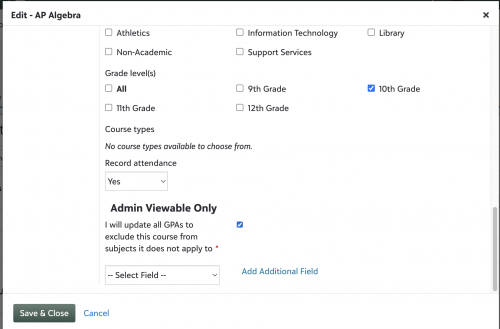
Once setup, the upkeep isn't bad. It's just a matter of remembering to exclude any new courses that are added to the system. For that, I created a custom field on the course level that was required for every new course. When the school added a new course, they had to check a box indicating that they were aware that they then needed to go into all other subjects and exclude the new course:
It worked beautifully for my school, but it was a smaller school and the registrar was the only one adding new courses. I could see this being very problematic/inaccurate for a larger school with multiple users adding courses that might not have the grading manager role
1 -
@Kristen Duval this almost breaks my brain… Very cool. We have too many courses and too many changes for this to work for us, but dang! Next level thinking.
0 -
@Carolyn Stevens
My next level thinking might actually be a curse haha. Especially when I come up with ideas in my dreams and have to text myself in the middle of the night so that I remember the next day ?♀️I tend to go too far sometimes with my workarounds, but still wanted to share! I think this might work for 5% of schools, which is why I was a bit hesitant to share.
I hope to see you in Seattle next month!
0









Categories
- All Categories
- 6 Blackbaud Community Help
- 209 bbcon®
- 1.4K Blackbaud Altru®
- 394 Blackbaud Award Management™ and Blackbaud Stewardship Management™
- 1.1K Blackbaud CRM™ and Blackbaud Internet Solutions™
- 15 donorCentrics®
- 359 Blackbaud eTapestry®
- 2.5K Blackbaud Financial Edge NXT®
- 646 Blackbaud Grantmaking™
- 563 Blackbaud Education Management Solutions for Higher Education
- 3.2K Blackbaud Education Management Solutions for K-12 Schools
- 934 Blackbaud Luminate Online® and Blackbaud TeamRaiser®
- 84 JustGiving® from Blackbaud®
- 6.4K Blackbaud Raiser's Edge NXT®
- 3.7K SKY Developer
- 243 ResearchPoint™
- 118 Blackbaud Tuition Management™
- 165 Organizational Best Practices
- 238 The Tap (Just for Fun)
- 33 Blackbaud Community Challenges
- 28 PowerUp Challenges
- 3 (Open) Raiser's Edge NXT PowerUp Challenge: Product Update Briefing
- 3 (Closed) Raiser's Edge NXT PowerUp Challenge: Standard Reports+
- 3 (Closed) Raiser's Edge NXT PowerUp Challenge: Email Marketing
- 3 (Closed) Raiser's Edge NXT PowerUp Challenge: Gift Management
- 4 (Closed) Raiser's Edge NXT PowerUp Challenge: Event Management
- 3 (Closed) Raiser's Edge NXT PowerUp Challenge: Home Page
- 4 (Closed) Raiser's Edge NXT PowerUp Challenge: Standard Reports
- 4 (Closed) Raiser's Edge NXT PowerUp Challenge: Query
- 779 Community News
- 2.9K Jobs Board
- 53 Blackbaud SKY® Reporting Announcements
- 47 Blackbaud CRM Higher Ed Product Advisory Group (HE PAG)
- 19 Blackbaud CRM Product Advisory Group (BBCRM PAG)