Grading - HELP!





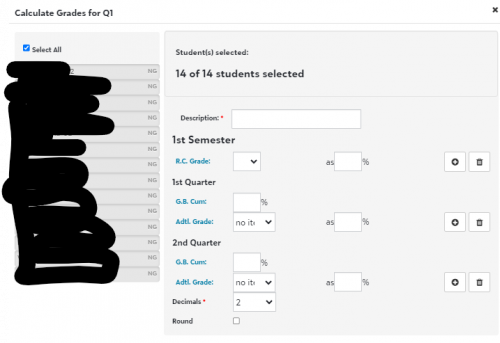
Good morning! For some reason, our Elementary grade plans are not working correctly. See the screenshot below - the calculations are not automatically filled in… and I can't find where to set these as default for teachers. Can anyone help point me in the right direction? I'm sure I'm just missing something simple…
Comments
-
@Amy Welsh I think you need to edit the Grade Plan Detail. From Academics > Grades > Grading Setup > School year setup, select appropriate filters to view the needed grade plan and then view the grading period where you would like to add the formula. Edit the Grade Plan Details to add the formula. I believe that if there is only one formula available that will be used by default, and if multiple formulas are added, the teacher will be able to choose among them. I have not had to set this up in the past (it carried over from year to year with the rollover) but when I looked up my grade plans to give you the screenshot below, I noticed that my formulas are also missing for this year. Not sure if I did something wrong during the grading rollover, or if this is a system issue.
 0
0 -
@Shannon Krise and @Amy Welsh
If the grade plan formulas didn't carry over it might be because they were rolled over before the Marking Periods were set up. Marking periods should be set up prior to the grading roll over. Here is a KB article.2 -
@Shannon Krise
Thank you so much!! It's so odd - my middle and high school formulas rolled over, but not my elementary… Perhaps I missed a step with rollover this year…Thanks so much for your help!!
0 -
@Nancy Kierstead Thanks! I remember seeing that note about the order, and I thought I followed all the same steps as last year, but clearly I missed something, so that's probably it. After going through and adding all the formulas this year, I'll no doubt remember in the future.
0 -
@Amy Welsh Checking in from Blackbaud here. Let me know if you'd like me to get you in touch with our support team on this!
0









Categories
- All Categories
- 6 Blackbaud Community Help
- 209 bbcon®
- 1.4K Blackbaud Altru®
- 394 Blackbaud Award Management™ and Blackbaud Stewardship Management™
- 1.1K Blackbaud CRM™ and Blackbaud Internet Solutions™
- 15 donorCentrics®
- 359 Blackbaud eTapestry®
- 2.5K Blackbaud Financial Edge NXT®
- 646 Blackbaud Grantmaking™
- 563 Blackbaud Education Management Solutions for Higher Education
- 3.2K Blackbaud Education Management Solutions for K-12 Schools
- 934 Blackbaud Luminate Online® and Blackbaud TeamRaiser®
- 84 JustGiving® from Blackbaud®
- 6.4K Blackbaud Raiser's Edge NXT®
- 3.7K SKY Developer
- 243 ResearchPoint™
- 118 Blackbaud Tuition Management™
- 165 Organizational Best Practices
- 238 The Tap (Just for Fun)
- 33 Blackbaud Community Challenges
- 28 PowerUp Challenges
- 3 (Open) Raiser's Edge NXT PowerUp Challenge: Product Update Briefing
- 3 (Closed) Raiser's Edge NXT PowerUp Challenge: Standard Reports+
- 3 (Closed) Raiser's Edge NXT PowerUp Challenge: Email Marketing
- 3 (Closed) Raiser's Edge NXT PowerUp Challenge: Gift Management
- 4 (Closed) Raiser's Edge NXT PowerUp Challenge: Event Management
- 3 (Closed) Raiser's Edge NXT PowerUp Challenge: Home Page
- 4 (Closed) Raiser's Edge NXT PowerUp Challenge: Standard Reports
- 4 (Closed) Raiser's Edge NXT PowerUp Challenge: Query
- 779 Community News
- 2.9K Jobs Board
- 53 Blackbaud SKY® Reporting Announcements
- 47 Blackbaud CRM Higher Ed Product Advisory Group (HE PAG)
- 19 Blackbaud CRM Product Advisory Group (BBCRM PAG)