Power BI Timeout using Power BI Connector


Quick Power BI and Blackbaud SKY API question. Do you know if it's possible when calling the gifts api to limit the data being pulled based on date added eg: I want to only pull gifts that have been added in the last 5 years? It seems that with the power bi connector you have to pull back all of the data and then filter it out using transformations in Power Query which means that my API Call is timing out - if anyone can point me in the right direction I'd be grateful. #PowerBI #Blackbaud #connector #SKYAPI
Comments
-
@Ant Fawkes
One of the problem of using Power BI Blackbaud connector directly: getting more data for use.The way to handle this would be to use Power Automate to pull data down (gift list action will allow you to specify gifts added in the last 5 years). The data that is returned is in JSON format and maximum you can pull is 5000 records at a time, so you need to handle pulling multiple 5000 per API call.
Once you have the data, you can dump it into sharepoint list, sharepoint excel, csv, SQL server, etc. and Power BI can connect to these data source to works its magic that way.
0 -
Hey @Ant Fawkes,
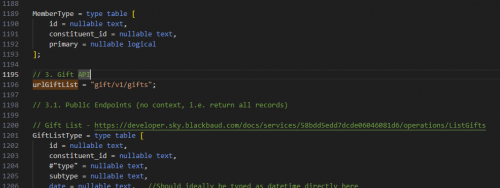
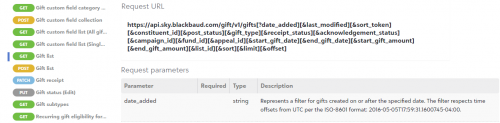
The Gift table in the Power BI connector is based off of the GET Gift List endpoint of the API. In the .pq file that is used to compile into the connector, there's a variable set on line 1195 that sets the base url that Power Query calls to get the list. You can add a parameter to that base url (formatted based on the endpoint documentation). I'd recommend setting a new variable to get the current time and subtracts 5 years and use the variable as the date_added parameter.
 1
1










Categories
- All Categories
- 6 Blackbaud Community Help
- 209 bbcon®
- 1.4K Blackbaud Altru®
- 394 Blackbaud Award Management™ and Blackbaud Stewardship Management™
- 1.1K Blackbaud CRM™ and Blackbaud Internet Solutions™
- 15 donorCentrics®
- 359 Blackbaud eTapestry®
- 2.5K Blackbaud Financial Edge NXT®
- 646 Blackbaud Grantmaking™
- 563 Blackbaud Education Management Solutions for Higher Education
- 3.2K Blackbaud Education Management Solutions for K-12 Schools
- 934 Blackbaud Luminate Online® and Blackbaud TeamRaiser®
- 84 JustGiving® from Blackbaud®
- 6.4K Blackbaud Raiser's Edge NXT®
- 3.7K SKY Developer
- 243 ResearchPoint™
- 118 Blackbaud Tuition Management™
- 165 Organizational Best Practices
- 238 The Tap (Just for Fun)
- 33 Blackbaud Community Challenges
- 28 PowerUp Challenges
- 3 (Open) Raiser's Edge NXT PowerUp Challenge: Product Update Briefing
- 3 (Closed) Raiser's Edge NXT PowerUp Challenge: Standard Reports+
- 3 (Closed) Raiser's Edge NXT PowerUp Challenge: Email Marketing
- 3 (Closed) Raiser's Edge NXT PowerUp Challenge: Gift Management
- 4 (Closed) Raiser's Edge NXT PowerUp Challenge: Event Management
- 3 (Closed) Raiser's Edge NXT PowerUp Challenge: Home Page
- 4 (Closed) Raiser's Edge NXT PowerUp Challenge: Standard Reports
- 4 (Closed) Raiser's Edge NXT PowerUp Challenge: Query
- 779 Community News
- 2.9K Jobs Board
- 53 Blackbaud SKY® Reporting Announcements
- 47 Blackbaud CRM Higher Ed Product Advisory Group (HE PAG)
- 19 Blackbaud CRM Product Advisory Group (BBCRM PAG)