Power Automate connector to multiple environments





I'm using Power Automate connector to pull query results from FENXT. It's running perfect with the query in our main environment/database. Now we have another query built in another FENEXT environment/database, I couldn't find the option to pick the environment when creating the connector in Power Automate. I'm wondering if Blackbaud FENXT Query in PA supports multiple environments?
Have anyone met the same situation?
Thanks in advance.
Comments
-
@Jacob d***
multiple re nxt environment is indistinguishable inside power automate.I recommend that you create a separate Power Automate environment (name it for each environment you have to connect to in FE NXT).
Also, do you use the same “login” to access the multiple FE NXT environment? if so, when you “create” the connection to FE NXT connector, it should give you an option to select the FE NXT envrionment to connect to. If you use different login, then you have to use different login to “create” the connection.
0 -
@Alex Wong
Yes. I'm using the same login to access the environments. The weired thing is when I'm at Blackbaud Sky API Developer portal, click “Try it” , it lets me choose the environment in the pop-up window. but in Power Automate , when I create connector, no options available in the pop-up window, only main environment by default.Could be something missing when setting up the account?
0 -
You need to then go into the context menu of the action and select to “create new connection”, which will prompt you to login again, and select an environment. But I am saying, don't do that, as there is no way to “name” the connection, so you will not be able to tell which “connection” is for which FE NXT environment. Create a new Power Automate environment for each Blackbaud environment you have.
0 -
@Alex Wong
I switched to another environment in PA and started a new query action. Found the “change connection”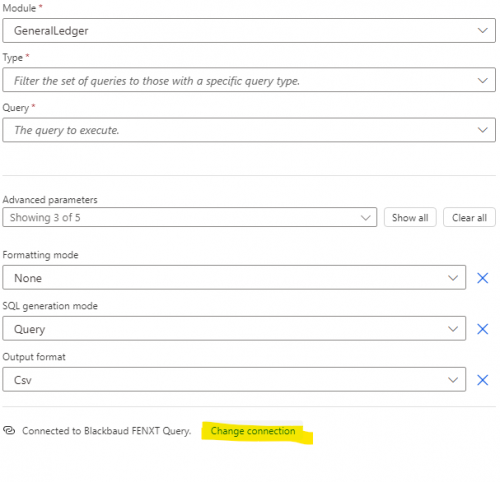
By clicking it, it allows me to add a new one,
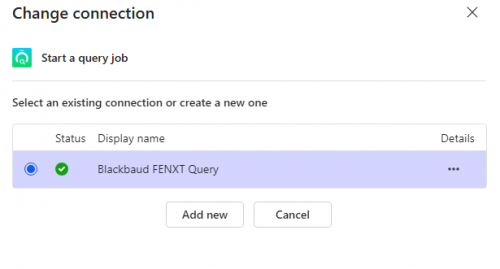
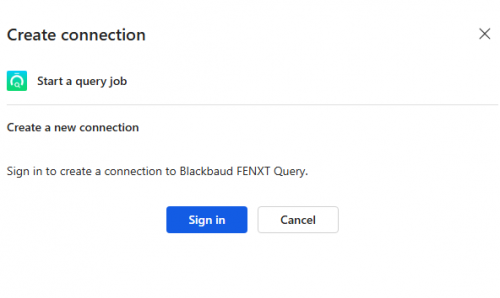
By clicking “Add new” and “Sign in” , no options in the following pop-up page.
I was under Developer's environment, rather than the Default one. That's the only two environments I have based on the license type.
0 -
@Jacob d***
When I try to create new connection in power automate, I get: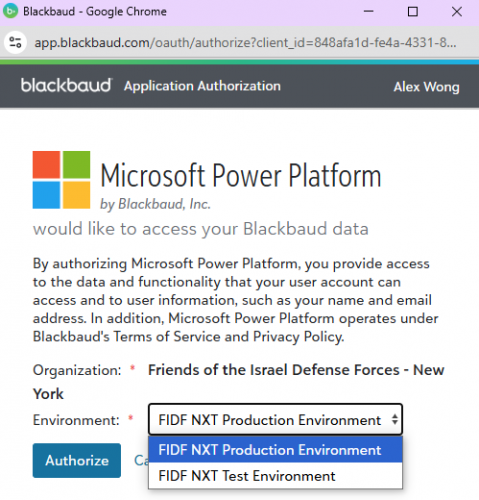
Giving me selection of environment to select.
My login is organization admin for both environment. Maybe check your access?
0





Categories
- All Categories
- 6 Blackbaud Community Help
- 209 bbcon®
- 1.4K Blackbaud Altru®
- 394 Blackbaud Award Management™ and Blackbaud Stewardship Management™
- 1.1K Blackbaud CRM™ and Blackbaud Internet Solutions™
- 15 donorCentrics®
- 359 Blackbaud eTapestry®
- 2.5K Blackbaud Financial Edge NXT®
- 646 Blackbaud Grantmaking™
- 563 Blackbaud Education Management Solutions for Higher Education
- 3.2K Blackbaud Education Management Solutions for K-12 Schools
- 934 Blackbaud Luminate Online® and Blackbaud TeamRaiser®
- 84 JustGiving® from Blackbaud®
- 6.4K Blackbaud Raiser's Edge NXT®
- 3.7K SKY Developer
- 243 ResearchPoint™
- 118 Blackbaud Tuition Management™
- 165 Organizational Best Practices
- 238 The Tap (Just for Fun)
- 33 Blackbaud Community Challenges
- 28 PowerUp Challenges
- 3 (Open) Raiser's Edge NXT PowerUp Challenge: Product Update Briefing
- 3 (Closed) Raiser's Edge NXT PowerUp Challenge: Standard Reports+
- 3 (Closed) Raiser's Edge NXT PowerUp Challenge: Email Marketing
- 3 (Closed) Raiser's Edge NXT PowerUp Challenge: Gift Management
- 4 (Closed) Raiser's Edge NXT PowerUp Challenge: Event Management
- 3 (Closed) Raiser's Edge NXT PowerUp Challenge: Home Page
- 4 (Closed) Raiser's Edge NXT PowerUp Challenge: Standard Reports
- 4 (Closed) Raiser's Edge NXT PowerUp Challenge: Query
- 779 Community News
- 2.9K Jobs Board
- 53 Blackbaud SKY® Reporting Announcements
- 47 Blackbaud CRM Higher Ed Product Advisory Group (HE PAG)
- 19 Blackbaud CRM Product Advisory Group (BBCRM PAG)