Problems with Modal Component





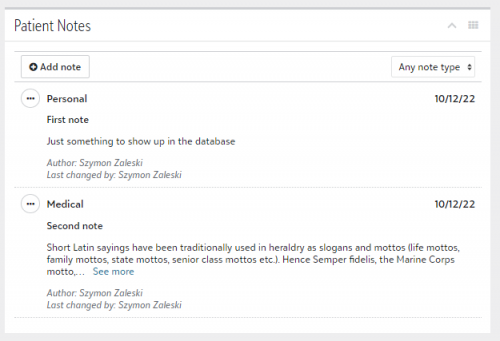
I am trying to use Modal Component as a form to enter additional notes with sensitive information visible only to the person who entered them.
I created a tile to display a list of the notes, mirroring the standard Notes tile in NXT, but I am having some problems with the Modal Component.
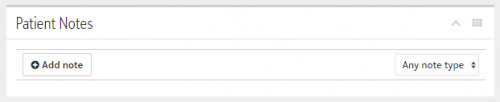
First, when there is no notes in the data warehouse, the tile is condensed to look like this:
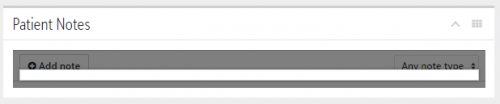
The problem is that the Modal Component opens only within the Add-in and while it temporarily expands the tile to fit the modal window in, it immediately shrinks the tile back to the condensed size and it looks like this:
I tried using fullPage option for the modal, I tried using sky-page with min-height: 500px within the tile, but it doesn't work - the tile size adjusts to the amount of content. Is there a way to force a minimum height of the add-in tile? Alternatively, is there a way to open a modal window outside the Add-in tile without building it as a separate Modal Add-in SPA?
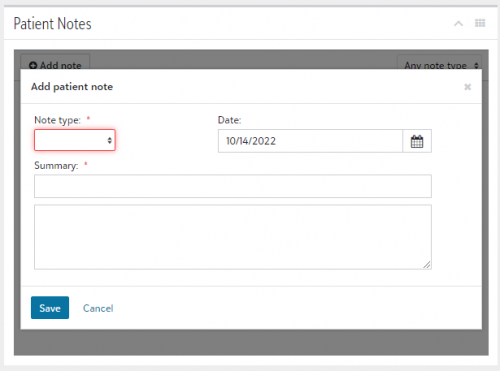
Anyway, for now I went around it and forced the tile to be taller by adding few br tags when (*ngIf) there are no notes to display and when Add Note is clicked.
At that point I can display the form within the modal window.
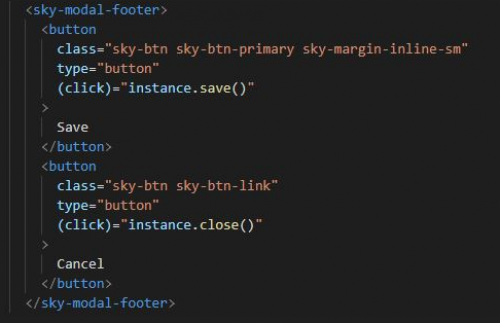
I followed the example on the website, have a public instance: SkyModalInstance in the constructor, button Save in the sky-modal-footer is calling instance.save() on click.
However, I am unable to capture the result from Modal instance.
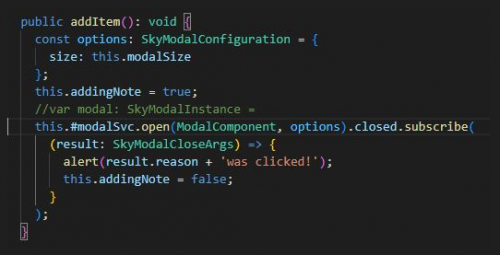
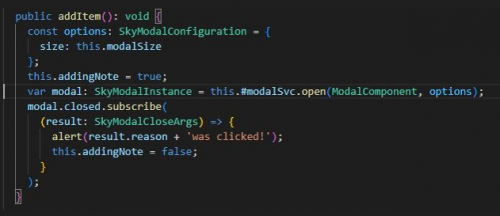
I am not even trying at this point to capture the content of the form within the modal window, but when I close the modal window, whether by clicking Cancel or Save, I don't get the alert and the tile doesn't condense, which means the addingNote flag for the html part remains true.
What am I doing wrong here?
Comments
-
@Szymon Zaleski your add-in is running in an iframe within the tile's content area, so anything you do within that context will be confined to the rectangular region of your iframe. You can certainly use the SKYUX modal component, but (as you're seeing) it will be rendered within your iframe.
That works (functionally), but what you really want is to ask the host application (the Blackbaud page) to show a model. That is handled through the Add-in Client library (or the Add-in Client SKYUX library if you're using it). When your add-in calls the addinClient.showModal() method, a message is sent to the host application page, which in turn handles instantiating a new iframe that spans the width of the screen, and that iframe is loaded with whatever URL you specify. You can think of that URL as being just a separate route in your add-in's SPA, where the route immediately shows a modal. The end result looks just like a native modal dialog experience.
Here's a link with more details from our documentation (including links to some sample code in GitHub):
https://developer.blackbaud.com/skyapi/docs/addins/concepts/capabilities#showing-a-modal
Hope this helps!
1 -
@Ben Lambert Thank you, I figured that would most likely be the case. I don't mind the modal opening in within the tile, it's just that the add-in tile briefly expands vertically to show the initiated modal, but then compacts to the original size based on the content of the tile, shrinking the modal dialog to the unusable size in the process.
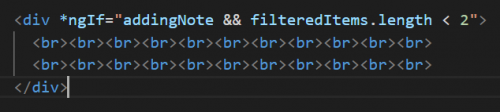
I was able to work around it to add some line breaks to the tile content when I need to display the modal in the no-content tile.
0 -
@Ben Lambert
One more question. Is there a way to control the height of the Add-in and the scroll bar in Add-in window? It's not critical, more of a pet peeve, but instead of expanding the tile to the right size, a scroll bar randomly appears in the add-in window, even when there is nothing really to scroll.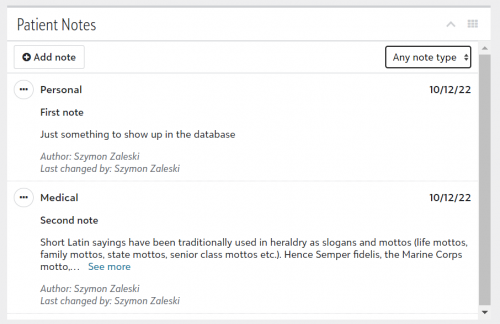
There are only two notes here and the scroll only on the right only scrolls the page one pixel up and down resulting in a thicker line between the tile header (Patient Notes) and the tile content
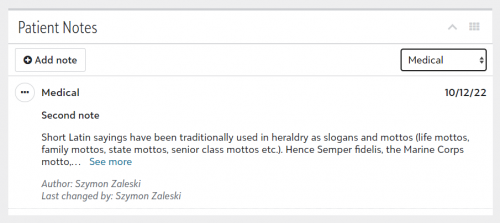
When I filter to show only Medical type, the scroll disappears and the window is displayed properly.
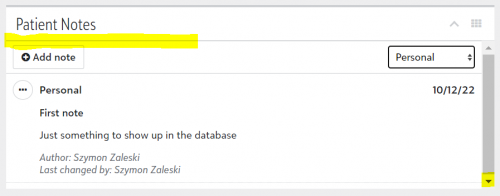
But when filtered to Personal, the scroll appears again, despite the note being even shorter.
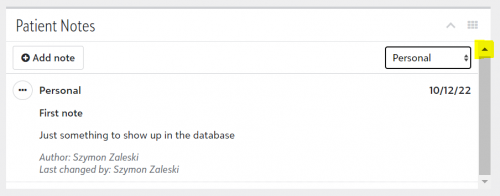
Like I mentioned above, the only difference in scroll up/scroll down is a thicker line separating add-in title (Patient Notes) from the tile content.
I've even encountered situations, where the tile started “blinking” - showing the scroll bar rearranged the displayed content, which then led to scroll bar disappearing, just to show up moments later when the displayed content rearranged for the window without the scroll bar.
I'm using <sky-page>, tried different types of style overflow-y - nothing seemed to work. Any ideas?
0



Categories
- All Categories
- 6 Blackbaud Community Help
- 209 bbcon®
- 1.4K Blackbaud Altru®
- 394 Blackbaud Award Management™ and Blackbaud Stewardship Management™
- 1.1K Blackbaud CRM™ and Blackbaud Internet Solutions™
- 15 donorCentrics®
- 359 Blackbaud eTapestry®
- 2.5K Blackbaud Financial Edge NXT®
- 646 Blackbaud Grantmaking™
- 563 Blackbaud Education Management Solutions for Higher Education
- 3.2K Blackbaud Education Management Solutions for K-12 Schools
- 934 Blackbaud Luminate Online® and Blackbaud TeamRaiser®
- 84 JustGiving® from Blackbaud®
- 6.4K Blackbaud Raiser's Edge NXT®
- 3.7K SKY Developer
- 243 ResearchPoint™
- 118 Blackbaud Tuition Management™
- 165 Organizational Best Practices
- 238 The Tap (Just for Fun)
- 33 Blackbaud Community Challenges
- 28 PowerUp Challenges
- 3 (Open) Raiser's Edge NXT PowerUp Challenge: Product Update Briefing
- 3 (Closed) Raiser's Edge NXT PowerUp Challenge: Standard Reports+
- 3 (Closed) Raiser's Edge NXT PowerUp Challenge: Email Marketing
- 3 (Closed) Raiser's Edge NXT PowerUp Challenge: Gift Management
- 4 (Closed) Raiser's Edge NXT PowerUp Challenge: Event Management
- 3 (Closed) Raiser's Edge NXT PowerUp Challenge: Home Page
- 4 (Closed) Raiser's Edge NXT PowerUp Challenge: Standard Reports
- 4 (Closed) Raiser's Edge NXT PowerUp Challenge: Query
- 779 Community News
- 2.9K Jobs Board
- 53 Blackbaud SKY® Reporting Announcements
- 47 Blackbaud CRM Higher Ed Product Advisory Group (HE PAG)
- 19 Blackbaud CRM Product Advisory Group (BBCRM PAG)