oath refresh token - client network socket disconnected error





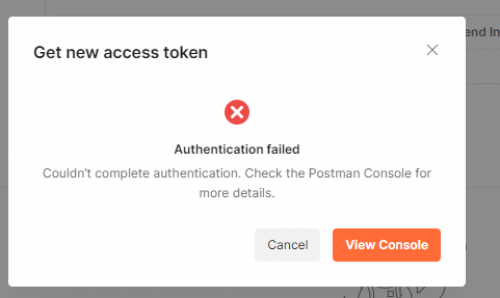
Hi - stuck, stuck, stuck on this step of calling via Postman for a refresh token. It pulls up the browser authenticate window, and says “authenticated” but Postman gives an error back “Client network socket disconnected before secure TLS connection was established”.
Checked out the typical google reported causes of this, and they don't seem to be the case. I have the app created, connected in the marketplace etc. But cannot fine any reason why I am getting this error. Tried it in multiple environments. Also tried running the “headless app” via Visual Studio, and getting a “bad request” when going that route.
I can run the API via the endpoint Blackbaud pages and can run an api with a bearer token - but of course that expires - so really need to get a refreshable token so that I can run this in an automated fashion.
Really hoping some kind soul has the solution out there - been banging my head against this for days. Thanks!
Comments
-
@Arlette Slachmuylder - Sorry you are experiencing an issue getting a refresh token via Postman. Have you had any luck getting past the problem yet? Other than the usual disabling of “SSL Certificate Validation” in Postman or checking proxy settings, I'm not quite sure what else to try next. Are you connected to a VPN or other firewall that may be blocking the https request?
0 -
@Michael Tims
Hi - no - absolutely no luck. I have tried the disabling of the ssl in Postman and checked proxy settings. I have tried doing it in our Azure environment vs. my laptop, I have tried it on a Mac rather than my windows computer and can find no way to get past this error. Is there anything in the setup or on the Blackbaud side that could be causing this problem? Thanks!0 -
@Michael Tims
Also - here are some screenshots, if that is helpful.Here is the error I get - AFTER a successful browser authentication

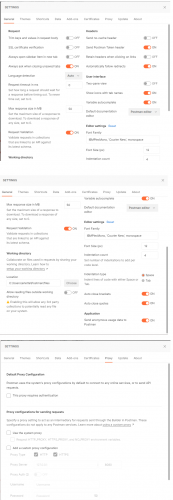
Here are some of my postman setups - (I also tried the c# headless app, but that also gives me an error)
 0
0 -
Hi @Arlette Slachmuylder - sorry for the delay. A couple of us tried searching around logs for activity from your apps to the OAuth token endpoint. Nothing was found which would most likely point to a TLS connection issue. TLS 1.2 is required, as well as a few cipher suites. I don't expect that version of TLS would be a problem with recent versions of Postman.
It would be interesting to know if you could access any of the following public URLs in Postman:
…or if you have any problems accessing other https endpoints via Postman requests.
0 -
@Michael Tims
Thanks so much for getting back to me. I deleted everything out of Postman, cleared my browser cache, reset my pop ups and then populated everything back in and for some reason it now works. No clue why - but it now works like a charm.1 -
@Arlette Slachmuylder - ok great! Glad to hear it's working now.
0




Categories
- All Categories
- 6 Blackbaud Community Help
- 209 bbcon®
- 1.4K Blackbaud Altru®
- 394 Blackbaud Award Management™ and Blackbaud Stewardship Management™
- 1.1K Blackbaud CRM™ and Blackbaud Internet Solutions™
- 15 donorCentrics®
- 359 Blackbaud eTapestry®
- 2.5K Blackbaud Financial Edge NXT®
- 646 Blackbaud Grantmaking™
- 563 Blackbaud Education Management Solutions for Higher Education
- 3.2K Blackbaud Education Management Solutions for K-12 Schools
- 934 Blackbaud Luminate Online® and Blackbaud TeamRaiser®
- 84 JustGiving® from Blackbaud®
- 6.4K Blackbaud Raiser's Edge NXT®
- 3.7K SKY Developer
- 243 ResearchPoint™
- 118 Blackbaud Tuition Management™
- 165 Organizational Best Practices
- 238 The Tap (Just for Fun)
- 33 Blackbaud Community Challenges
- 28 PowerUp Challenges
- 3 (Open) Raiser's Edge NXT PowerUp Challenge: Product Update Briefing
- 3 (Closed) Raiser's Edge NXT PowerUp Challenge: Standard Reports+
- 3 (Closed) Raiser's Edge NXT PowerUp Challenge: Email Marketing
- 3 (Closed) Raiser's Edge NXT PowerUp Challenge: Gift Management
- 4 (Closed) Raiser's Edge NXT PowerUp Challenge: Event Management
- 3 (Closed) Raiser's Edge NXT PowerUp Challenge: Home Page
- 4 (Closed) Raiser's Edge NXT PowerUp Challenge: Standard Reports
- 4 (Closed) Raiser's Edge NXT PowerUp Challenge: Query
- 779 Community News
- 2.9K Jobs Board
- 53 Blackbaud SKY® Reporting Announcements
- 47 Blackbaud CRM Higher Ed Product Advisory Group (HE PAG)
- 19 Blackbaud CRM Product Advisory Group (BBCRM PAG)