Embed Power BI Report in NXT




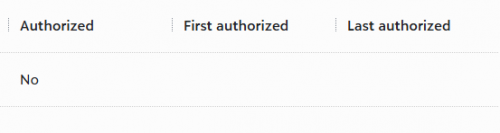
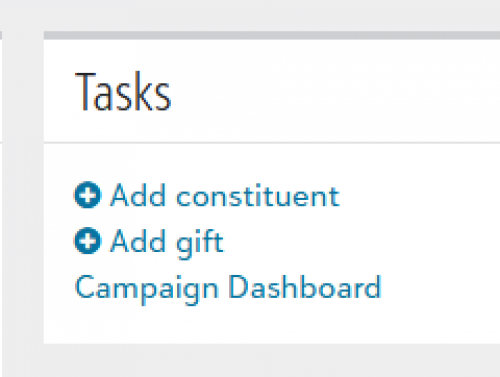
Hello - I am trying to create a button on NXT homepage that will launch a page with my Power BI Dashboard. I have the hyperlinked text on the homepage, but when I click it, I get a Nothing to See Here message. Are my App URL's missing something? I also noticed that my App - Environment is not authorized, I am not sure how to authorize it or if that is the problem?
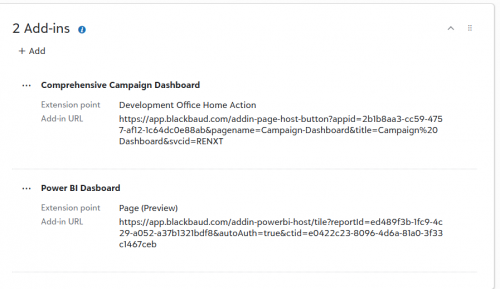
I've been going through this page, paired with my documentation from a Power BI accelerator last spring and I'm stuck!
Comments
-
Hi @Molly Glowacki - Looking at the URL's, the Home Page Action URL is wrong. The pagename parameter should be referencing the name of the page add-in. Which for you is Power BI Dashboard, not Campaign-Dashboard.
In the Development Office Home Action add-in, try removing: Campaign-Dashboard
and replace with: Power%20BI%20Dashboard
(note: %20 represents the spaces)
1 -
@Ashley Moose Thanks for your reply! I understand that correction now and made the update! Unfortunately, I'm still getting the same “Nothing to See Here” message when I click the button. Here are my updated add-in URLs:
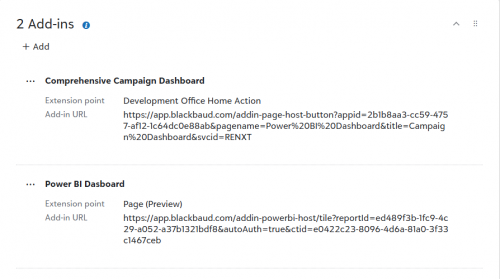
I have double checked my Report ID and App ID's used. I think the issue must still be with the Power BI Dashboard add-in/Page (preview) one.
0 -
@Molly Glowacki
You don't need 2 add-inJust one:
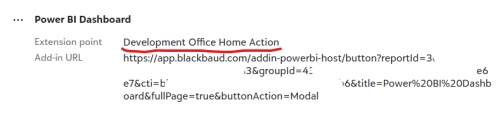
https://app.blackbaud.com/addin-powerbi-host/button?reportId=3xxxxxxx-bxxd-4xx7-bxxx-3xxxxxxxxxx3&groupId=4xxxxxxx3-4xx3-4xxx-xxx3-dxxxxxxxxxxxx7&cti=bxxxxxxx3-1xxx-4xxx-axxx-4xxxxxxxxxxxx6&title=Power BI Dashboard&fullPage=true&buttonAction=Modal
0 -
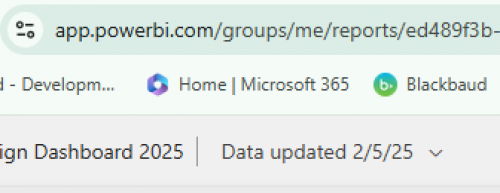
@Alex Wong Thanks for your reply! I do not have a group ID, when I follow the steps to find it, the ID = me. I would expect to see it between Groups/ and /Reports in the URL. Do I need to get my dashboard out of My Workspaces? If so, how should I do that?
 0
0 -
@Alex Wong I updated my link with no group ID and it worked! I was prompted to sign-in.
0 -
@Molly Glowacki
Glad it is working for you.Item of concern is the “group”. Since it is in your workspace, and you didn't specify group. Your BI will likely not be able to show for others to see. As the “me” is different for different people, and another person is not going to have a power bi with that power bi ID in the “my workspace” of their login.
1 -
@Molly Glowacki
while you are in your workspace.. the URL show “me”. However, if you actually click into the report you are trying to display. The URL should have the ID between /groups/ and /reports/0 -
@Molly Glowacki To add a little more context, what Alex shared is totally correct and a valid way of displaying Power BI reports. The only downside of using a modal instead of a full page add-in is you lose the omnibar for navigation purposes.
The add-in URLs you had did look correct at this point though so maybe the issue was related to the group ID. For more information on the parameters for embedding power BI reports, take a look at: https://docs.blackbaud.com/microsoft-connectors-docs/microsoft-power-platform/power-bi/power-bi-addins
1 -
@Ashley Moose Thanks, Ashley! The Omnibar would be helpful to keep, so I will keep troubleshooting.
0 -
@Molly Glowacki
I am not sure if the Power BI SPA works for full page WITH omnibar. the Power BI SPA only have a “tile” or “button” option documented.Maybe @Erik Leaver or @Heather McLean or @Ben Wong can chime in.
0 -
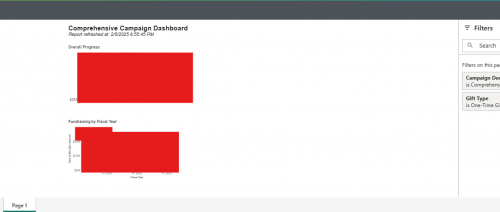
@Molly Glowacki @Alex Wong I was able to get both URL methods to work after adding in the Group ID (thank you!), though to be honest I'm not sure I see much of a difference. I thought the omnibar would allow me to move back into normal NXT navigation. Should I expect to see navigation the options in the dark gray header? Below is a screenshot using the two add-ins from my initial post:
And a 2nd question!!! Do my teammates (who will not be creating dashboards, just viewing) need a Power BI Pro account? Is there a free account suitable for just being able to view the dashboards? I asked a teammate to click into the dashboard and they were prompted to Sign-in to Power BI, they have not worked with it before, so I want to make sure I am getting them set-up the right way. Our organization intends to use Power BI for additional needs, beyond NXT reporting, so this is our first staff exposure! # wise I would anticipate that being about 20 staff that would eventually want to view these.
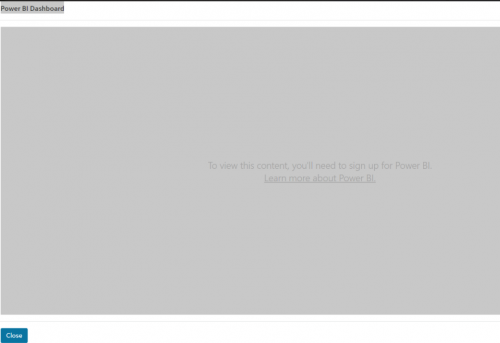
View from teammate when clicking into dashboard in NXT 0 -
@Molly Glowacki
Power BI license is required for viewing too, AND that you will need to create a new workspace that gives them access to your published power bi.My workspace does not have ability to give others access.
0 -
@Alex Wong Thank you!
0 -
@Molly Glowacki For the omnibar navigation, make sure to have &svcid=renxt included at the end of the URL. Looking at your original URLs it was in the Home Page action but the Page add-in.
As far as the “full-page” option, that is not available for Tiles, but height is an available parameter. If no height parameter is provided, it defaults to 450. I believe the suggested height from the accelerator class is 800.
CC: @Alex Wong
1







Categories
- All Categories
- 6 Blackbaud Community Help
- 209 bbcon®
- 1.4K Blackbaud Altru®
- 394 Blackbaud Award Management™ and Blackbaud Stewardship Management™
- 1.1K Blackbaud CRM™ and Blackbaud Internet Solutions™
- 15 donorCentrics®
- 359 Blackbaud eTapestry®
- 2.5K Blackbaud Financial Edge NXT®
- 646 Blackbaud Grantmaking™
- 563 Blackbaud Education Management Solutions for Higher Education
- 3.2K Blackbaud Education Management Solutions for K-12 Schools
- 934 Blackbaud Luminate Online® and Blackbaud TeamRaiser®
- 84 JustGiving® from Blackbaud®
- 6.4K Blackbaud Raiser's Edge NXT®
- 3.7K SKY Developer
- 243 ResearchPoint™
- 118 Blackbaud Tuition Management™
- 165 Organizational Best Practices
- 238 The Tap (Just for Fun)
- 33 Blackbaud Community Challenges
- 28 PowerUp Challenges
- 3 (Open) Raiser's Edge NXT PowerUp Challenge: Product Update Briefing
- 3 (Closed) Raiser's Edge NXT PowerUp Challenge: Standard Reports+
- 3 (Closed) Raiser's Edge NXT PowerUp Challenge: Email Marketing
- 3 (Closed) Raiser's Edge NXT PowerUp Challenge: Gift Management
- 4 (Closed) Raiser's Edge NXT PowerUp Challenge: Event Management
- 3 (Closed) Raiser's Edge NXT PowerUp Challenge: Home Page
- 4 (Closed) Raiser's Edge NXT PowerUp Challenge: Standard Reports
- 4 (Closed) Raiser's Edge NXT PowerUp Challenge: Query
- 779 Community News
- 2.9K Jobs Board
- 53 Blackbaud SKY® Reporting Announcements
- 47 Blackbaud CRM Higher Ed Product Advisory Group (HE PAG)
- 19 Blackbaud CRM Product Advisory Group (BBCRM PAG)