Education Management-View Only Access to Contact Card





Hello,
We have users that need to VIEW ONLY the data on contact cards, schedules, etc. We have went around and around with Blackbaud and roles and cannot figure out how to grant VIEW ONLY access. The only access we can give is the ability to edit. Has anyone figured out a way to grant VIEW ONLY access to the contact card and schedule?
Thank you!
Comments
-
@Amanda Shows
We have asked the same questions for over a year. Specifically for coaches to be able to see this information both on the Academics and EMS modules as well as administrative assistants who need to see room and student schedules. We have been told it is not available and they have given us no workarounds.2 -
@Christine Adams
This is a data security issue for sure!!0 -
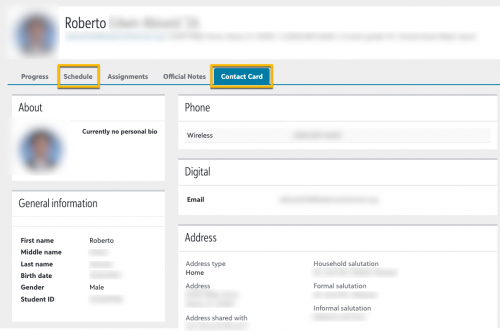
Hi @Amanda Shows - for basic information such as email, address, phone numbers you can create a directory and users would be able view contact information for the students and their schedule as well via the schedule tab.
 1
1 -
@Bryan Lorenzo
We have a directory created for this user and they can see the contact card, but not the schedule. Even though the schedule tab is there, when they view it, it doesn't show their upcoming Fall schedule.1 -
@Bryan Lorenzo
If we set up the directory with that basic information, what role would the user need to be able to view that directory and where would they find it to view it?0 -
Here's some help documentation about directories. You can set roles for each directory when you edit or create the directory.
By the way, if you have feedback about this topic, feel free to send me a message.
0 -
@Amanda Shows it may depend on your publish date settings. If you reach out to support they should be able to guide you.
1 -
@Christine Adams when you set up the directory you can select which roles you want to include in the directory as well as which roles have access to the directory.
0 -
@Bryan Lorenzo Yes. Thank you for your help. We did add the roles for this user to see the directory. They can see it. They can also see the contact card, but not the schedule. They can click the schedule tab, but the future schedule for the student doesn't show up.
0 -
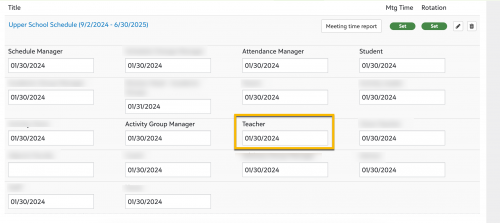
@Amanda Shows if the users searching the directory are teachers/faculty you would need the following:
Your schedule set has to be published to teacher:
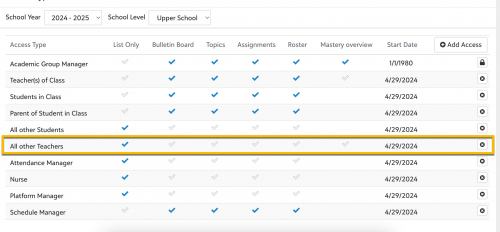
You would also want to give group page access to the role such as All other teachers/faculty with at least the “list” option enabled.
 1
1 -
@Bryan Lorenzo Thank you. I will look into this!
1







Categories
- All Categories
- 6 Blackbaud Community Help
- 209 bbcon®
- 1.4K Blackbaud Altru®
- 394 Blackbaud Award Management™ and Blackbaud Stewardship Management™
- 1.1K Blackbaud CRM™ and Blackbaud Internet Solutions™
- 15 donorCentrics®
- 359 Blackbaud eTapestry®
- 2.5K Blackbaud Financial Edge NXT®
- 646 Blackbaud Grantmaking™
- 563 Blackbaud Education Management Solutions for Higher Education
- 3.2K Blackbaud Education Management Solutions for K-12 Schools
- 934 Blackbaud Luminate Online® and Blackbaud TeamRaiser®
- 84 JustGiving® from Blackbaud®
- 6.4K Blackbaud Raiser's Edge NXT®
- 3.7K SKY Developer
- 243 ResearchPoint™
- 118 Blackbaud Tuition Management™
- 165 Organizational Best Practices
- 238 The Tap (Just for Fun)
- 33 Blackbaud Community Challenges
- 28 PowerUp Challenges
- 3 (Open) Raiser's Edge NXT PowerUp Challenge: Product Update Briefing
- 3 (Closed) Raiser's Edge NXT PowerUp Challenge: Standard Reports+
- 3 (Closed) Raiser's Edge NXT PowerUp Challenge: Email Marketing
- 3 (Closed) Raiser's Edge NXT PowerUp Challenge: Gift Management
- 4 (Closed) Raiser's Edge NXT PowerUp Challenge: Event Management
- 3 (Closed) Raiser's Edge NXT PowerUp Challenge: Home Page
- 4 (Closed) Raiser's Edge NXT PowerUp Challenge: Standard Reports
- 4 (Closed) Raiser's Edge NXT PowerUp Challenge: Query
- 779 Community News
- 2.9K Jobs Board
- 53 Blackbaud SKY® Reporting Announcements
- 47 Blackbaud CRM Higher Ed Product Advisory Group (HE PAG)
- 19 Blackbaud CRM Product Advisory Group (BBCRM PAG)