Hi.
I'm currently in the process of migrating a mobile app we built about 3 years ago that allows users to access the mySchoolApp directory via an iOS or Android native app.
The app would allow a school consituent log into the app and then search for users, see list views of users based on their grade, or fac/staff status and navigate through users by navigating their relationships a little.
Simply put it replicates and adds a little functionality to mySchoolApp's builtin people finder functionality.
Previously, a user would enter username and password and we would authenticate them by sending a `POST` request to the onAPI authentication endpoint for a token. Would then use that token for subsequent requests.
I'm working on migrating the login mechanism to SKY's app authorization requirements with OAuth2, and I'm running into a couple problems.
1. Despite access to the environment, I'm getting an error using a test user when they authenticate via the authorization endpoint.
We have correctly created an application, and an admin on the organization's side has connected the app to an "environment" (I put that in quotes, because I'm not sure what that is on their side and I suspect there are some additional configs that might be the cause of the issue I'm running into).
I have a user that I use to log into the mySchoolApp site for the org that has Platrform Manager and Web Services API Manager roles, that I am going to test the authorization with.
To test the authorization flow, (I'm trying out the implicit flow), I've gone to the BB authorization flow site and logged in through the Google, but instead of redirecting to the callback url (which I've configured on the application as well) I passed in with the params, I get the following error screen:
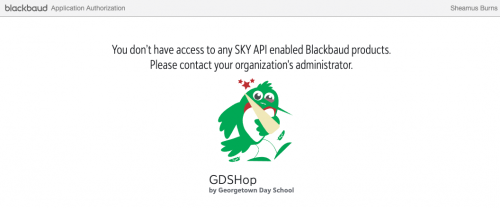
Google helped me to this FAQ:
https://developer.blackbaud.com/skyapi/docs/authorization/common-auth-issues which has a number of error screens like this one, but not this exact one. So I'm wondering, can someone tell me what I should be doing to resolve this issue? How does a user get access to a SKY API enabled blackbaud product? What must we do to configure that?
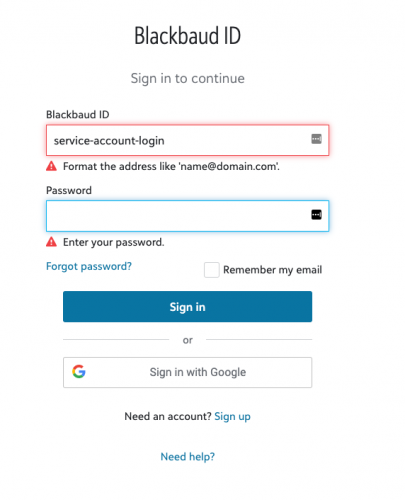
2. I think the answer to the first question will determine a good deal about my second question, which is pretty basic. I noticed that when I went to the authorization login url, when I tried to put in another user, specifically a user that does not have an email address in the system but is basically an account we use as a service account, (the account id in the picture is not the actual service account) the form tells me it wants a user with a domain like email ending.
It also tells me that I have to use google login
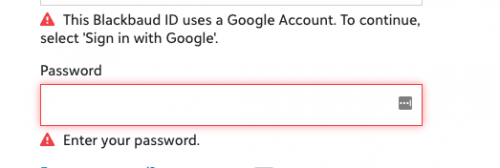
which makes it hard to understand how I might use a service account that has no email with SKY API. What do I need to know/ where can I find more info about authenticating users and authorizing my app to access their data? Will all of the users who use my app need some configuration on the organization-side that allows for the app to access specific SKY APIs on that user's behalf? Where can I find that documentation? Will every user need an email/login -- I'm seeing a bunch of stuff about blackbaud id, but I'm not sure users in the mySchoolApp app use blackbaud id to login to the mySchoolApp -- is that required for users who would authorize for SKY API? Is the premise of this app compatible with SKY API?
Thanks for your help. I'm excited to get this migration out of the way, since SKY is clearly a much more secure way to authorize applications and data access. I'm just hoping someone out there can point me to some answers because right now I'm blocked.
Thanks!
Sheamus