Lists





I posted this on the RENXT FB page but I'm desperate for answers so I'm posting it here as well.
I need to pull a list of current and past parents who are alumni and also has or had a child attend the school.
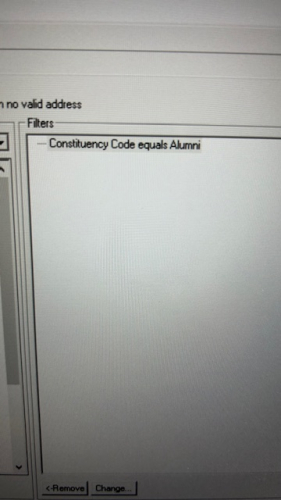
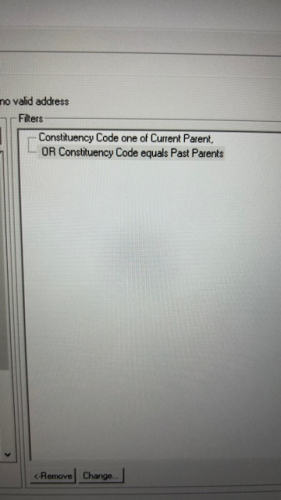
I was instructed by someone to run the following queries then merge them using the AND operator. That seemed to have worked but now I’m noticing I’m missing the alumni who don’t have kids at our school who we also want to include in this list. Because their parents are listed but not them because they don’t have kids. Does that make sense? Based on my queries , shouldn’t they have been included? What am I missing?
Thank you in advance for your help!
Comments
-
@Jolynn Uyehara
from the screenshot, I can see the coding for Past Parent, Current Parent, and Alumni, but I can't see how you are recording “had a child attend the school”, so provide that and then can help further.NOTE: on the query for Past Parent or Current Parent, you do not need 2 lines of condition, you can just do Constituent Code “one of” Past Parent Current Parent. (not really going to change the function of the query, but it is cleaner for future querying purpose).
1 -
@Jolynn Uyehara I’m not fully clear on the use case yet. If constituent is an alum and current or past ‘parent’ (coded on constituent if they have or had a child as a student), in our org they have a hierarchy assigned to them with both constituent codes (one to many). If I'm understanding correctly, in the ‘one of’ constituent code filter criteria dialogue box, click the box at bottom left in database view query and you will see (each) displayed in the query criteria window. Apologies if this misses the mark, pls. disregard.
 1
1 -
@Darlene LeVielle
forgot the “each” option, this is an important option that helps create better complex queries, nice call.with Darlene's screenshot on query, you won't need 2 query merged together.
1 -
@Darlene LeVielle I will give this a try. Thank you! I appreciate screen shots as it helps me to better understand. ?
0 -
@Darlene LeVielle sorry and to clarify the use, I am creating a mail list for a Legacy dinner we are having. Legacy families would be all Alumni who has or had a child attend the school as well. So the reason for the current parent/alumni query was to capture current parents who are alumni.
But we also need to include alumni who don't have kids at our school but their parents are alumni of the school. The parents are pulling into the list but not their kid which is strange because the kid is an alumni but just that they don't have kids of their own yet.
I am probably overthinking this way too much so I appreciate your help in trying to simplify this process for me but where I still capture everyone I need to. Thank you!
0 -
@Jolynn Uyehara No worries. You would only need to add and additional or statement which would be ‘or constituent code equals Alum’ to pull in any alum regardless of whether or not they had a child who is or was a student. For your use case, the Query feature in DBV can only be used for the purpose of a ‘grouping’ tool to gather the population you are looking for with is essentially ‘Alums'. As far as I can tell to-date, you will now use the DBV Export feature, to bring column(s) - may have more than 1 child attending or have graduated into an export file that will grab the parent-child relationship for that Alum's current Student(s) or child that is now an alum using the field export criteria logic to do so. I hope this is helpful. Again, if I am off the mark, please disregard.
1 -
@Jolynn Uyehara
I think you are overthinking it. it sounds like all you need is Alumni.all Alumni who has or had a child attend the school
the above is satisfied with just Constituency Code equals Alumni. This will be regardless of if this Alumni has or had a child attend the school.
But we also need to include alumni who don't have kids at our school
If a constituent record is an alumni, that record will have the Alumni code right? even if they don't have kids.
Unless you are talking about wanting to include record that doesn't have the Alumni code, then need you to clarify what exactly this means.
1 -
@Alex Wong I think you're right. I am overthinking this way too much. Let me break it down as this will help me as well. We are having a Legacy Dinner and these are the people we want to invite.
1. Current Parents who are alumni that have children attending2. Past Parents who are alumni and their children who are alumni
So this should not include ALL alumni, only the ones that their parents are alum as well.
Appreciate your feedback! ?
0 -
@Jolynn Uyehara
so 1 is easy, Current Parent code means they have a child attending school, all you need there is “constituent code one of (each) Current Parent, Alumni”#2 is going to depends. Since Past Parents only means the constituent had a child that attended the school (not anymore), does not mean this child is an Alumni. You will need to “bring in” to check if the child record has the Alumni code. Question is how is a child related to parent? (I'm assuming individual relationship with a relationship code?)
0 -
@Alex Wong yes, under relationships we have them as son or daughter
0 -
@Jolynn Uyehara
under the relationship section > individual relationship, you can condition on relationship type of son or daughter AND condition on the subsection under indivdual relationship > Constituency = “Alumni”.so in one query:
- constituent code one of (each) Current Parent, Alumni
- OR (constituent code = Past Parent
- AND relationship > individual relationship > relationship code one of Son, Daughter
- AND relationship > individual relationship > constituency > consittuency code = Alumni)
0 -
@Alex Wong thank you for all your help. I appreciate your time and knowledge.
0








Categories
- All Categories
- New YourCause Community TEST
- New SKY Community TEST
- New Grantmaking TEST Community
- New Altru Test Community
- New bbcon Community - TEST
- 12 Blackbaud Agents for Good™
- New Raiser's Edge NXT Community
- 7 Blackbaud Community Help
- 218 bbcon®
- 1.4K Blackbaud Altru®
- 409 Blackbaud Award Management™ and Blackbaud Stewardship Management™
- 1.2K Blackbaud CRM™ and Blackbaud Internet Solutions™
- 16 donorCentrics®
- 361 Blackbaud eTapestry®
- 2.7K Blackbaud Financial Edge NXT®
- 680 Blackbaud Grantmaking™
- 598 Blackbaud Education Management Solutions for Higher Education
- 3.3K Blackbaud Education Management Solutions for K-12 Schools
- 952 Blackbaud Luminate Online® and Blackbaud TeamRaiser®
- 85 JustGiving® from Blackbaud®
- 7K Blackbaud Raiser's Edge NXT®
- 3.9K SKY Developer
- 257 ResearchPoint™
- 123 Blackbaud Tuition Management™
- 165 Organizational Best Practices
- 247 Member Lounge (Just for Fun)
- 40 Blackbaud Community Challenges
- 37 PowerUp Challenges
- 3 (Closed) PowerUp Challenge: Grid View Batch
- 3 (Closed) PowerUp Challenge: Chat for Blackbaud AI
- 3 (Closed) PowerUp Challenge: Data Health
- 3 (Closed) Raiser's Edge NXT PowerUp Challenge: Product Update Briefing
- 3 (Closed) Raiser's Edge NXT PowerUp Challenge: Standard Reports+
- 3 (Closed) Raiser's Edge NXT PowerUp Challenge: Email Marketing
- 3 (Closed) Raiser's Edge NXT PowerUp Challenge: Gift Management
- 4 (Closed) Raiser's Edge NXT PowerUp Challenge: Event Management
- 3 (Closed) Raiser's Edge NXT PowerUp Challenge: Home Page
- 4 (Closed) Raiser's Edge NXT PowerUp Challenge: Standard Reports
- 4 (Closed) Raiser's Edge NXT PowerUp Challenge: Query
- 822 Community News
- 3.1K Jobs Board
- 57 Blackbaud SKY® Reporting Announcements
- 47 Blackbaud CRM Higher Ed Product Advisory Group (HE PAG)
- 19 Blackbaud CRM Product Advisory Group (BBCRM PAG)