Presenting the case of teachers versus the first few grades of the marking period! Don't worry! It's not as adversarial as it sounds; however, now that parents and students have access to grades (depending on your NetClassroom configuration, of course), it is important that teachers understand how the set-up of their gradebook affects students and parents. As a former teacher and user of FAWeb, I have tried as best I can to bring my own experiences into my role as an Education Edge consultant and FAWeb trainer. How many of your teachers have had to field phone calls from parents or panic stricken students because they now have access to their daily grades via NetClassroom? Although NetClassroom is a GREAT way to keep communication between parents, students and teachers open and transparent, it can also lead to a few headaches and mysterious phenomenon. Here is the first in a series of tips and tricks to avoid such issues.
Case #1: OMG I am failing this class….
Plaintiff: Students and Parents
Defense: 2 lonely homework grades

The Background: Every teacher has different ways in which they calculate a student’s average; whether it be homework, projects, tests or quizzes, there are many opportunities for students to balance out their overall grade average in any class…. However, that is NOT the case in the beginning of the year. If your school allows students and/or parents to view both the Daily Grades and Running totals via NetClassroom, the beginning of the year can be very disconcerting. Here's why: If you assign 2 homework assignments during week 1 and the student completes one, but not the other (they get 100 and 0 respectively) their "Running Total" as of the first week of school will be a 50. Trust me… even though we as teachers may understand that there are going to be several other grades and opportunities to even that homework/overall average out, it is very unnerving for students or parents to see an overall grade of 50. So how do we prevent that from happening? We the jury recommend:
- For the first handful of assignments you create, consider setting your "Factor" to 0. If you create an assignment with a factor of 0, it will not count towards the final grade. This will enable you to enter the grades in the grade book, but not have it become a "factor" until there are more than just a few assignments. Once you have enough to give the student a fair representation of their grade, you can go back into your assignment grid and change the factor to 1. FAWeb will then recalculate the grades for you.

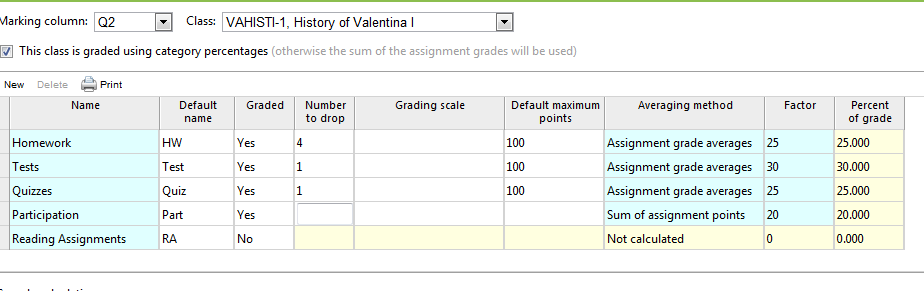
2. Consider going into your categories and allowing for 1 grade to be dropped, at least in the beginning of the year. This will automatically drop the lowest grade in that category so it will not count towards their final grade. This should be done for any category that you know will be graded in those first 2 weeks of school.
3. Administrators may consider UNCHECKING the options for parents and students to view their Daily Grades and/or Running Total until after the first 2-3 weeks of school in order to give the teachers time to collect more than 1 or 2 assignment grades.
The Verdict: A much calmer student and/or parent.
