Track Actions with Default Completion Statuses or Custom Status Codes
**Brushing the dust off this blog post from last year, in preparation for new actions-related features on the horizon (as well as actions analysis with the upcoming Analyze feature (currently in BETA)). If you haven't done so already, now's a good time to set up which action statuses — the default completion status, or custom status codes — are available at your organization!**
To help manage the tasks and interactions used to cultivate relationships with constituents, easy-to-use actions are a key feature of Raiser's Edge NXT. Out of the box, Raiser's Edge NXT enables you to track whether an action's complete and help keep your To Do list current so you know which ones deserve your attention. However, your organization can also set up custom statuses to track where actions are in your overall workflow, not just as they cross the finish line.
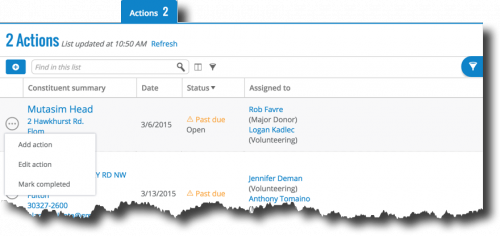
Default completion status. With the out-of-the-box statuses, you can easily mark actions as complete as you wrap them up. With this default completion status and an action's due date, you can track whether a task or interaction is "Open" (not closed, before the due date) or "Past due" (open, after the due date) in addition to "Closed". With this option, you can filter lists of actions by their completion status, such as to jump on those that are past due. For a straightforward, no-fuss way to track actions, this option may be ideal for your organization.
Custom status codes. For a more robust tracking system, your organization can set up custom status codes to track where actions are in the pipeline. For example, your organization may have a status of "Assigned" when an action's first assigned to a fundraiser, and the fundraiser can update it to "In progress" when they begin their work. With this option, you can filter lists of actions by their custom status in addition to their completion status.
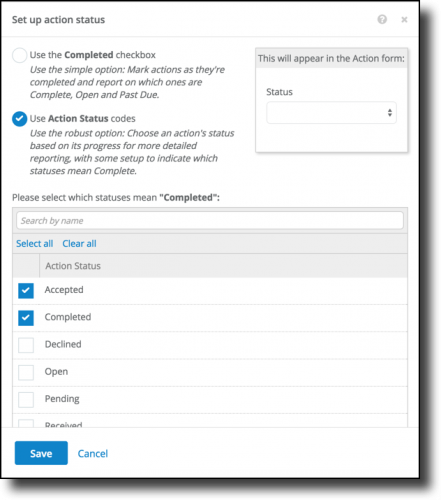
To set up custom status codes, a system administrator at your organization must do some configuration behind the scenes.
What different statuses does your organization use to track an action's progress?

To help manage the tasks and interactions used to cultivate relationships with constituents, easy-to-use actions are a key feature of Raiser's Edge NXT. Out of the box, Raiser's Edge NXT enables you to track whether an action's complete and help keep your To Do list current so you know which ones deserve your attention. However, your organization can also set up custom statuses to track where actions are in your overall workflow, not just as they cross the finish line.

Default completion status. With the out-of-the-box statuses, you can easily mark actions as complete as you wrap them up. With this default completion status and an action's due date, you can track whether a task or interaction is "Open" (not closed, before the due date) or "Past due" (open, after the due date) in addition to "Closed". With this option, you can filter lists of actions by their completion status, such as to jump on those that are past due. For a straightforward, no-fuss way to track actions, this option may be ideal for your organization.
Custom status codes. For a more robust tracking system, your organization can set up custom status codes to track where actions are in the pipeline. For example, your organization may have a status of "Assigned" when an action's first assigned to a fundraiser, and the fundraiser can update it to "In progress" when they begin their work. With this option, you can filter lists of actions by their custom status in addition to their completion status.
To set up custom status codes, a system administrator at your organization must do some configuration behind the scenes.
- In the database view, set up the action status code table (Configuration > Tables > Action Status) with the available statuses.
- In the web view, click Settings (the wrench) under Notes and actions on any constituent's record or Actions on any proposal's record.
- On the Set up action status form, select Use Action Status codes and then — so Raiser's Edge NXT can still track whether a task or interaction's complete — choose which statuses mean an action's finished. Once you're done, select Save.
What different statuses does your organization use to track an action's progress?
0
Categories
- All Categories
- 6 Blackbaud Community Help
- 209 bbcon®
- 1.4K Blackbaud Altru®
- 395 Blackbaud Award Management™ and Blackbaud Stewardship Management™
- 1.1K Blackbaud CRM™ and Blackbaud Internet Solutions™
- 15 donorCentrics®
- 359 Blackbaud eTapestry®
- 2.5K Blackbaud Financial Edge NXT®
- 646 Blackbaud Grantmaking™
- 563 Blackbaud Education Management Solutions for Higher Education
- 3.2K Blackbaud Education Management Solutions for K-12 Schools
- 934 Blackbaud Luminate Online® and Blackbaud TeamRaiser®
- 84 JustGiving® from Blackbaud®
- 6.4K Blackbaud Raiser's Edge NXT®
- 3.7K SKY Developer
- 243 ResearchPoint™
- 118 Blackbaud Tuition Management™
- 165 Organizational Best Practices
- 238 The Tap (Just for Fun)
- 33 Blackbaud Community Challenges
- 28 PowerUp Challenges
- 3 (Open) Raiser's Edge NXT PowerUp Challenge: Product Update Briefing
- 3 (Closed) Raiser's Edge NXT PowerUp Challenge: Standard Reports+
- 3 (Closed) Raiser's Edge NXT PowerUp Challenge: Email Marketing
- 3 (Closed) Raiser's Edge NXT PowerUp Challenge: Gift Management
- 4 (Closed) Raiser's Edge NXT PowerUp Challenge: Event Management
- 3 (Closed) Raiser's Edge NXT PowerUp Challenge: Home Page
- 4 (Closed) Raiser's Edge NXT PowerUp Challenge: Standard Reports
- 4 (Closed) Raiser's Edge NXT PowerUp Challenge: Query
- 779 Community News
- 2.9K Jobs Board
- 53 Blackbaud SKY® Reporting Announcements
- 47 Blackbaud CRM Higher Ed Product Advisory Group (HE PAG)
- 19 Blackbaud CRM Product Advisory Group (BBCRM PAG)
