What's New in Raiser's Edge NXT the week of October 19 (Part II!)





To help keep next week's focus on BBCON (hope you can make it!), Raiser's Edge NXT updates this week — again! — with additional new features and enhancements. And if you can't make it to Austin (me neither!), follow all the festivities and knowledge-sharing on Twitter! #bbcon
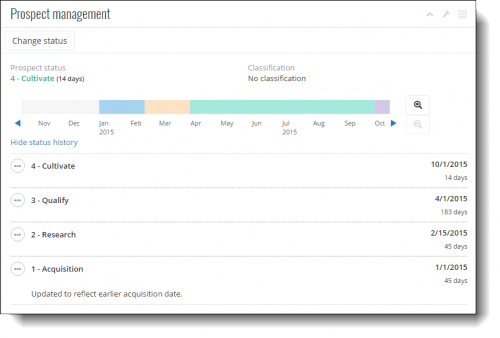 Manage a prospect's status. With Prospect Research Management, you can track and update prospects as they flow through your moves management process. To better describe this feature, Prospect research on a constituent's record now appears as Prospect management. From here, you can now update a prospect's status in your process, quickly see how long they've been at their current status, and scroll through their moves management history. (Note: Since this is a brand new feature, only the current prospect status appears initially, as a recent change. For accurate information, edit the moves management history — starting with your primary prospects — or update current status dates as necessary.)
To better track your moves management process, your organization can also now set expected time frames for each status. A constituent's prospect status now appears as an alert at the top of their record when they have a status for too long. Previously, the status always appeared at the top of the record in addition to with the prospect research information. (Admins! To alert fundraisers when a prospect is past due, select Settings under Prospect management to set how long someone should stay in each stage of your moves management process.) For more information, including suggested statuses, check out the Prospect Status Help.
While you can save a constituent's prospect status on their record in the database view, we recommend you use the web interface instead to track the moves management history. For all the details why, see the Prospect Status: Web or Database View? Help.
Add profile pictures to constituent records. To help identify a constituent or personalize their relationship, you can now attach a photo or image — such as a selfie or company logo — at the top of their record, in place of the default avatar. To use an image file — PNG, BMP, or JPG — saved locally or on your network as a profile picture, simply move it to the avatar from your file explorer, or select the avatar to browse to the file or upload it from your phone or tablet's camera, pictures, or cloud storage. For more information, see the Profile Pictures Help.
Save, open, and delete custom lists. In Lists (introduced earlier this week!), you can build custom lists of records, such as to analyze fundraising efforts or refine recipients of a communication. You can now save a list's filter settings for future use to track the latest information based on records that meet the criteria. When you save a list, you can give it a name and choose who can use it. You can also delete saved lists you no longer need. (In future releases, you'll be able to save tweaks to filter settings as additional lists, edit the names and security settings of saved lists, and easily share them with others at your organization!) For more information, check out the Lists Help.
For details about these features, or to catch up on previous releases, see the What's New Help or What's Recent Help. Enjoy!
 Manage a prospect's status. With Prospect Research Management, you can track and update prospects as they flow through your moves management process. To better describe this feature, Prospect research on a constituent's record now appears as Prospect management. From here, you can now update a prospect's status in your process, quickly see how long they've been at their current status, and scroll through their moves management history. (Note: Since this is a brand new feature, only the current prospect status appears initially, as a recent change. For accurate information, edit the moves management history — starting with your primary prospects — or update current status dates as necessary.)
To better track your moves management process, your organization can also now set expected time frames for each status. A constituent's prospect status now appears as an alert at the top of their record when they have a status for too long. Previously, the status always appeared at the top of the record in addition to with the prospect research information. (Admins! To alert fundraisers when a prospect is past due, select Settings under Prospect management to set how long someone should stay in each stage of your moves management process.) For more information, including suggested statuses, check out the Prospect Status Help.
While you can save a constituent's prospect status on their record in the database view, we recommend you use the web interface instead to track the moves management history. For all the details why, see the Prospect Status: Web or Database View? Help.
Add profile pictures to constituent records. To help identify a constituent or personalize their relationship, you can now attach a photo or image — such as a selfie or company logo — at the top of their record, in place of the default avatar. To use an image file — PNG, BMP, or JPG — saved locally or on your network as a profile picture, simply move it to the avatar from your file explorer, or select the avatar to browse to the file or upload it from your phone or tablet's camera, pictures, or cloud storage. For more information, see the Profile Pictures Help.
Save, open, and delete custom lists. In Lists (introduced earlier this week!), you can build custom lists of records, such as to analyze fundraising efforts or refine recipients of a communication. You can now save a list's filter settings for future use to track the latest information based on records that meet the criteria. When you save a list, you can give it a name and choose who can use it. You can also delete saved lists you no longer need. (In future releases, you'll be able to save tweaks to filter settings as additional lists, edit the names and security settings of saved lists, and easily share them with others at your organization!) For more information, check out the Lists Help.
For details about these features, or to catch up on previous releases, see the What's New Help or What's Recent Help. Enjoy!
0
Categories
- All Categories
- 6 Blackbaud Community Help
- 211 bbcon®
- 1.4K Blackbaud Altru®
- 403 Blackbaud Award Management™ and Blackbaud Stewardship Management™
- 1.2K Blackbaud CRM™ and Blackbaud Internet Solutions™
- 16 donorCentrics®
- 360 Blackbaud eTapestry®
- 2.6K Blackbaud Financial Edge NXT®
- 661 Blackbaud Grantmaking™
- 581 Blackbaud Education Management Solutions for Higher Education
- 3.2K Blackbaud Education Management Solutions for K-12 Schools
- 944 Blackbaud Luminate Online® and Blackbaud TeamRaiser®
- 84 JustGiving® from Blackbaud®
- 6.7K Blackbaud Raiser's Edge NXT®
- 3.8K SKY Developer
- 250 ResearchPoint™
- 120 Blackbaud Tuition Management™
- 165 Organizational Best Practices
- 242 Member Lounge (Just for Fun)
- 37 Blackbaud Community Challenges
- 37 PowerUp Challenges
- 3 (Closed) PowerUp Challenge: Grid View Batch
- 3 (Closed) PowerUp Challenge: Chat for Blackbaud AI
- 3 (Closed) PowerUp Challenge: Data Health
- 3 (Closed) Raiser's Edge NXT PowerUp Challenge: Product Update Briefing
- 3 (Closed) Raiser's Edge NXT PowerUp Challenge: Standard Reports+
- 3 (Closed) Raiser's Edge NXT PowerUp Challenge: Email Marketing
- 3 (Closed) Raiser's Edge NXT PowerUp Challenge: Gift Management
- 4 (Closed) Raiser's Edge NXT PowerUp Challenge: Event Management
- 3 (Closed) Raiser's Edge NXT PowerUp Challenge: Home Page
- 4 (Closed) Raiser's Edge NXT PowerUp Challenge: Standard Reports
- 4 (Closed) Raiser's Edge NXT PowerUp Challenge: Query
- 802 Community News
- 3K Jobs Board
- 56 Blackbaud SKY® Reporting Announcements
- 47 Blackbaud CRM Higher Ed Product Advisory Group (HE PAG)
- 19 Blackbaud CRM Product Advisory Group (BBCRM PAG)