What's New In Raiser's Edge NXT The Week of October 29





This week, Raiser's Edge NXT includes enhancements in Insight Designer. With Insight designer, you can create your own customized metrics beyond what’s available out of the box in Report builder.
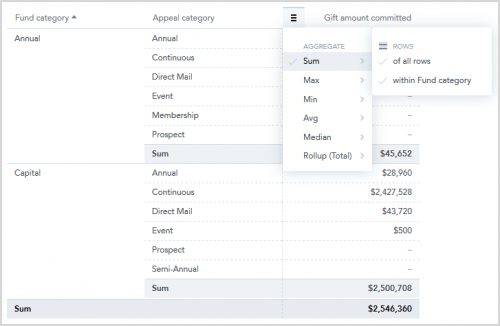 Add subtotals to table insights. To help you view more cumulative information in your table insights, you can now add subtotals to your columns.
From Analysis, Report builder, Insights, when you have at least two attributes under Rows in a table insight, you can add a subtotal by attribute. Previously, you could add a summary calculation for the entire column, but not for individual attributes. Now, you can add subtotals and cumulative totals on the same table.
To add a subtotal, from a column’s menu in a table insight, select the type of calculation you want to add. Then, select whether you want to include all rows, just one attribute, or both. For more information, see Insight Types.
Use improved fundraiser filters in gift and action insights. To help improve how you analyze gift and action insights, you can now filter by fundraisers.
 Add subtotals to table insights. To help you view more cumulative information in your table insights, you can now add subtotals to your columns.
 From Analysis, Report builder, Insights, when you have at least two attributes under Rows in a table insight, you can add a subtotal by attribute. Previously, you could add a summary calculation for the entire column, but not for individual attributes. Now, you can add subtotals and cumulative totals on the same table.
To add a subtotal, from a column’s menu in a table insight, select the type of calculation you want to add. Then, select whether you want to include all rows, just one attribute, or both. For more information, see Insight Types.
Use improved fundraiser filters in gift and action insights. To help improve how you analyze gift and action insights, you can now filter by fundraisers.
From Analysis, Report builder, Insights, include the Fundraiser name attribute under Constituent to filter gift and action insights based on who cultivates the relationships with constituents. Previously, when you added the Fundraiser name attribute, you couldn’t select measures such as Constituent actions or Gift amount. For more information, see Action Measures and Giving Measures.
Note: Since multiple fundraisers can receive credit for giving, and actions may have more than one fundraiser assigned to them, measures may double-count gifts and actions.
5
Comments
-
The subtotals will really help for our reporting on weekly progress toward goals. Thanks!!0



Categories
- All Categories
- 6 Blackbaud Community Help
- 213 bbcon®
- 1.4K Blackbaud Altru®
- 401 Blackbaud Award Management™ and Blackbaud Stewardship Management™
- 1.1K Blackbaud CRM™ and Blackbaud Internet Solutions™
- 15 donorCentrics®
- 360 Blackbaud eTapestry®
- 2.6K Blackbaud Financial Edge NXT®
- 655 Blackbaud Grantmaking™
- 576 Blackbaud Education Management Solutions for Higher Education
- 3.2K Blackbaud Education Management Solutions for K-12 Schools
- 939 Blackbaud Luminate Online® and Blackbaud TeamRaiser®
- 84 JustGiving® from Blackbaud®
- 6.6K Blackbaud Raiser's Edge NXT®
- 3.7K SKY Developer
- 248 ResearchPoint™
- 119 Blackbaud Tuition Management™
- 165 Organizational Best Practices
- 241 Member Lounge (Just for Fun)
- 34 Blackbaud Community Challenges
- 34 PowerUp Challenges
- 3 (Open) PowerUp Challenge: Chat for Blackbaud AI
- 3 (Closed) PowerUp Challenge: Data Health
- 3 (Closed) Raiser's Edge NXT PowerUp Challenge: Product Update Briefing
- 3 (Closed) Raiser's Edge NXT PowerUp Challenge: Standard Reports+
- 3 (Closed) Raiser's Edge NXT PowerUp Challenge: Email Marketing
- 3 (Closed) Raiser's Edge NXT PowerUp Challenge: Gift Management
- 4 (Closed) Raiser's Edge NXT PowerUp Challenge: Event Management
- 3 (Closed) Raiser's Edge NXT PowerUp Challenge: Home Page
- 4 (Closed) Raiser's Edge NXT PowerUp Challenge: Standard Reports
- 4 (Closed) Raiser's Edge NXT PowerUp Challenge: Query
- 791 Community News
- 2.9K Jobs Board
- 53 Blackbaud SKY® Reporting Announcements
- 47 Blackbaud CRM Higher Ed Product Advisory Group (HE PAG)
- 19 Blackbaud CRM Product Advisory Group (BBCRM PAG)