Exciting Features Releasing In Waves!

Ellyn Hassell
Blackbaud Employee




With the most recent Financial Edge NXT release, we're introducing features that will roll out to your organization in waves. Expect a wider release in a future update!
Invite users and manage their access with roles
In Control Panel, Security, admins can now invite users and manage their security based on roles. A role combines tasks and permissions to determine a user's access to features in the web view. While similar to security groups, roles enable you to:
Under Roles in Control Panel, Security, your users' security groups with rights set for web view features now appear as roles under Financial roles. Most security groups now appear as identical roles, with the group's rights now its corresponding role's permissions. For more nuanced users, security groups may combine into a single role to capture rights that don't align with the same tasks and permissions of other roles created from security groups. For more information, see Security Groups or Roles?.
Under Financial roles, admins can manage roles and their tasks and permissions for web view features.
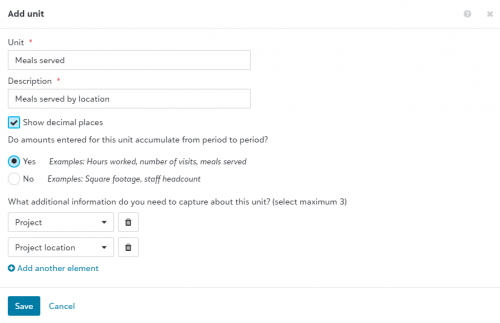
As your organization's financial needs grow, you'll likely need to move amounts from one set of accounts, projects, or grants to another. In the database view, Allocation Management helped you automate the allocation of amounts from one set of accounts to another. The amounts allocated were entered and calculated based only on account balances. In the web view, from General ledger, Statistical units, you can now enter non-financial measures — such as hours worked per project — and use these to determine when and how to move amounts over time.
The first building block to managing allocations in Financial Edge NXT is to work with statistical units. This feature lays the groundwork to expand from a purely financial transaction-based approach to a managerial system with stronger analysis capabilities. For more information, see Statistical Units.
Take note Admins! To provide existing users with access to General ledger, Statistical units, navigate to Control Panel, Security. For more information, see Role-based Security.
Invite users and manage their access with roles
In Control Panel, Security, admins can now invite users and manage their security based on roles. A role combines tasks and permissions to determine a user's access to features in the web view. While similar to security groups, roles enable you to:
- Invite users to your organization and the web and database view of its Financial Edge NXT with a single invitation. When they accept the invitation, they can access tasks and features in the web view based on their assigned role. After you add a user, you can manage their access to your organization and Financial Edge database as necessary. For more information, see Users.
- Apply default tasks to grant common permissions to roles, and customize roles' tasks for more granular permissions. For more information, see Role-based Security Overview.
Under Roles in Control Panel, Security, your users' security groups with rights set for web view features now appear as roles under Financial roles. Most security groups now appear as identical roles, with the group's rights now its corresponding role's permissions. For more nuanced users, security groups may combine into a single role to capture rights that don't align with the same tasks and permissions of other roles created from security groups. For more information, see Security Groups or Roles?.
Under Financial roles, admins can manage roles and their tasks and permissions for web view features.
- For tasks and permissions for General Ledger, Statistical units, see Role-based Security.
- For tasks and permissions for Analysis, Dashboards, see Analysis Rights.

As your organization's financial needs grow, you'll likely need to move amounts from one set of accounts, projects, or grants to another. In the database view, Allocation Management helped you automate the allocation of amounts from one set of accounts to another. The amounts allocated were entered and calculated based only on account balances. In the web view, from General ledger, Statistical units, you can now enter non-financial measures — such as hours worked per project — and use these to determine when and how to move amounts over time.
The first building block to managing allocations in Financial Edge NXT is to work with statistical units. This feature lays the groundwork to expand from a purely financial transaction-based approach to a managerial system with stronger analysis capabilities. For more information, see Statistical Units.
Take note Admins! To provide existing users with access to General ledger, Statistical units, navigate to Control Panel, Security. For more information, see Role-based Security.
1
Comments
-
When is this being rolled out?0
-
Hi Julie, the first wave has already begun. We expect all waves to be completed in the first half of 2019. Thank you!0
-
Can you add the statistical units to a report?
0




Categories
- All Categories
- New K-12 Community Home (TEST)
- New Higher Education Home Page (Test)
- New Impact Edge Community TEST
- New YourCause Community TEST
- New SKY Community TEST
- New Grantmaking TEST Community
- New Altru Test Community
- New bbcon Community - TEST
- 12 Blackbaud Agents for Good™
- New Raiser's Edge NXT Community
- 8 Blackbaud Community Help
- 222 bbcon®
- 1.4K Blackbaud Altru®
- 410 Blackbaud Award Management™ and Blackbaud Stewardship Management™
- 1.2K Blackbaud CRM™ and Blackbaud Internet Solutions™
- 16 donorCentrics®
- 361 Blackbaud eTapestry®
- 2.7K Blackbaud Financial Edge NXT®
- 687 Blackbaud Grantmaking™
- 604 Blackbaud Education Management Solutions for Higher Education
- 3.3K Blackbaud Education Management Solutions for K-12 Schools
- 954 Blackbaud Luminate Online® and Blackbaud TeamRaiser®
- 85 JustGiving® from Blackbaud®
- 7K Blackbaud Raiser's Edge NXT®
- 4K SKY Developer
- 258 ResearchPoint™
- 123 Blackbaud Tuition Management™
- 165 Organizational Best Practices
- 248 Member Lounge (Just for Fun)
- 40 Blackbaud Community Challenges
- 37 PowerUp Challenges
- 3 (Closed) PowerUp Challenge: Grid View Batch
- 3 (Closed) PowerUp Challenge: Chat for Blackbaud AI
- 3 (Closed) PowerUp Challenge: Data Health
- 3 (Closed) Raiser's Edge NXT PowerUp Challenge: Product Update Briefing
- 3 (Closed) Raiser's Edge NXT PowerUp Challenge: Standard Reports+
- 3 (Closed) Raiser's Edge NXT PowerUp Challenge: Email Marketing
- 3 (Closed) Raiser's Edge NXT PowerUp Challenge: Gift Management
- 4 (Closed) Raiser's Edge NXT PowerUp Challenge: Event Management
- 3 (Closed) Raiser's Edge NXT PowerUp Challenge: Home Page
- 4 (Closed) Raiser's Edge NXT PowerUp Challenge: Standard Reports
- 4 (Closed) Raiser's Edge NXT PowerUp Challenge: Query
- 829 Community News
- 3.1K Jobs Board
- 57 Blackbaud SKY® Reporting Announcements
- 47 Blackbaud CRM Higher Ed Product Advisory Group (HE PAG)
- 19 Blackbaud CRM Product Advisory Group (BBCRM PAG)