How do I include multiple class years in participant exports for name tags.





With more and more individuals getting multiple degrees from the same institution, we need to be able to export multiple class years for name tags. When I add a primary alumni column and an education relationship column(s), the primary class year shows up twice, once under primary and once under education relationship. In addition to getting the primary class year twice, we also get blank columns for non-degree or incomplete degrees. Despite ordering them in ascending order by date added, they are often exported out of order.
Does anyone have any ideas on a clean way to extract this class information from Raiser's Edge?
Best Answer
-
Attached your query to an export (do not export straight from a query). Chose the info you want, Last Name, First, whatever you want and the for the education, just go to Relationship, Education, then pick what you want, School Name, Class of, Degree, whatever. Your criteria for the number to export should be whatever you think is the most number of schools, degrees or year one person has. You do not need to choose the Primary Alumni Info, since that only pulls the primary and not any others, but the Education Relationship will pull all that info, including the Primary.
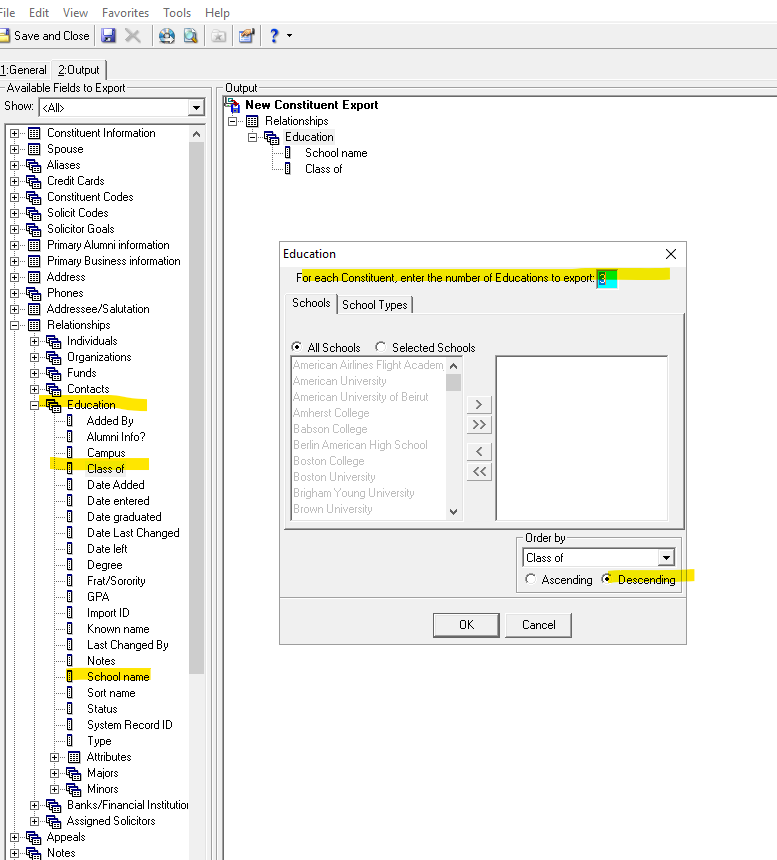
Your results:
 1
1







Categories
- All Categories
- 6 Blackbaud Community Help
- 209 bbcon®
- 1.4K Blackbaud Altru®
- 394 Blackbaud Award Management™ and Blackbaud Stewardship Management™
- 1.1K Blackbaud CRM™ and Blackbaud Internet Solutions™
- 15 donorCentrics®
- 359 Blackbaud eTapestry®
- 2.5K Blackbaud Financial Edge NXT®
- 646 Blackbaud Grantmaking™
- 563 Blackbaud Education Management Solutions for Higher Education
- 3.2K Blackbaud Education Management Solutions for K-12 Schools
- 934 Blackbaud Luminate Online® and Blackbaud TeamRaiser®
- 84 JustGiving® from Blackbaud®
- 6.4K Blackbaud Raiser's Edge NXT®
- 3.7K SKY Developer
- 243 ResearchPoint™
- 118 Blackbaud Tuition Management™
- 165 Organizational Best Practices
- 238 The Tap (Just for Fun)
- 33 Blackbaud Community Challenges
- 28 PowerUp Challenges
- 3 (Open) Raiser's Edge NXT PowerUp Challenge: Product Update Briefing
- 3 (Closed) Raiser's Edge NXT PowerUp Challenge: Standard Reports+
- 3 (Closed) Raiser's Edge NXT PowerUp Challenge: Email Marketing
- 3 (Closed) Raiser's Edge NXT PowerUp Challenge: Gift Management
- 4 (Closed) Raiser's Edge NXT PowerUp Challenge: Event Management
- 3 (Closed) Raiser's Edge NXT PowerUp Challenge: Home Page
- 4 (Closed) Raiser's Edge NXT PowerUp Challenge: Standard Reports
- 4 (Closed) Raiser's Edge NXT PowerUp Challenge: Query
- 779 Community News
- 2.9K Jobs Board
- 53 Blackbaud SKY® Reporting Announcements
- 47 Blackbaud CRM Higher Ed Product Advisory Group (HE PAG)
- 19 Blackbaud CRM Product Advisory Group (BBCRM PAG)