How to identify duplicate constituents and merge them



Hi all,
I have been handed the task of identifying all of the duplicate constituents in our organization and then merging the information. I've searched and read "Duplicate Constituents and Merge Task Guide" and the directions state
Run the full duplicate constituent search process
1. From Constituents, click Duplicates. The Duplicates page appears.
2. Click Full duplicate search. The Full Duplicate Constituent Search Process screen appears.
3. Click Edit process. The Edit full constituent duplicate search process screen appears.
Well I don't have Duplicates on my Constituent page. I asked my Administrator and she does not have it either. Could I be reading old information?
I have been handed the task of identifying all of the duplicate constituents in our organization and then merging the information. I've searched and read "Duplicate Constituents and Merge Task Guide" and the directions state
Run the full duplicate constituent search process
1. From Constituents, click Duplicates. The Duplicates page appears.
2. Click Full duplicate search. The Full Duplicate Constituent Search Process screen appears.
3. Click Edit process. The Edit full constituent duplicate search process screen appears.
Well I don't have Duplicates on my Constituent page. I asked my Administrator and she does not have it either. Could I be reading old information?
1
Comments
-
It should be a task in the Maintenance section. Mine is just under Batch Search and before Constituent Data Review.1
-
Please someone send me a screenshot or step by step instructions. I don't have a Maintenance section.
0 -
Is it possible that you don't have security rights to Maintenance for constituents. The system Admin should have it though. Here's a couple of screen shots in case it helps.
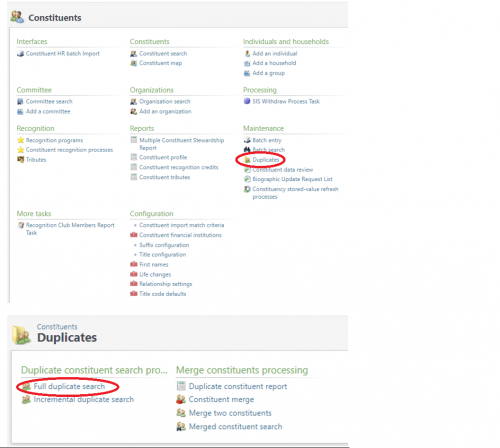
:
1







Categories
- All Categories
- 6 Blackbaud Community Help
- 211 bbcon®
- 1.4K Blackbaud Altru®
- 402 Blackbaud Award Management™ and Blackbaud Stewardship Management™
- 1.1K Blackbaud CRM™ and Blackbaud Internet Solutions™
- 15 donorCentrics®
- 360 Blackbaud eTapestry®
- 2.6K Blackbaud Financial Edge NXT®
- 655 Blackbaud Grantmaking™
- 576 Blackbaud Education Management Solutions for Higher Education
- 3.2K Blackbaud Education Management Solutions for K-12 Schools
- 940 Blackbaud Luminate Online® and Blackbaud TeamRaiser®
- 84 JustGiving® from Blackbaud®
- 6.7K Blackbaud Raiser's Edge NXT®
- 3.7K SKY Developer
- 248 ResearchPoint™
- 120 Blackbaud Tuition Management™
- 165 Organizational Best Practices
- 240 Member Lounge (Just for Fun)
- 34 Blackbaud Community Challenges
- 37 PowerUp Challenges
- 3 (Open) PowerUp Challenge: Grid View Batch
- 3 (Closed) PowerUp Challenge: Chat for Blackbaud AI
- 3 (Closed) PowerUp Challenge: Data Health
- 3 (Closed) Raiser's Edge NXT PowerUp Challenge: Product Update Briefing
- 3 (Closed) Raiser's Edge NXT PowerUp Challenge: Standard Reports+
- 3 (Closed) Raiser's Edge NXT PowerUp Challenge: Email Marketing
- 3 (Closed) Raiser's Edge NXT PowerUp Challenge: Gift Management
- 4 (Closed) Raiser's Edge NXT PowerUp Challenge: Event Management
- 3 (Closed) Raiser's Edge NXT PowerUp Challenge: Home Page
- 4 (Closed) Raiser's Edge NXT PowerUp Challenge: Standard Reports
- 4 (Closed) Raiser's Edge NXT PowerUp Challenge: Query
- 796 Community News
- 3K Jobs Board
- 54 Blackbaud SKY® Reporting Announcements
- 47 Blackbaud CRM Higher Ed Product Advisory Group (HE PAG)
- 19 Blackbaud CRM Product Advisory Group (BBCRM PAG)